
Question
480 SD renders, 720 HD does not. Error: -1609629695
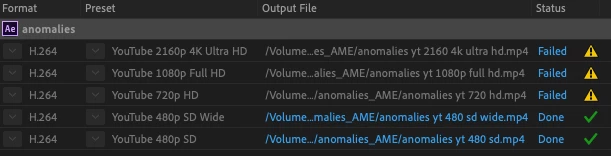
Here's a shot of a recent AME render queue. As you can see, only the 480 SD presets will successfully render, although it's the same file in all cases. The failed renders all give the infamous -1609629695 error code.
The imported AE file is a 4-minute 1280x960 animation which rendered just fine until recently. After import into AME, I trimmed the 4-minute composition down to several three-second chunks for these tests. The screen shot shows the results from one of those chunks.
I rendered using both Software Encoding and Hardware Encoding in the Encoding Settings, as well as the Renderer set to Software Only and GPU Acceleration (Metal). Also unchecked Enable Parallel Encoding in Preferences. I tried all these variations on the different three-second work areas. I also tried these tests from both an external drive and my hard drive.
Just in case it matters, the composition contains numerous precomps, and uses the Video Copilot Sure Target camera from beginning to end.
Here's my setup:
iMac, 27 inch, late 2013.
System Version: macOS 10.15.3 (19D76)
Kernel Version: Darwin 19.3.0
Processor Name: Quad-Core Intel Core i7
Processor Speed: 3.5 GHz
Memory: 32 GB
Storage: 4 TB
Free: 3.15 TB
NVIDIA GeForce GTX 780M
VRAM: 4 GB
Media Encoder:
14.0.1 (Build 70)
After Effects:
17.0.2 (Build 26)
So, what's going on? One update too many for an aging graphics card? Or some wacky AME variable that I haven't thought of? Why fail rendering a file at 720 HD but not at 480 SD? I know there are many similar threads, but I can't find a solution among them. Thanks in advance for a simple, easy, universal answer.
Andy


 AdChoices