



Adobe Employee
Jun 18, 2020 5:40 AM UTC
Question

Adobe Media Encoder 14.3 is now available!
Adobe Media Encoder 14.3 is now available for download from the Creative Cloud Desktop app. This update includes multiple bug fixes and new features. 

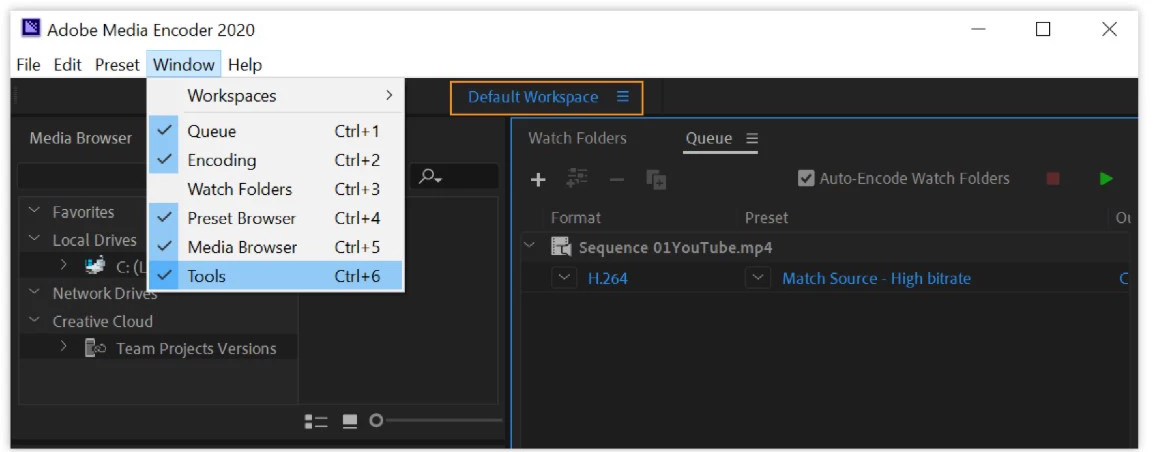
With this new release, you can switch between multiple workspaces using the new Tools bar.
We have also added support for Importing new file formats.

  • Import of Canon EOS R5 footage
  • Import of Canon EOS-1D X Mark III footage
  • Import of RED Komodo footage


This update is recommended for all users.

This topic is closed to new replies. Start a new post to keep the conversation going.

31 replies

Participant
Aug 14, 2020 5:50 PM UTC

How about an update that fixes the crash problem? I haven't been able to launch Media Encoder for weeks, and it looks like a lot of others share my problem.

Translate
Participant
Aug 17, 2020 1:22 PM UTC

Samething here !   2 month without Media Encoder !

Translate
Participant
Aug 18, 2020 1:48 PM UTC

SOLUTION for this!! It is an old plugin from CoreMelt (Active Text) that is causing Adobe Media Encoder to crash at Launch. Go and look for "CoreMelt", rename the directory to xxx_old_CoreMelt and you will be able to use the newest Media Encoder!!! 

Because CoreMelt is provided by a third party, Adobe can't support this or do anything about it I guess.

Kind Regards!

Translate
LouSassle
Participant
Jul 14, 2020 9:11 PM UTC

I cant connect vimeo through media encoder. It lets me sign in then takes me to a page that says "unauthorized" (picture attached)

Translate
Participant
Jul 3, 2020 7:06 PM UTC

Sounds good!

Translate
Participating Frequently
Jul 3, 2020 3:31 PM UTC

This upgrade crashes on loading.  It won't start.

I then reverted to the previous version of media encoder but now all my renders sent from the latest premiere are crazy.   All my graphics/titles are placed in different places on the screen.  Not what I created.

I'm being forced to export one by one from Premiere without using Media Encoder.

Please release an update that starts/loads and that when rendering it won't do crazy things to graphics.

Translate
gupta shivangi
Legend
Jul 3, 2020 6:11 PM UTC

Hi there,

We're sorry to hear that. Dynamic link does not work if the version of the applications are different.

  1. What are your system details(OS, RAM, GPU, etc)?
  2. Do you get any error when AME fails to launch?

Let us know. We'll make sure the issue gets sorted ASAP.

Thanks,

Shivangi

Translate
TheWus
Participating Frequently
Jun 27, 2020 12:31 PM UTC

I have an i7-9750H with nVidia RTX2070 on Windows 10 2004. Premiere Pro 4.12 and Media Encoder 14.2 were working fine on this machine.

Updating to Premiere Pro 14.3 seems to work fine so far, but Media Encoder 14.3 crashes when it opens. I have made no other changes to the system.


I tried uninstalling, cleaning the profile and custom options folders and reinstalling, but that does not resolve the problem.

Translate
Participating Frequently
Jun 26, 2020 7:35 PM UTC

Media Encoder 2020 crashes before fully opening on both my MacPro and MacBook Pro.  2019 works, but I've created a project in Character Animator 2020 that I need to export, and it won't go through M.E. 2019. 

Translate
gupta shivangi
Legend
Jul 3, 2020 6:31 PM UTC

Hi there,

We're sorry to hear that. Dynamic link does not work if the version of the applications are different.

  1. Which macOS version you have installed?
  2. Please share your system info(RAM, GPU, etc).
  3. Do you get any error when AME fails to launch?

Let us know. We're here to help.

Thanks,

Shivangi

Translate
Participant
Jun 26, 2020 4:48 PM UTC

And it doesn't launch.  My workflow now in a hole.  Having to export via Premiere.  Please can we have a solution asap!


2.7 GHz Quad-Core Intel Core i7

16 GB 1600 MHz DDR3

NVIDIA GeForce GT 650M 1 GB

Intel HD Graphics 4000 1536 MB

Translate
TheWus
Participating Frequently
Jun 27, 2020 1:11 PM UTC

Same here!


Premiere Pro 14.3 launches and functions, but Media Encoder 14.3 does not.


Also, Premiere Pro 14.3 - the Audio Track mixer doesn't display volume levels when the program windows plays back... all of the VU meters are blank... 😞 Not a good look...

Translate
Stephen__Impasto_
Participant
Jun 25, 2020 7:12 AM UTC

I still can't encode a H264 file at less than 1mbps. What's gone wrong? I used to be able to do this on older versions.

Translate
bradf14565012
Participant
Jun 24, 2020 11:55 AM UTC

Hi, I have just updated my AfterEffects and my Media Encoder. I have just tried to export an animation from AfterEffects in Media Encoder and it doesn't load the file. It only opens Media Encoder and that is all. There is no sync between the two programs and seems that it could be another rush update from Adobe. Anyone else having this issue?

Translate
marcosgutih
Participant
Jun 25, 2020 10:07 AM UTC

That's happening to me too. I have updated the After Effects and Media Encoder and it does not allow me to export my animations. The Dynamic Link does not appear to be working properly. Coding error also shows up. Trying to find solutions is wasting my time (and rendering through Adobe Premier is not the solution I'm looking for).

Translate
Participant
Jun 23, 2020 6:00 AM UTC

I have a podcast file (.WAV) file that is about 1.5 GB in size. I uploaded to a background in AE with 1 wavelength animation and my project has been encoding for 15 hours right now with 57 hours to go. Can someone please help me explain what exactly I am doing wrong? Worked like a charm with standard .mp4 files.


I've chatted with support, cleared cache, reinstalled the program and still the same issue persists. I even went and literally upgraded my ENTIRE system to a 2080ti, 10th gen i7, new motherboard and 64GB of DDR4 RAM. 


PLEASE HELP, this should NOT take this long.

Translate
Participant
Jun 23, 2020 6:04 AM UTC
Its been almost a week, I am wondering do Adobe people ever try to provide
help here? I too have max spec for my pc but the rendering time and the
frequent crashing is ridiculous.
Translate