Participant
March 15, 2022
Answered

Extremely Slow Render/Export on Adobe Media Encoder 2022

  • March 15, 2022
  • 68 replies
  • 122284 views

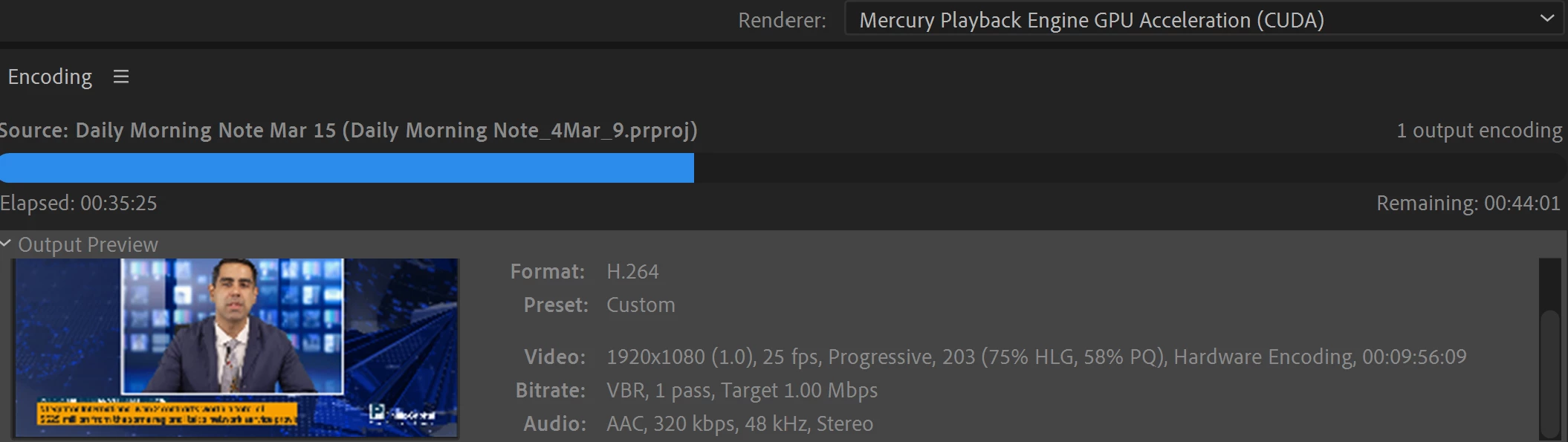
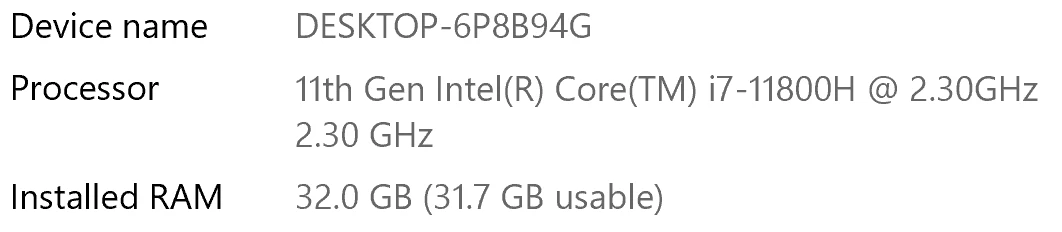
I have been waiting for more than 30 mins for the final video to be rendered. It's already 40 mins and it's barely 50% rendered. Never had this issue before. My laptop specs are as below and my GPU is RTX 3070.


Anyone knows how to solve this sudden issue?


Correct answer Fergus H

Hi all, 
Despite receiving test files from many of you (thank you!), we have not been able to reproduce this problem at Adobe. That's a bit unusual and certainly frustrating - to you and us - but we do think this issue has been fixed in the latest beta of After Effects and Media Encoder. We'd love to get your feedback on that. Creative Cloud betas are specifically designed to run alongside the release versions and are available in the "Beta apps" section of Creative Cloud Desktop. More information is here: https://helpx.adobe.com/x-productkb/global/creative-cloud-beta.html

The v23.x beta of After Effects also has the ability to directly export H.264 - without having to use Media Encoder - so your feedback on this would be useful too. More information is available here: https://community.adobe.com/t5/after-effects-beta-discussions/feature-focus-exporting-h-264-from-the-after-effects-render-queue/td-p/13117618


Regards,

Fergus

68 replies

Participant
January 5, 2023

Same problem for me with ME 2023. Render times are up to an hour instead of multiple minutes.

Participant
December 30, 2022

I'm having the same issue.  I can export a video directly out of Premiere, and it takes 56 seconds.  When I export the same video in ME using the same preset, it takes seven minutes and 32 seconds 7:32.  this a problem as I'm trying to batch export 30 videos.

Participant
December 30, 2022

My machine is a Mac Pro 3.2 GHz 16-Core Intel Xeon W, AMD Radeon Pro W5700X 16 GB, 48 GB 2933 MHz DDR4, running  Ventura 13.1.  Premiere pro 23.1.0, Media Encoder 23.1


Okorie7
Participant
December 30, 2022

I've checked out the help tabs and all but my AME keeps failing to render my video and I don't know if it's a system issue or if I need to downgrade my AME. Ps: I'm using the '22 version

Participating Frequently
December 30, 2022

22.2.1 has worked for me. But I've found you have to be using both AE and ME 22.2.1.


Btw, I'm using M1 Macs, one running Big Sur and one running Monterey.

Participant
December 19, 2022

My 4:30 video is taking 20 hours to render. this is project-breaking. not only that, i get errors like "user interrupted render" when I have done nothing but leave my Mac alone. there has to be a solution for this soon. Otherwise After Effects is just not a viable video software if rendering is such a pain.

Community Expert
December 19, 2022

@Nandhi 

Have you run any After Effects benchmark projects to see if your computer is rendering in keeping with what's to be expected of your hardware?


While 20 hours does sound too long for 4 minutes and 30 seconds, knowing if that is unusual or not depends on what is happening during Composition.  If it's just the Transform properties being keyframed with Motion Blur, yes, that is probably much longer than should be expected.  However, if it also has effects like CC Light Burst and Detail-preserving Upscale applied, then 20 hours may not be not unrealistic.


By "user interrupted render", do you mean the "User Stopped" Status message in the Render Queue?  If you're seeing that and you are confident that the "Stop" button is not being clieked, then that is unusual and needs futher troubleshooting.


Something to try:  Disable all third-party plugins and render your Comp (even if this means it will render with watermarks due to missing effects).   This will help to rule out a memory leak due to a third-party plugin.  

Participant
December 9, 2022

Same for me! first 50% of progress was in 30-40min, and second 50% 18h.


My mac specs:

i7 3.8Ghz

AMD Radeon Pro 5500XT 8gb

72 GB RAM

Jase240
Participating Frequently
December 9, 2022

I have found that no matter what, if more than one effect is used. It seems to really slow it down.


One of the things I tried that seems to have helped tremendously is transcoding the footage beforehand.


It's still not as good as it used to be, but it helps.

Jase240
Participating Frequently
November 20, 2022

I believe I have found a solution, at least one that works for me.


In all clips I had been using in my timelines, I had Lumetri Color added and all footage was color graded. If I uncheck "HSL Secondary" in Lumetri Color, my render speed for a 5 minute clip goes from over 1-2 hours, to under 3 minutes. 


I will point out, that on a seperate PC with SIMILAR specs (Same CPU, RAM, slower GPU.) I did not have any issue with rendering times and it was outperforming my current PC regardless of effects used or settings.


Note the specs on my PC with the issue:

Asus G15

AMD Ryzen 5900HS 8 core 16 thread

Nvidia GTX 3070 Laptop GPU

24GB of RAM (Tested with 16GB and 24GB just in-case)

2 TB dual SSD PCI-3.0 NVMe


And the specs of a secondary PC without the issue:

Asus G14

AMD Ryzen 5900HS 8 core 16 thread

Nvidia GTX 3060 Laptop GPU

16GB of RAM

1 TB SSD PCI-3.0 NVMe


Again, the PC with the Nvidia 3060 graphics card did NOT have any issues. Only my main PC with the Nvidia 3070 is experiencing this.


This seems to be an issue with the Lumetri Color, since HSL Secondary seemed to cause the issue for me. I have this issue no matter what version of Premiere I use. Luckily, I don't typically need to use HSL Secondary, so I can safely turn it off for all future edits.


I'm assuming this must be GPU support related.


Adobe please work on GPU compatiblity with Nvidia 30 series cards. Perhaps a driver fix will need to be worked on with Nvidia as well.


jandrewramsey
Known Participant
November 21, 2022

Chiming in here with more complains about Media Encoder. I believe I've identified that it's basically worthless while Premiere or AE are open. Just open, not even playing back anything. It just can't handle any other video apps being open. Very weird and new problem in 2023 for me.

Participant
November 24, 2022

Estou com o mesmo defeito. Alguém resolveu o problema?

Participant
November 19, 2022

i dont know what adobe team is doing or just having coffee all day instead of work, i have 3500$ pc and rendereing a 7 second video taking me 19+ hours, i let my laptop turned on whole night still it wasn't rendered, i took a freelance job for making a intro and u know what? cuz of this worst issue the guy took someone else for the job i spent my 20+ hours (1 hour editing + 19 hours for rendering) for nothing, i lost my client cuz of this frustrating issue, im being very patient here, tried 100+ videos from youtube, gone though so may reddit threads, no help from anywhere.

Community Manager
November 21, 2022

The project - was it an AE comp being rendered in AME or purely PPro in AME or a mix of both? If just AE, did you try rendering directly out of AE? 

cauthier721
Participating Frequently
November 10, 2022

So when I first encountered this issue, the one suggestion that worked was to go back many versions of After Effects. That worked! I'm using the latest version (v 23) expecting it to be fixed by now, and am waiting 15 hours for a render to finish that should have taken an hour. 😕😕

So many people have had this issue, what has been found? Seems I'm going to just have to re-install the old version so at least I can render out my projects in a timely matter. Hopefully a fix for this issue will be found soon so I can enjoy the new version of AE.

Community Expert
November 10, 2022

@cauthier721 


This indicates that something installed with After Effects that does not conflict with a prior version needs to be updated for the current version.


Participant
November 15, 2022

Well, I've encoutered the same problems as all the people above... what I did ?

I tested MOV rendering of few seconds of 6k material that was normal in comparison to h264 which was more than an hour with standard settings. Of course MOV gives much larger files and thus stuttering so it is useless comparing to h64.

So I tweaked some parameters in H264 and it was a boom, back to normal, short and fast render again.

I recommend to change parameters from MAIN to BASE in h264 settings and by the way I increased bit rate.

Participant
November 9, 2022

I am having these same issues - using AME to encode out of AE and Premiere taking triple the length it has taken before. Is there any news on a fix? I can't wait 12 hours for a half hour video to render....

brunoseven
Known Participant
November 14, 2022

hey man.


unfortunatelly there's no solution so far. The only "solution" is get back to old versions of after effects and Media Encoder. I gave up a month ago, and I just started to use the AE 22.6 and ME 22.6.1. now all the things are working properly.

Participant
November 15, 2022

Try changing Profile from Main to Base in H264 settings...

brunoseven
Known Participant
November 3, 2022

Hey Adobe Team, this discussion started on March 14, 2022, is it really going to be 1 year without a solution to this problem? Will I really need to learn to use another editing software because yours is totally unstable and doesn't work anymore?

Since I joined this discussion here the only really effective "helps" and "solutions" have been posted by the users themselves. From you I only saw messages with attempts at solutions that did not result in anything or you asking for our files, which also did not result in anything apparently.

I made the MISTAKE of updating After effects to version 23 and things got even worse than before. a file I made totally in version 23 worked, but others from older versions don't render anymore even with the tricks I discoevered like watch videos on youtube or on the computer. They just stop at some moment and stay stucked forever.


I've lost count of the amount of work hours I've lost because of this problem of yours and I'm really shocked that to this day you haven't solved such a critical bug. Basically whoever works with this can't work, it's not an aesthetic bug, it's not a bug that only bothers, it's a bug that makes us lose money and credibility.


you already know that the beta didn't work, you already know that the 23 didn't work, you already know that until some version of the 22 things were working, you already have the files, you already have tips that if we are watching videos the rendering improves and not it's so slow.

The impression it gives me is that you are not giving due importance to this problem that is a CRITICAL PROBLEM, and you are dealing with it as if it were a silly thing.

PS: and for the love of God, don't answer me here with generic comments like "hmm, have you cleared your cache? have you tried reinstalling? Could you send us the files?"

Community Manager
November 3, 2022

Can we setup a video conference call so you can share your screen and we can try to debug the issue together on your machine?