New Participant
March 15, 2022
Answered

Extremely Slow Render/Export on Adobe Media Encoder 2022

  • March 15, 2022
  • 68 replies
  • 122275 views

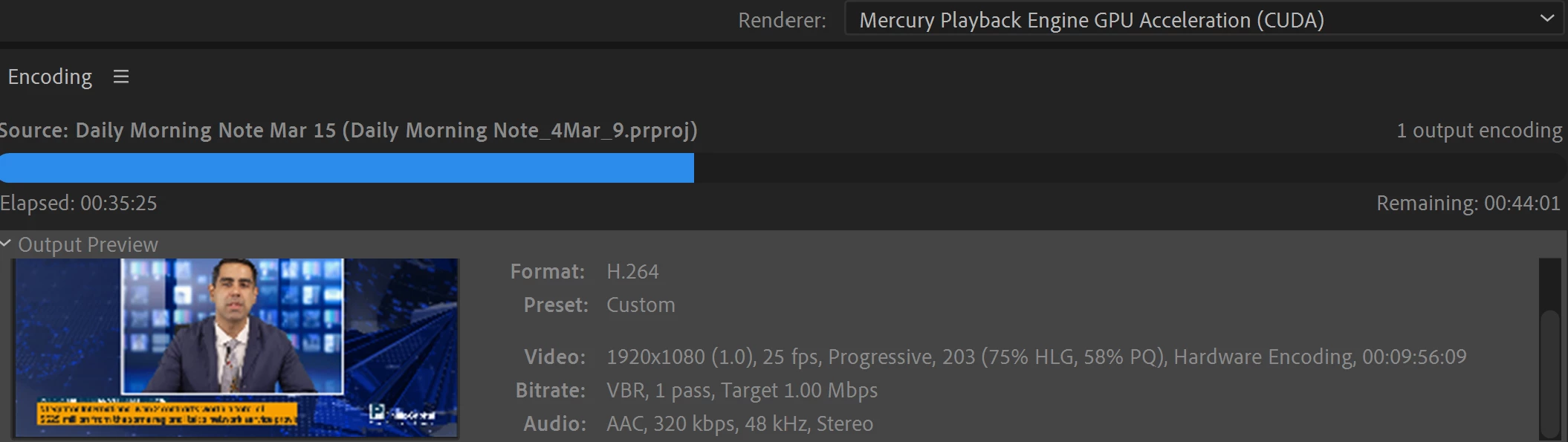
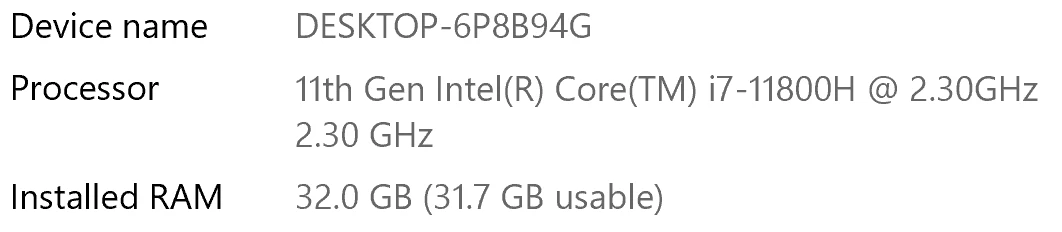
I have been waiting for more than 30 mins for the final video to be rendered. It's already 40 mins and it's barely 50% rendered. Never had this issue before. My laptop specs are as below and my GPU is RTX 3070.


Anyone knows how to solve this sudden issue?


Correct answer Fergus H

Hi all, 
Despite receiving test files from many of you (thank you!), we have not been able to reproduce this problem at Adobe. That's a bit unusual and certainly frustrating - to you and us - but we do think this issue has been fixed in the latest beta of After Effects and Media Encoder. We'd love to get your feedback on that. Creative Cloud betas are specifically designed to run alongside the release versions and are available in the "Beta apps" section of Creative Cloud Desktop. More information is here: https://helpx.adobe.com/x-productkb/global/creative-cloud-beta.html

The v23.x beta of After Effects also has the ability to directly export H.264 - without having to use Media Encoder - so your feedback on this would be useful too. More information is available here: https://community.adobe.com/t5/after-effects-beta-discussions/feature-focus-exporting-h-264-from-the-after-effects-render-queue/td-p/13117618


Regards,

Fergus

68 replies

New Participant
October 30, 2022

I have the same problem.  Performance rendering a video with either Media Encoder or Premiere Pro was acceptable until I upgraded to the 2023 version.  Now is completely unceptable: it now takes 5 to 6 times longer to render a video. 


New Participant
October 28, 2022

same issue here 3070 but getting 3 hours on rendering for an 8mb video ....wtf did u guys do to your media encoder. 


Community Manager
October 28, 2022

We'd love to figure that out! 🙂 

Are you able to generate a log file from Media Encoder so we can see what the delay is?

Jase240
Participating Frequently
October 23, 2022

I am also getting this bug, a simple 2 minute sequence is estimated to take over 2 hours. 


Specs:


Asus G15 laptop 

AMD Ryzen 5950HS

NVIDIA GTX 3070 Laptop GPU

24GB RAM

2 1TB NVMe SSDs

Jase240
Participating Frequently
October 23, 2022

Issue is present in both version 22.6 and 23 of Media Encoder.

Jase240
Participating Frequently
October 24, 2022

After more testing with a 2 minute sequence, it takes over 2 hours to encode in 22.6, 23, and beta 23.1.


However the issue seems to improve slightly IF I turn off Nvidia hardware decode AND clear my media cache. (Still taking much longer than it should)

New Participant
October 21, 2022

Hey!


I had a similar problem AE 23.0. Project was quite large with many pre-comps, Maxon effects, 4K .mxf footage etc. Still was not expecting a 4-5 hours render with media encoder. I have this feeling that about 10 months ago the same project took about an hour to render. Anyhow tried the beta with build-in render and it completed the work around 2 hours.


Also with the version 23.0. frames were not cached during the playback and the playback overall was very sluggish. 


Setup: ryzen 3600, nvidia 3080, 32gb ram, nvidia studio drivers & game ready


New Participant
October 28, 2022

Follow up on this:


Updated few computer part. Internal renderer is as quick as I would expect (1.5min). Need to output .mxf too, so tried media-encoder, stopped after 7 hours...


I attached a log file

New Participant
October 20, 2022

Hi!  Try to install fresh version of Nvidia Driver. In my case it helped

russr64667685
New Participant
October 20, 2022

The latest version of After Effects (23.0.0) fixed the issue for me. 😄

New Participant
October 18, 2022

Processor: Intel Core i7 2 GHz

RAM 16 GB (15.8 usable)


It is taking 30 hours to render a 12 second video clip made in After Effects through Media Encoder.  There is talk about settings and everything else, but tell us what the settings should be. I'm trying to export a video for Youtube.Format H.264, Preset "YouTube 1080p Full HD".  Why am I having a 30 hour render for a 12 second video?


Community Manager
October 18, 2022

That is a very good question. Is the 12 second video clip literally just a piece of footage, or does it have effects on it? If you export directly from AE, does it take 30 hours or something less? 


AE 23.0 just released and has H.264 rendering built into the Render Queue. If you're able to update, it'd be good to know if you see different results in AE directly as well. 


Otherwise, we'd love to see some log files. If you're willing, can you do an export from AME where the issue happens, and then when that's complete, go to Help -> Reveal Log Files and find the Adobe Media Encoder Log.txt and Adobe Media Encoder Log-last.txt file and post those back. We are  looking for some log lines related to async timeouts. 


Community Manager
October 17, 2022

We might have found a repro overnight. If you're able to repro this issue, can you do an export from AME where the issue happens, and then when that's complete, go to Help -> Reveal Log Files and find the Adobe Media Encoder Log.txt and Adobe Media Encoder Log-last.txt file and post those back. We are  looking for some log lines related to async timeouts. 

Participating Frequently
October 17, 2022

i haven't replied in this thread so far but i've experienced a similar issue (aka my AME renders take forever). i haven't done any A/B testing on my projects (too time-consuming for the salary adobe pays me, which is $0/lifetime so far) but my most recent project took ~6 hours to render where past projects with a very similar structure render in 20 minutes in AME.  these are 3-4-minute long ppro sequences; no effects outside opacity keyframing, layering some gaussian blur via luma key, and 2-3 lumetri effect modules; dynamically linked into AE for some simple transform keyframes; and exported to AME from AE.


i'll DM you a dropbox link to my log output, which i believe refers to a recent instance of rendering my project. (i haven't rendered anything since then, but i don't know how often the logs expire or get replaced.)

cauthier721
Participating Frequently
October 15, 2022

I'm having the same issue. 😕😕

Have been rendering a 36min clip. Right now I've waited 9+ hours and 1 hour is left. Never had this issue before. Hopefully you have the solution soon. Tried mutiple 'solutions', except the downloading the beta and none of them worked. I'll try the beta once this is done.


brunoseven
Known Participant
October 15, 2022

Man, I have to say that probably this problem won't be solved soon. I was having it for the last 3 or 4 months and is not solved yet. The solution for me it was change the after effects and media encoder to older versions. Now is working normally again to me

cauthier721
Participating Frequently
October 15, 2022

What older version worked for you? If the beta doesn't work, I'll try an older version. Thanks for the quick reply. 🙂

New Participant
October 7, 2022

With 22.6 I couldn't preview more than 2 frames with annoying warning box about my ram usage. Render times with 22.6 are horrible!! I've waited 3.5 hours for render to be done. It's unacceptable. I thought the problem is with my slow computers ( 4 core, 16 gb ram each) but I have opened my old projects and everything was the same -  going that way I downgraded AE to older version and it seems to be OK, so I am trying not to loose my job now. Thanks Adobe. 

Community Manager
October 7, 2022

Well it's not intentional that AE/AME is rendering slower, but we are sorry you're running into the issue. Can you share your project, full computer specs, output formats, etc., so we can attempt to reproduce the issue please?

Fergus H
Community Manager
Fergus HCommunity ManagerCorrect answer
Community Manager
October 4, 2022

Hi all, 
Despite receiving test files from many of you (thank you!), we have not been able to reproduce this problem at Adobe. That's a bit unusual and certainly frustrating - to you and us - but we do think this issue has been fixed in the latest beta of After Effects and Media Encoder. We'd love to get your feedback on that. Creative Cloud betas are specifically designed to run alongside the release versions and are available in the "Beta apps" section of Creative Cloud Desktop. More information is here: https://helpx.adobe.com/x-productkb/global/creative-cloud-beta.html

The v23.x beta of After Effects also has the ability to directly export H.264 - without having to use Media Encoder - so your feedback on this would be useful too. More information is available here: https://community.adobe.com/t5/after-effects-beta-discussions/feature-focus-exporting-h-264-from-the-after-effects-render-queue/td-p/13117618


Regards,

Fergus

New Participant
October 5, 2022

I have the same issue.

I tried to encode an AAE project of 04:20 min by AME took me 20 hours.

The beta versions didn't make it, the same result = 20 hours.

The encode (H.264) by AAE itself took me 1 hour.

New Participant
October 6, 2022

Hi again,

I want to correct and give an update:

- using the beta version of AAE for rendering (lossless) didn't work fine. In the end, the software was hanging, and after 36 !!! hours no progress at all.

- I've installed the AAE 18.0.0 version and rendered the same project (lossless). It was finished after 1,5 hours.


Since many users report the same condition there is a bug within the new versions. In my case, the AAE 18.0.0 worked fine, but the versions above did not.

I hope this information helps some how.


Regards

Dimitrij