
Participant
July 17, 2012
Question

No Audio From Source

  • July 17, 2012
  • 12 replies
  • 36381 views

Hi guys,

I'm trying to convert .mts files to .f4v or some other working format in AME but AME shows that there is No Audio in the source as below.
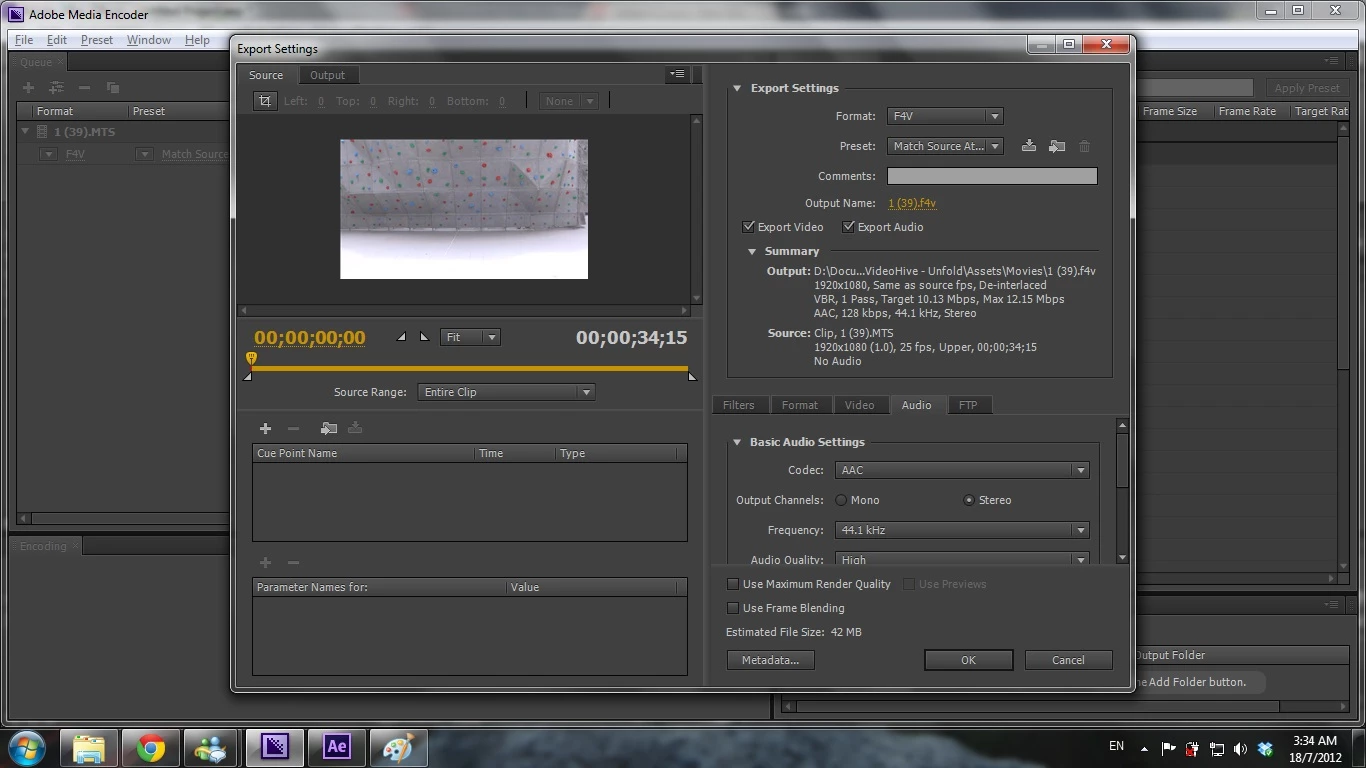
When I click the encode button, true enough, the output file doesn't have any audio in them.

I'm 100% sure my .mts files have audio in them, I can hear them pretty loudly when played in VLC.

Any idea why and how to resolve this? Thank you.

    This topic has been closed for replies.

    12 replies

    Participant
    December 4, 2018

    Solution: VLC

    I have the answer to you problem: transform the MTS file into an MP4 file (or a readable high quality format for Adobe programs) with VLC following this process: https://www.guidingtech.com/8848/use-vlc-player-to-convert-videos-from-one-format-to-another/

    Important:

    Also, once you've added the files you want to convert, and clicked the "Save/Convert" button I suggest you to change the settings of the "Audio codec" shown in the "edit selected profile" button

    Change the Audio codec to the "MPEG 4 Audio (AAC)" format, so that the audio could be compatible with any Adobe video app.

    Yoda1989
    Participant
    November 18, 2014

    I am sorry, but why you convert MTS to F4V. Are you sure that your computer has installed F4V audio codec? According to result, it seems that your computer does not have F4V codec installed. As far as I know, the most friend video format for AE is MPEG-2, you can have a try to encode MTS to MPEG-2 via some tools on Google so that MTS can be accepted by AE. Good luck!

    Inspiring
    December 27, 2014

    I can confirm that NOBODY in the encoding world supports AC3 natively on a mac accept to pass it out to AAC when recoding.  Remember to change the encoding of your audio to something supported by your system.  If you have a WinPC and cannot process it, it is unsupported.  I can only guess at the reason, but this format is heavily compressed.  When playing through VLC, you are not "Playing" the AC3, but instead playing the STREAM of DATA coming from it, along with the video stream.  This supports only one conclusion, AC3 is the audio equivalent of .MTS video streams.  It isn't a format for a file.  It's a format for a data dump.  The difference is that a File has only one major packet, the file itself, while the data dump stream is made up of chunks (each chunk be a split file) that only has function when the data is interpreted and recoded.  A stream must be placed into something that interprets it (a program) or codes it into a single understandable file.

    Inspiring
    April 25, 2014

    I have the same experiences trying to use AME to convert MTS files.  No audio.

    Try this software... it does the encoding with no loss of audio!  HandBrake: Open Source Video Transcoder

    It works perfectly converting video and audio from MTS to MP4.

    Participant
    April 25, 2013

    There is an eaay way to convert to mp4 with audio to use in Premiere Pro, you use a freeware program "HANDBRAKE"  to convert it, then use the MP4 in Premiere Pro.

    Participant
    April 25, 2013

    Confirmed I just used it and it worked first time no problem.  Using premiere pro to convert to YouTube!  I don't take credit for the resolve, it was on YouTube already how to fix this.

    Participant
    December 3, 2012

    ******************************************************************

                                                     found it

    ******************************************************************

    First i tried to convert it normally but no sound no matter what I tried. MTS file plays normally with sound in bs player or vlc BUT NOT in windows player. That means thats some kind of win7 codec problem.

    After that the easiest solution would be to try on someWIN XP machine but also on internet so I used this page (clik it) where I converted and downloaded my file. It has the sound.

    I am only affraid because my test file was only 63mb but when I will need the other it has 800mb so I hope they dont have size limit.

    yes I know...lucky bastard


    Participant
    February 11, 2013

    I have a Mac and I had the same problem. I figured it out, with a little help from above. I found the Adobe Common File. I then went in the cache folders. I deleted all the caches from the dates that my files were originally encoded. Then, I reimported them. When they were remimported the sound showed in all my audio clips, including the short piece that had been missing. I'm going to guess that something interupted the importation of the files the first time and then since they were in the cache, reimporting them didn't solve my problem. Since they played fine in VLC, I knew it wasn't the file.

    Participant
    March 28, 2013

    Hello Lebertyninmo,

    I have th same problem. I tried your solution but I don't understand it. Were can I find the adobe Common File and the cache folders?

    Hope you can help me.

    October 5, 2012

    Having the same problem, been trying to convert mts. files into some type of H.246 File and after encoding had finished I viewed it and the video looked great but no audio....

    Adobe needs to fix this problem.

    Participating Frequently
    October 30, 2012

    I have this problem with most any file I try to encode into a .flv or .mp4 - NO AUDIO!

    Stop blaming all the users and their machines and fix your software.

    LOL the media encoder that can't ecode anything.

    Participating Frequently
    November 13, 2012

    I'm having the same problem with MTS files.

    I have installed A52 Codec Component -- no source audio.

    I installed Perian -- same.

    I installed the AME 6.0.2 patch -- same.

    Using a Mac 10.8.2

    3.2 GHz quad-core intel xeon

    32 GB ram

    Kletsel
    Participant
    September 15, 2012

    The problem was resolved after installing A52Codec.component

    September 15, 2012

    Hi Kletsel,

    Looks like A52Codec.component link in your post is for Mac. Can you post the linkk for Windows OS? Thanks.

    Kletsel
    Participant
    September 15, 2012

    It is indeed a QuickTime component for Mac. Unfortunately, I do not know a solution for Windows environment.

    Participant
    September 2, 2012

    Hi,

    Have had this exact same problem for a few months.
    I've tried everything to solve it, but none of them worked.

    I do have audio now, how?
    well.. it isn't the easiest way, by totally restore your pc/laptop to the factory settings.
    1. Copy documents, videos, music, and more important files to an external hhd (or make a windows.old file)
    2. Restore and set to factory settings (http://www.youtube.com/watch?v=rcQYC948AzA)
    3. Install your windows version again
    4. Install master collection again

    Voila

    Takes a couple of hours to do this but... it's worth it.
    Your PC performance will increase drastically as well

    Not the easiest way, I know

    Jeff Bellune
    Legend
    September 2, 2012

    Please don't post multiple times -- I deleted your duplicate posts.

    September 14, 2012

    I had the same issue when encoding m2ts files (using Media Encoder CS6). But the issue got RESOLVED after installing the latest trial version of "Adobe Premier Pro".  Now AME works fine and there is no missing audio issue. Looks like "Adobe Premier Pro" updated/installed some system files required for "Media Encoder". The nice thing is that even after uninstalling the "Premier Pro" trial version, AME still works.

    Try it and see if it reolves your issue.

    Participating Frequently
    September 1, 2012

    I'm a newby, but I think I'm having the same problem. I have a clip from a Sony RX100. The sound is there when I play the original .MTS file, but I've tried several different settings, and I get no sound when rendered by Adobe Media Encoder. CS6.01, OS10.7.4.

    Is this a bug, or an unsupported feature?

    Kletsel
    Participant
    August 31, 2012

    Hi all,

    It is not worked also to me on OS X 10.8.1. I see into Activity Monitor that AME, while encoding, uses QuickTime resources. QT now also has sound problem (VLC does not). Might be it is because QuickTime.