Participant
March 15, 2022
Answered

P: Extremely Slow Render/Export on Adobe Media Encoder 2022

  • March 15, 2022
  • 463 replies
  • 124831 views

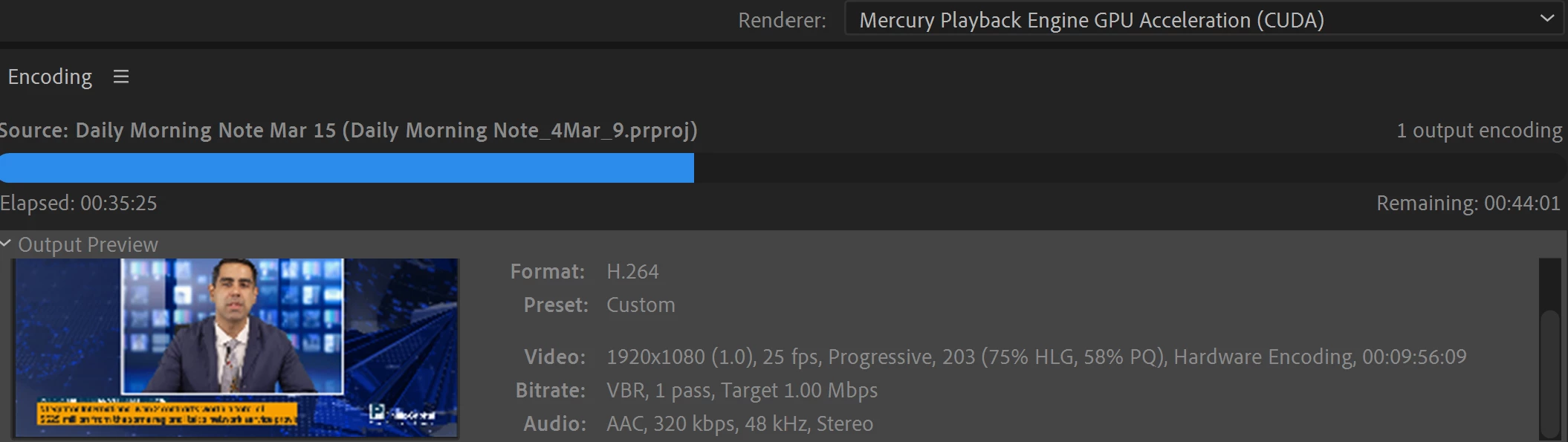
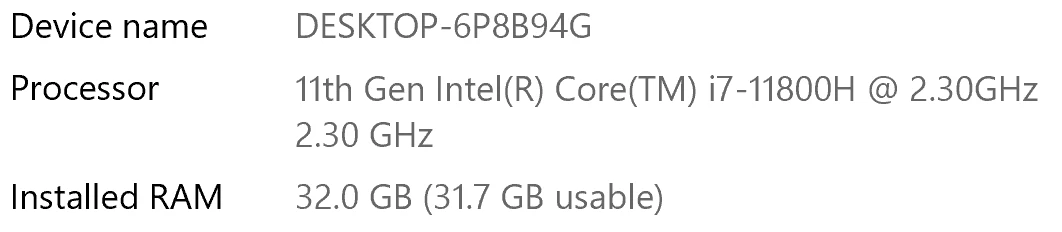
I have been waiting for more than 30 mins for the final video to be rendered. It's already 40 mins and it's barely 50% rendered. Never had this issue before. My laptop specs are as below and my GPU is RTX 3070.


Anyone knows how to solve this sudden issue?


Correct answer Fergus H

Hi all, 
Despite receiving test files from many of you (thank you!), we have not been able to reproduce this problem at Adobe. That's a bit unusual and certainly frustrating - to you and us - but we do think this issue has been fixed in the latest beta of After Effects and Media Encoder. We'd love to get your feedback on that. Creative Cloud betas are specifically designed to run alongside the release versions and are available in the "Beta apps" section of Creative Cloud Desktop. More information is here: https://helpx.adobe.com/x-productkb/global/creative-cloud-beta.html

The v23.x beta of After Effects also has the ability to directly export H.264 - without having to use Media Encoder - so your feedback on this would be useful too. More information is available here: https://community.adobe.com/t5/after-effects-beta-discussions/feature-focus-exporting-h-264-from-the-after-effects-render-queue/td-p/13117618


Regards,

Fergus

463 replies

Participant
September 15, 2022

I tried installing Studio Driver for my Nvidia RTX 2060 and man it changed everything now the video (Composition made in After Effects) that was taking 9 freaking hours to render got rendered in just 56 minutes.

PC Specs:
CPU: I9-10850K

GPU: RTX 2060

RAM: 32 GB (3600 Mhz)

Inspiring
September 15, 2022

I no longer have the issues I once brought up after simply restarting machine, and closing other apps. How do I close this discussion?

November 1, 2023

I have the same issue and the same resolution as you do. The problem is, I have to restart the computer after every couple fo renders in order for it to work properly. It is not a solution. When you do a lot of small renders it gets old FAST. Regular FullHD video with nothing much on it, no third party plugins takes forever. Restart the computer, it finishes in couple of seconds. Then each following render takes more time than the previous one until I restart again.

Participating Frequently
September 13, 2022

Hello All, In my humble opinion, any of us sending in AE projects for analysis is really not needed.  I work as a theatrical designer and my workflow and media change drastically from project to project.  The one thing that, unfortuately, remains consistent is that ME 2022 renders painfully slow on my M1 Max MacbookPro.  Whether it it be Prores, HAP or H264, it's problematic.  If I walk over to my 5 year old iMac that is running AE & ME 2021, files render in minutes while my M1 Mac take 4 hours.  I'm very, very frustrated by all this and I must say, it's seems like Adobe has stopped supporting ME.  Unfortunately these are the programs I use, so I soldier onward for the time being.

September 13, 2022

We are asking for projects because we aren't able to reproduce the problem here internally. I promise no one has stopped supporting Media Encoder, there is an entire team dedicated to it. We really do want to fix this problem, but we need a bit more help in identifying the cause. 

Felipe Osti
Participant
September 13, 2022

Same happens to me. Funny that it began after I got a new computer. My old i7 3770 16gb gtx970 performs way better than my new i7 10700k rtx3070 64gb and nvme. It is taking 3 hours to render a 40 seconds After Effects video, it says remaining 5 hours, the same video rendered in less than 10 minutes on my old computer. Just makes abolute no sense at all.


September 13, 2022

Are you using the exact same version of After Effects and Media Encoder? Any effects being used in those projects? Any different versions of those effects? If you install the AE / AME beta from CCD, do you have the same problem? We'd love to help but we need specific details, projects, etc., to be able to debug. 

Felipe Osti
Participant
September 13, 2022

Yes, I am using both the latest versions of AE and AME. Im trying to render a project with multiple effects 1080 of 35 seconds, and as the elpased time and the render increases, also the remaining time does, Its at 50% now with 4 hours and still remaning 4 hours to finish, this is just unaceptable. My work is getting really behind the schedule and Im statting to have trouble with my clients. Interesting, I tried it at my friend`s house and his version is older and not genuine, it worked just perfectly. 

Participating Frequently
September 9, 2022

sigh.....getting really tired of adobe taking 4 hours to render a 15 second video....its' beyond insane now 

September 13, 2022

Please give us more details, or a copy of the project. I know it's frustrating but we really need specifics and projects to be able to reproduce the issue. 

Cisco88
Participant
September 23, 2022

Hi I'm also having same issue, how can I give you a copy of my project? Thanks 

Participant
September 1, 2022

As everyone else, same issue here. Last week exporting the same videos took 2-3min, now they are taking 2+ hours for a 30sec video. Spec below (although it doesn't matter because this is a new problem that was working perfect on the same machine days ago)


Mac 12.5.1

AE 22.6

ME 22.6

Inspiring
August 31, 2022

Same here

Running AE 22.6.0 and ME 22.6 o a M1 Mac (64 GB, Monterey 12.4) and plenty 2,2 TB free on hard drive.


Rendered a quite simple movie in AE Render Que, default lossless in 1 min 46 sec.

Rendering the same project in ME (H.264 and Youtube preset) and it's now about 40 % done after 1 hour and 4 min – remaining: 1 hour 24 min.

Was thinking that the latest update would solve this catastrophe bug along with all problems regarding Dynamic Link – but no... same old disappointment...

Participating Frequently
August 30, 2022

Hello Everyone, Over the past few months I've been pulling my hair out in frustration watching Media Encoder take 4 hours to render a 10 second after effects clip.  That said, I stumbled onto something that allows the encoder to run at what seems to be a normal speed.  As a file was slowly rendering in ME, I opened a movie in the quicktime app.  As I was watching the movie I saw the the "Time Remaining" had sped up to finish what was gong to be another 2 hours and it finished in a few minutes.  Not sure why but having QT Open and playing and ME running in the background made it go faster.  If I quit QT and run ME in the forefront, it goes back to a crawl.

brunoseven
Known Participant
September 2, 2022

exactly the same is happening with me. Since july when I'm rendering in Media Encoder something from AE it get stucked in some moments, but when I open some video on youtube it kinda get back to normal. But I need to keep opening a new video every once in a while. it doesn't make any sense for me.

Participant
September 7, 2022

Woah, just tried the "YouTube" trick - it is like putting a booster on the render, starts flying!!

Participating Frequently
August 26, 2022

I have just spent the entire day making a tutorial on how to speed up Render times in After Effects. It does cost $20. but you will never regret spending that $20. 

https://youtu.be/6O_lO8_izZg

Participant
August 26, 2022

ME and AE are not well integrated, do not use the "Queue in ME" button.
Advice: Render from AE, and then drag finished Mov into ME. ie. The old way, that worked just fine.

Participant
August 26, 2022

I'm working with a Macbook pro. 16GB ram--Final Cut exported a 15 minute video with effects/transitions/other video files in 8 min.  Yet I'm stuck working with Adobe for this project because the client sent me an After Effects template as a base for this file.  


Here we are....4 hours later....


Seriously cannot figure out what settings is cause it to take 4 hours to render a minute and a half worth of video...

Participating Frequently
August 26, 2022

simply buy Anubis (renderer)  from battleaxe. It cost $20 but this was the best money I ever spent.  Renders went from 2 hours on media encoder to 4 minutes. 

The alternative is to export with the render queue and then convert/compress the large videos with Media encoder

Participant
August 26, 2022

Thanks, but I'm not interested in spending money on a third party app when the problem is in the adobe software itself.