Participant
March 15, 2022
Answered

P: Extremely Slow Render/Export on Adobe Media Encoder 2022

  • March 15, 2022
  • 463 replies
  • 124831 views

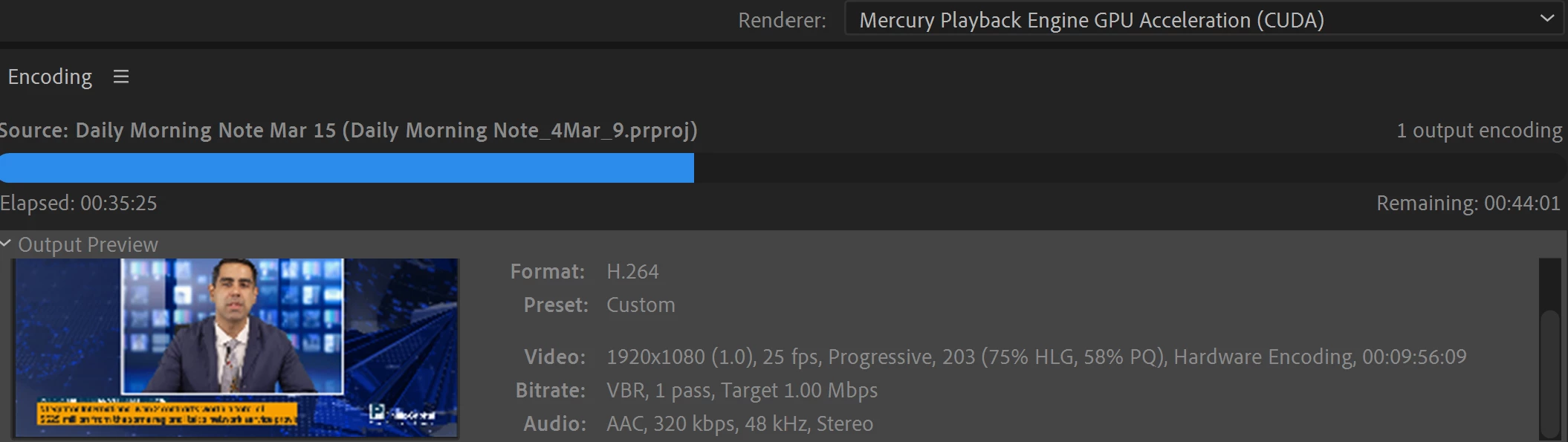
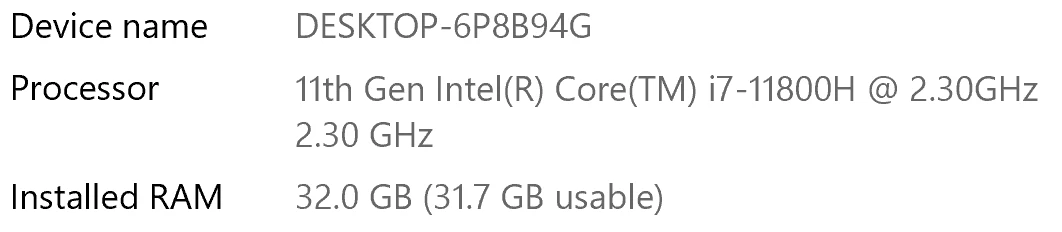
I have been waiting for more than 30 mins for the final video to be rendered. It's already 40 mins and it's barely 50% rendered. Never had this issue before. My laptop specs are as below and my GPU is RTX 3070.


Anyone knows how to solve this sudden issue?


Correct answer Fergus H

Hi all, 
Despite receiving test files from many of you (thank you!), we have not been able to reproduce this problem at Adobe. That's a bit unusual and certainly frustrating - to you and us - but we do think this issue has been fixed in the latest beta of After Effects and Media Encoder. We'd love to get your feedback on that. Creative Cloud betas are specifically designed to run alongside the release versions and are available in the "Beta apps" section of Creative Cloud Desktop. More information is here: https://helpx.adobe.com/x-productkb/global/creative-cloud-beta.html

The v23.x beta of After Effects also has the ability to directly export H.264 - without having to use Media Encoder - so your feedback on this would be useful too. More information is available here: https://community.adobe.com/t5/after-effects-beta-discussions/feature-focus-exporting-h-264-from-the-after-effects-render-queue/td-p/13117618


Regards,

Fergus

463 replies

cauthier721
Participating Frequently
October 15, 2022

I'm having the same issue. 😕😕

Have been rendering a 36min clip. Right now I've waited 9+ hours and 1 hour is left. Never had this issue before. Hopefully you have the solution soon. Tried mutiple 'solutions', except the downloading the beta and none of them worked. I'll try the beta once this is done.


brunoseven
Known Participant
October 15, 2022

Man, I have to say that probably this problem won't be solved soon. I was having it for the last 3 or 4 months and is not solved yet. The solution for me it was change the after effects and media encoder to older versions. Now is working normally again to me

cauthier721
Participating Frequently
October 15, 2022

What older version worked for you? If the beta doesn't work, I'll try an older version. Thanks for the quick reply. 🙂

Participant
October 7, 2022

With 22.6 I couldn't preview more than 2 frames with annoying warning box about my ram usage. Render times with 22.6 are horrible!! I've waited 3.5 hours for render to be done. It's unacceptable. I thought the problem is with my slow computers ( 4 core, 16 gb ram each) but I have opened my old projects and everything was the same -  going that way I downgraded AE to older version and it seems to be OK, so I am trying not to loose my job now. Thanks Adobe. 

October 7, 2022

Well it's not intentional that AE/AME is rendering slower, but we are sorry you're running into the issue. Can you share your project, full computer specs, output formats, etc., so we can attempt to reproduce the issue please?

Fergus H
Community Manager
Fergus HCommunity ManagerCorrect answer
Community Manager
October 4, 2022

Hi all, 
Despite receiving test files from many of you (thank you!), we have not been able to reproduce this problem at Adobe. That's a bit unusual and certainly frustrating - to you and us - but we do think this issue has been fixed in the latest beta of After Effects and Media Encoder. We'd love to get your feedback on that. Creative Cloud betas are specifically designed to run alongside the release versions and are available in the "Beta apps" section of Creative Cloud Desktop. More information is here: https://helpx.adobe.com/x-productkb/global/creative-cloud-beta.html

The v23.x beta of After Effects also has the ability to directly export H.264 - without having to use Media Encoder - so your feedback on this would be useful too. More information is available here: https://community.adobe.com/t5/after-effects-beta-discussions/feature-focus-exporting-h-264-from-the-after-effects-render-queue/td-p/13117618


Regards,

Fergus

Participant
October 5, 2022

I have the same issue.

I tried to encode an AAE project of 04:20 min by AME took me 20 hours.

The beta versions didn't make it, the same result = 20 hours.

The encode (H.264) by AAE itself took me 1 hour.

Participant
October 6, 2022

Hi again,

I want to correct and give an update:

- using the beta version of AAE for rendering (lossless) didn't work fine. In the end, the software was hanging, and after 36 !!! hours no progress at all.

- I've installed the AAE 18.0.0 version and rendered the same project (lossless). It was finished after 1,5 hours.


Since many users report the same condition there is a bug within the new versions. In my case, the AAE 18.0.0 worked fine, but the versions above did not.

I hope this information helps some how.


Regards

Dimitrij

Participant
October 4, 2022

Hi Everyone,

Same here... 
12th Gen Intel(R) Core(TM) i9-12900K
Nvidia GeForce RTX 3060 12GB
All brand new.
Processor usage: 20%
GPU usage 20%
Extremly slow rendering on a very-very simple composition!


Cheers,
Peter

October 17, 2022

We might have found a repro overnight. If you're willing, can you do an export from AME where the issue happens, and then when that's complete, go to Help -> Reveal Log Files and find the Adobe Media Encoder Log.txt and Adobe Media Encoder Log-last.txt file and post those back. We are  looking for some log lines related to async timeouts. 

Chummystyle
Participant
October 3, 2022

I haven't read this thread all the way through buy mu suggestions for slow Media Encoder would be.

  • Clear your cache.

  • Media Encoder the update selected "Mercury Playback Engine Software Only" so make sure you select under
    Preferences/General/ Video Rendering " Mercury Playback Engine GPU Acceleration (Metal) Recommended.
    Check in premiere as well. Same setting. Then restart and do work.

  • Media Encoder Preferences > General > Uncheck "Import sequences natively" and try export again.

  • Deactivate parallel encoding.

  • The source file needs on a fast drive - and I mean fast, 2GB/s minimum, better 3GB/s (M.2 NVMe with 4xPCIe for example.

  • Put source and target on different physical hard drives.


I'm not sure which of these works for me but Making sure all these changes are in place does the trick.

Martin

Participating Frequently
September 28, 2022

I'm having the same problem with the latest version of AE and AME. Similar videos that used to render 15-30 minutes have an estimated render time of 10+ hours. It was (and still is) driving me crazy.

My solution for the time being: install an older version of both software.
I installed After Effects 18.4.6 and Media Encoder 15.4.5 and just rendered a video in 20 minutes which took me hours with the latest versions.

Participating Frequently
September 29, 2022

If you want to stay at the 2022 version of both software, you can follow the solution of @Digiwheel 


Hi guys, had this issue for months and finally stumbled across a fix that works for me now perfectly.

Roll back to AE 22.2.1 and teh same on ME. It has to be this exact version. Works like a dream for me so it may be the solution for now.

(FYI I am running on Mac Monterey 12.6).


I tried it on Windows and it also works

Participating Frequently
September 29, 2022

Hmmm, thanks, that sounds like a reasonable solution! Where do I find the older version of AE and AME? They don't show up in my Creative Cloud panel.

Participant
September 28, 2022

Hi guys, had this issue for months and finally stumbled across a fix that works for me now perfectly.

Roll back to AE 22.2.1 and teh same on ME. It has to be this exact version. Works like a dream for me so it may be the solution for now.

(FYI I am running on Mac Monterey 12.6).

Participant
September 28, 2022

This worked for me. 


Participant
September 26, 2022

I've had this same issue for a while and it's causing the quality of my work to worsen since I'm spending so much time managing and waiting on exports. I can't send my 170 GB project folder in for troubleshooting, but three different computers and several versions of AE and ME are exporting terribly slowly. And mutli-frame rendering drops down to 1 concurrent frame after a couple minutes. Same with the current beta version. 

brunoseven
Known Participant
September 26, 2022

man, I've been facing the same problem. a tip that MAYBE can help you a little:

OPEN SOME YOUTUBE VIDEOS IN YOUR COMPUTER DURING THE RENDER, AND ONCE IN A WHILE CHANGE THE VIDEO TO ANOTHER ONE. IT DOESN'T SOLVE THE PROBLEM, BUT KEEP REPEATING THIS DURING THE RENDER MADE THE PROCESS OF RENDER FASTER.

I have no idea why it works, but it does. Try it.

Cisco88
Participant
September 27, 2022

I did try this and you are right it did help speed up the process a little bit.

Known Participant
September 21, 2022

Me too. For some reason, Creative cloud ignored my 'don't upgrade' request and upgraded everything.
AE slow. Photoshop slow. Media encoder is rendering a 'fairly' complex comp thats 17 seconds HD. 
Plays easily in AE on full rez. Half way through the render and it's taken 37 minutes. Says another 45 minutes to go.
The problem is, my computer is HUNG while this is going on, so I can't even work in the background.
Adobe.

Participant
September 20, 2022

Hi everyone,
Had the same issue. Could not render with media encoder anymore. It was super slow and stopped during the render process! 
Now it works again! Halleluja!
Here is what I did:
Go in After Effects to Preferences, Media Cache, Media Caches Files and press delete! After that it worked smooth again!

Participant
October 12, 2022

This worked for me too, thank you!!! ❤️