Participant
March 15, 2022
Answered

P: Extremely Slow Render/Export on Adobe Media Encoder 2022

  • March 15, 2022
  • 463 replies
  • 124830 views

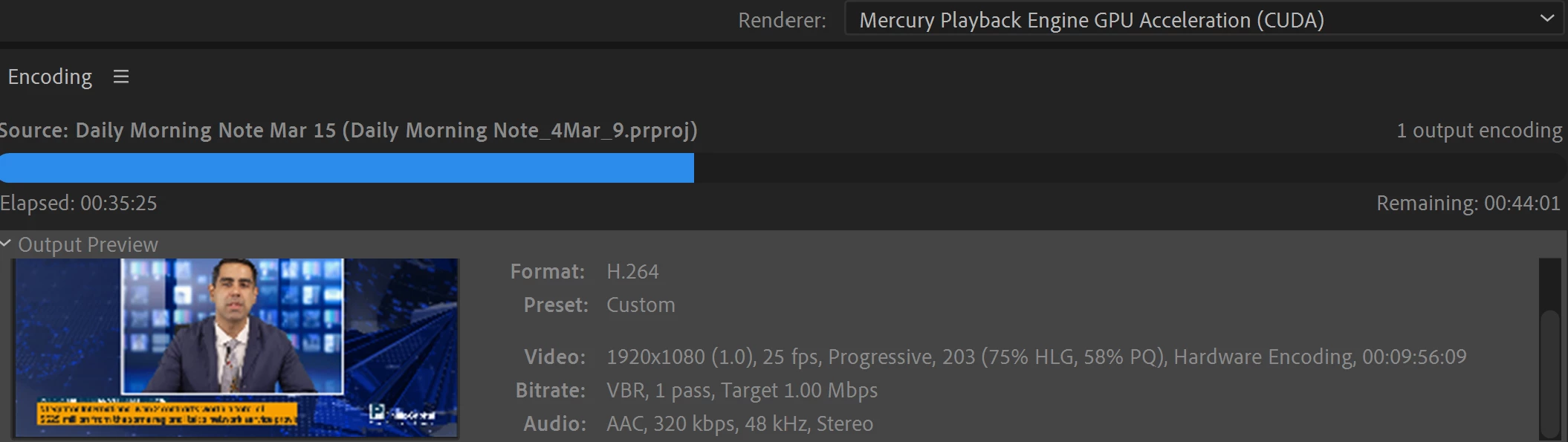
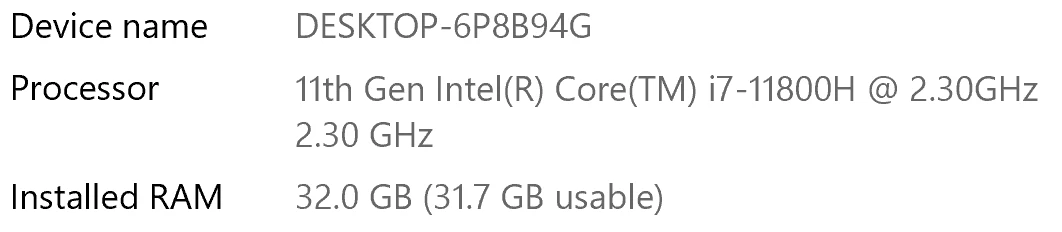
I have been waiting for more than 30 mins for the final video to be rendered. It's already 40 mins and it's barely 50% rendered. Never had this issue before. My laptop specs are as below and my GPU is RTX 3070.


Anyone knows how to solve this sudden issue?


Correct answer Fergus H

Hi all, 
Despite receiving test files from many of you (thank you!), we have not been able to reproduce this problem at Adobe. That's a bit unusual and certainly frustrating - to you and us - but we do think this issue has been fixed in the latest beta of After Effects and Media Encoder. We'd love to get your feedback on that. Creative Cloud betas are specifically designed to run alongside the release versions and are available in the "Beta apps" section of Creative Cloud Desktop. More information is here: https://helpx.adobe.com/x-productkb/global/creative-cloud-beta.html

The v23.x beta of After Effects also has the ability to directly export H.264 - without having to use Media Encoder - so your feedback on this would be useful too. More information is available here: https://community.adobe.com/t5/after-effects-beta-discussions/feature-focus-exporting-h-264-from-the-after-effects-render-queue/td-p/13117618


Regards,

Fergus

463 replies

cauthier721
Participating Frequently
November 10, 2022

So when I first encountered this issue, the one suggestion that worked was to go back many versions of After Effects. That worked! I'm using the latest version (v 23) expecting it to be fixed by now, and am waiting 15 hours for a render to finish that should have taken an hour. 😕😕

So many people have had this issue, what has been found? Seems I'm going to just have to re-install the old version so at least I can render out my projects in a timely matter. Hopefully a fix for this issue will be found soon so I can enjoy the new version of AE.

Warren Heaton
Community Expert
Community Expert
November 10, 2022

@cauthier721 


This indicates that something installed with After Effects that does not conflict with a prior version needs to be updated for the current version.


Participant
November 15, 2022

Well, I've encoutered the same problems as all the people above... what I did ?

I tested MOV rendering of few seconds of 6k material that was normal in comparison to h264 which was more than an hour with standard settings. Of course MOV gives much larger files and thus stuttering so it is useless comparing to h64.

So I tweaked some parameters in H264 and it was a boom, back to normal, short and fast render again.

I recommend to change parameters from MAIN to BASE in h264 settings and by the way I increased bit rate.

Participant
November 9, 2022

I am having these same issues - using AME to encode out of AE and Premiere taking triple the length it has taken before. Is there any news on a fix? I can't wait 12 hours for a half hour video to render....

brunoseven
Known Participant
November 14, 2022

hey man.


unfortunatelly there's no solution so far. The only "solution" is get back to old versions of after effects and Media Encoder. I gave up a month ago, and I just started to use the AE 22.6 and ME 22.6.1. now all the things are working properly.

Participant
November 15, 2022

Try changing Profile from Main to Base in H264 settings...

brunoseven
Known Participant
November 3, 2022

Hey Adobe Team, this discussion started on March 14, 2022, is it really going to be 1 year without a solution to this problem? Will I really need to learn to use another editing software because yours is totally unstable and doesn't work anymore?

Since I joined this discussion here the only really effective "helps" and "solutions" have been posted by the users themselves. From you I only saw messages with attempts at solutions that did not result in anything or you asking for our files, which also did not result in anything apparently.

I made the MISTAKE of updating After effects to version 23 and things got even worse than before. a file I made totally in version 23 worked, but others from older versions don't render anymore even with the tricks I discoevered like watch videos on youtube or on the computer. They just stop at some moment and stay stucked forever.


I've lost count of the amount of work hours I've lost because of this problem of yours and I'm really shocked that to this day you haven't solved such a critical bug. Basically whoever works with this can't work, it's not an aesthetic bug, it's not a bug that only bothers, it's a bug that makes us lose money and credibility.


you already know that the beta didn't work, you already know that the 23 didn't work, you already know that until some version of the 22 things were working, you already have the files, you already have tips that if we are watching videos the rendering improves and not it's so slow.

The impression it gives me is that you are not giving due importance to this problem that is a CRITICAL PROBLEM, and you are dealing with it as if it were a silly thing.

PS: and for the love of God, don't answer me here with generic comments like "hmm, have you cleared your cache? have you tried reinstalling? Could you send us the files?"

November 3, 2022

Can we setup a video conference call so you can share your screen and we can try to debug the issue together on your machine?

Participant
October 30, 2022

I have the same problem.  Performance rendering a video with either Media Encoder or Premiere Pro was acceptable until I upgraded to the 2023 version.  Now is completely unceptable: it now takes 5 to 6 times longer to render a video. 


Participant
October 28, 2022

same issue here 3070 but getting 3 hours on rendering for an 8mb video ....wtf did u guys do to your media encoder. 


October 28, 2022

We'd love to figure that out! 🙂 

Are you able to generate a log file from Media Encoder so we can see what the delay is?

Jase240
Participating Frequently
October 23, 2022

I am also getting this bug, a simple 2 minute sequence is estimated to take over 2 hours. 


Specs:


Asus G15 laptop 

AMD Ryzen 5950HS

NVIDIA GTX 3070 Laptop GPU

24GB RAM

2 1TB NVMe SSDs

Jase240
Participating Frequently
October 23, 2022

Issue is present in both version 22.6 and 23 of Media Encoder.

Jase240
Participating Frequently
October 24, 2022

After more testing with a 2 minute sequence, it takes over 2 hours to encode in 22.6, 23, and beta 23.1.


However the issue seems to improve slightly IF I turn off Nvidia hardware decode AND clear my media cache. (Still taking much longer than it should)

Participant
October 21, 2022

Hey!


I had a similar problem AE 23.0. Project was quite large with many pre-comps, Maxon effects, 4K .mxf footage etc. Still was not expecting a 4-5 hours render with media encoder. I have this feeling that about 10 months ago the same project took about an hour to render. Anyhow tried the beta with build-in render and it completed the work around 2 hours.


Also with the version 23.0. frames were not cached during the playback and the playback overall was very sluggish. 


Setup: ryzen 3600, nvidia 3080, 32gb ram, nvidia studio drivers & game ready


Participant
October 28, 2022

Follow up on this:


Updated few computer part. Internal renderer is as quick as I would expect (1.5min). Need to output .mxf too, so tried media-encoder, stopped after 7 hours...


I attached a log file

Participant
October 20, 2022

Hi!  Try to install fresh version of Nvidia Driver. In my case it helped

russr64667685
Participant
October 20, 2022

The latest version of After Effects (23.0.0) fixed the issue for me. 😄

Participant
October 18, 2022

Processor: Intel Core i7 2 GHz

RAM 16 GB (15.8 usable)


It is taking 30 hours to render a 12 second video clip made in After Effects through Media Encoder.  There is talk about settings and everything else, but tell us what the settings should be. I'm trying to export a video for Youtube.Format H.264, Preset "YouTube 1080p Full HD".  Why am I having a 30 hour render for a 12 second video?


October 18, 2022

That is a very good question. Is the 12 second video clip literally just a piece of footage, or does it have effects on it? If you export directly from AE, does it take 30 hours or something less? 


AE 23.0 just released and has H.264 rendering built into the Render Queue. If you're able to update, it'd be good to know if you see different results in AE directly as well. 


Otherwise, we'd love to see some log files. If you're willing, can you do an export from AME where the issue happens, and then when that's complete, go to Help -> Reveal Log Files and find the Adobe Media Encoder Log.txt and Adobe Media Encoder Log-last.txt file and post those back. We are  looking for some log lines related to async timeouts. 


October 17, 2022

We might have found a repro overnight. If you're able to repro this issue, can you do an export from AME where the issue happens, and then when that's complete, go to Help -> Reveal Log Files and find the Adobe Media Encoder Log.txt and Adobe Media Encoder Log-last.txt file and post those back. We are  looking for some log lines related to async timeouts. 

Participating Frequently
October 17, 2022

i haven't replied in this thread so far but i've experienced a similar issue (aka my AME renders take forever). i haven't done any A/B testing on my projects (too time-consuming for the salary adobe pays me, which is $0/lifetime so far) but my most recent project took ~6 hours to render where past projects with a very similar structure render in 20 minutes in AME.  these are 3-4-minute long ppro sequences; no effects outside opacity keyframing, layering some gaussian blur via luma key, and 2-3 lumetri effect modules; dynamically linked into AE for some simple transform keyframes; and exported to AME from AE.


i'll DM you a dropbox link to my log output, which i believe refers to a recent instance of rendering my project. (i haven't rendered anything since then, but i don't know how often the logs expire or get replaced.)