Participant
March 15, 2022
Answered

P: Extremely Slow Render/Export on Adobe Media Encoder 2022

  • March 15, 2022
  • 463 replies
  • 124828 views

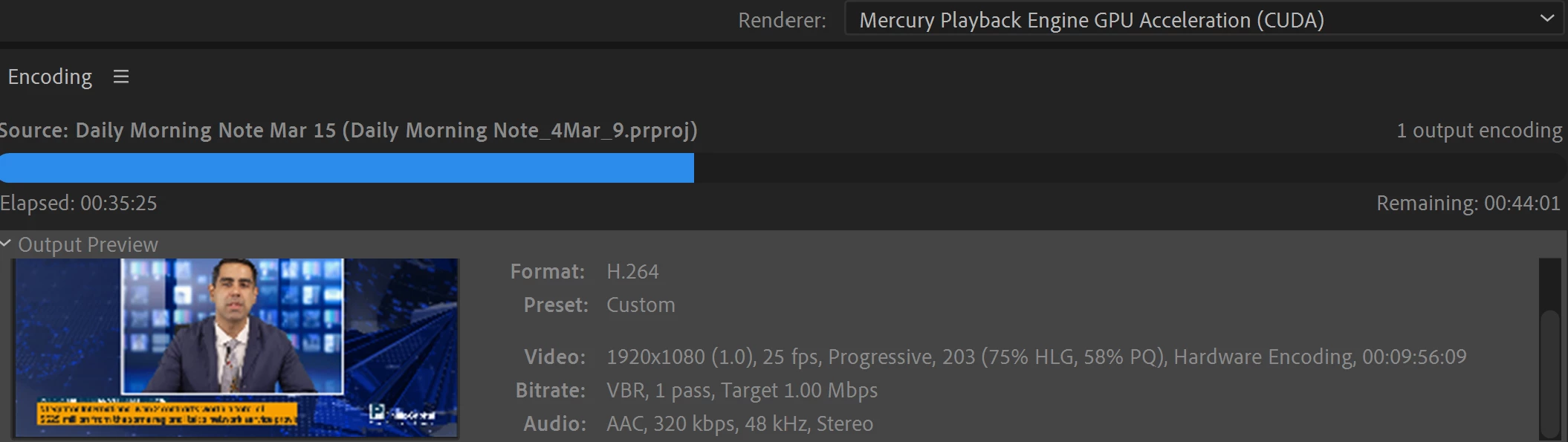
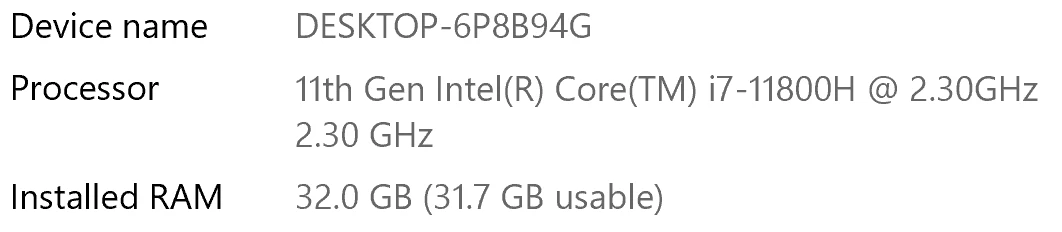
I have been waiting for more than 30 mins for the final video to be rendered. It's already 40 mins and it's barely 50% rendered. Never had this issue before. My laptop specs are as below and my GPU is RTX 3070.


Anyone knows how to solve this sudden issue?


Correct answer Fergus H

Hi all, 
Despite receiving test files from many of you (thank you!), we have not been able to reproduce this problem at Adobe. That's a bit unusual and certainly frustrating - to you and us - but we do think this issue has been fixed in the latest beta of After Effects and Media Encoder. We'd love to get your feedback on that. Creative Cloud betas are specifically designed to run alongside the release versions and are available in the "Beta apps" section of Creative Cloud Desktop. More information is here: https://helpx.adobe.com/x-productkb/global/creative-cloud-beta.html

The v23.x beta of After Effects also has the ability to directly export H.264 - without having to use Media Encoder - so your feedback on this would be useful too. More information is available here: https://community.adobe.com/t5/after-effects-beta-discussions/feature-focus-exporting-h-264-from-the-after-effects-render-queue/td-p/13117618


Regards,

Fergus

463 replies

MotionDana2
Participant
December 10, 2022

Same here.
Switched to render in AE render queue (Like the old days..).
It's much faster.

Participant
December 9, 2022

Im experiencing the same trouble, by more than a month, the only solution is the native render of Ae 

Participant
December 9, 2022

Same for me! first 50% of progress was in 30-40min, and second 50% 18h.


My mac specs:

i7 3.8Ghz

AMD Radeon Pro 5500XT 8gb

72 GB RAM

Jase240
Participating Frequently
December 9, 2022

I have found that no matter what, if more than one effect is used. It seems to really slow it down.


One of the things I tried that seems to have helped tremendously is transcoding the footage beforehand.


It's still not as good as it used to be, but it helps.

Participating Frequently
November 23, 2022

Just an idea, do you use GPU acceleration? I noticed that some older GPUs were dropped out of support recently, e.g. nVidia K5000 seems no longer to be working in AME 2023. This results in way longer render times if the GPU was used for decoding / encoding.

ChWard
Community Manager
Community Manager
November 22, 2022

Could you check if "HSL Secondary" in Lumetri Color is enabled? 

Participant
November 22, 2022

As I've observed, Media Encoder has been having problems linking with After Effect during rendering. Ever since the 2023 version of After Effect has the addition of H.264, it is more reliable to render within After Effect's native render queue than Media Encoder now. Image that, it used to be the other way around.
We have no choice bu to wait for Adobe to release a new update to fix the rendercore problem between After Effect and Media Encoder. Until then, please refrain from using Encoder to render complex project.

Adobe Employee
January 11, 2023

Would you be able to share media & your system specs & app versions?

Participant
January 11, 2023

Not publically, but yes, I will gladly share it directly with Adobe.

Jase240
Participating Frequently
November 20, 2022

I believe I have found a solution, at least one that works for me.


In all clips I had been using in my timelines, I had Lumetri Color added and all footage was color graded. If I uncheck "HSL Secondary" in Lumetri Color, my render speed for a 5 minute clip goes from over 1-2 hours, to under 3 minutes. 


I will point out, that on a seperate PC with SIMILAR specs (Same CPU, RAM, slower GPU.) I did not have any issue with rendering times and it was outperforming my current PC regardless of effects used or settings.


Note the specs on my PC with the issue:

Asus G15

AMD Ryzen 5900HS 8 core 16 thread

Nvidia GTX 3070 Laptop GPU

24GB of RAM (Tested with 16GB and 24GB just in-case)

2 TB dual SSD PCI-3.0 NVMe


And the specs of a secondary PC without the issue:

Asus G14

AMD Ryzen 5900HS 8 core 16 thread

Nvidia GTX 3060 Laptop GPU

16GB of RAM

1 TB SSD PCI-3.0 NVMe


Again, the PC with the Nvidia 3060 graphics card did NOT have any issues. Only my main PC with the Nvidia 3070 is experiencing this.


This seems to be an issue with the Lumetri Color, since HSL Secondary seemed to cause the issue for me. I have this issue no matter what version of Premiere I use. Luckily, I don't typically need to use HSL Secondary, so I can safely turn it off for all future edits.


I'm assuming this must be GPU support related.


Adobe please work on GPU compatiblity with Nvidia 30 series cards. Perhaps a driver fix will need to be worked on with Nvidia as well.


jandrewramsey
Known Participant
November 21, 2022

Chiming in here with more complains about Media Encoder. I believe I've identified that it's basically worthless while Premiere or AE are open. Just open, not even playing back anything. It just can't handle any other video apps being open. Very weird and new problem in 2023 for me.

Participant
November 24, 2022

Estou com o mesmo defeito. Alguém resolveu o problema?

Participant
November 19, 2022

i dont know what adobe team is doing or just having coffee all day instead of work, i have 3500$ pc and rendereing a 7 second video taking me 19+ hours, i let my laptop turned on whole night still it wasn't rendered, i took a freelance job for making a intro and u know what? cuz of this worst issue the guy took someone else for the job i spent my 20+ hours (1 hour editing + 19 hours for rendering) for nothing, i lost my client cuz of this frustrating issue, im being very patient here, tried 100+ videos from youtube, gone though so may reddit threads, no help from anywhere.

November 21, 2022

The project - was it an AE comp being rendered in AME or purely PPro in AME or a mix of both? If just AE, did you try rendering directly out of AE? 

ChWard
Community Manager
Community Manager
November 17, 2022

Hi, sorry to hear that. Do you have any 3rd Party Plug Ins installed? Do the versions of AME and Ae match (both are 2023 versions)? And would it be possible to share the .aep with us?

Participant
November 17, 2022

slow export/rendering Adobe Media Encoder 2023

Hi,


I experience a slow exporting or rendering in Adobe Media Encoder after i update it to 2023.

when i render the After effects project to Media Encoder it takes hours or more to be done,

but when i render it in After effects it only takes minutes.

I didn't experience this kind of issue in version 2021 of Adobe Media Encoder.

Amy the Stuv
Community Manager
Community Manager
October 2, 2026

Hi ​@Writers5FEF 

I merged your post with this one so that you and those who replied to you can get the latest updates and we can pool together all pertinent information on this issue. 

Thank you for bringing this to our attention.

Amy