Participant
March 15, 2022
Answered

P: Extremely Slow Render/Export on Adobe Media Encoder 2022

  • March 15, 2022
  • 463 replies
  • 124827 views

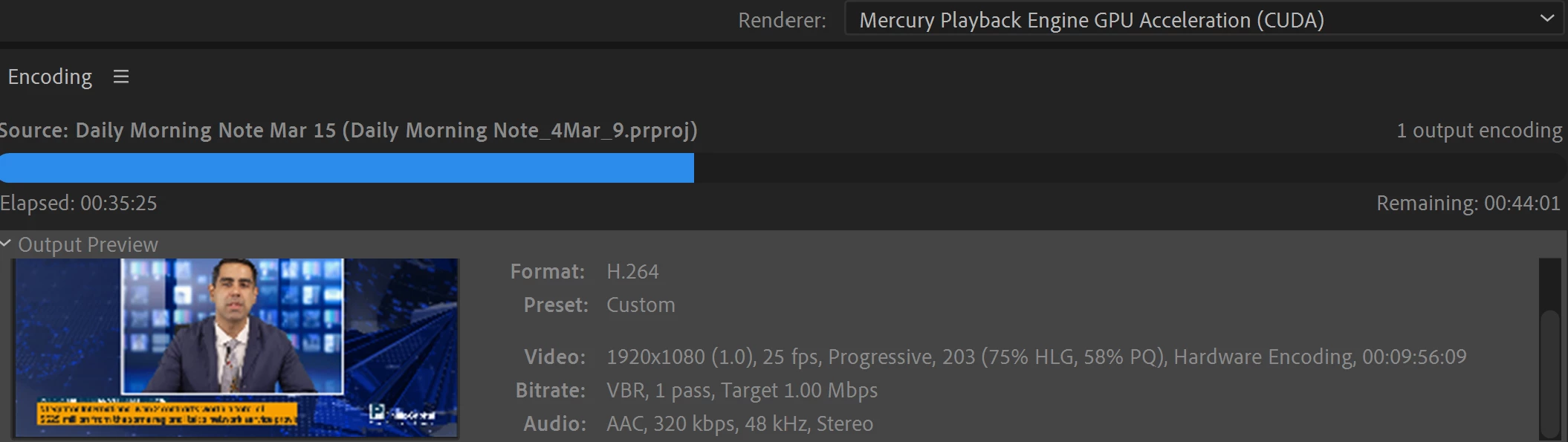
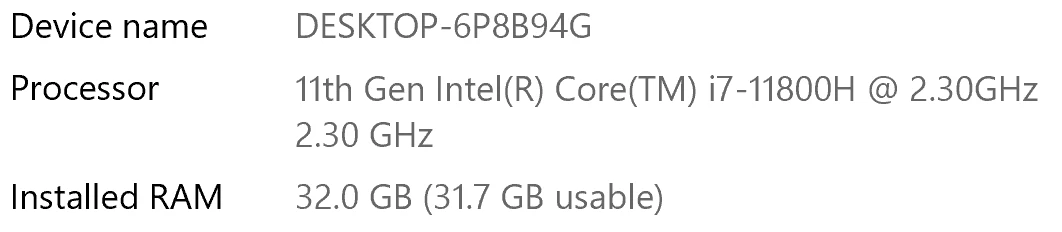
I have been waiting for more than 30 mins for the final video to be rendered. It's already 40 mins and it's barely 50% rendered. Never had this issue before. My laptop specs are as below and my GPU is RTX 3070.


Anyone knows how to solve this sudden issue?


Correct answer Fergus H

Hi all, 
Despite receiving test files from many of you (thank you!), we have not been able to reproduce this problem at Adobe. That's a bit unusual and certainly frustrating - to you and us - but we do think this issue has been fixed in the latest beta of After Effects and Media Encoder. We'd love to get your feedback on that. Creative Cloud betas are specifically designed to run alongside the release versions and are available in the "Beta apps" section of Creative Cloud Desktop. More information is here: https://helpx.adobe.com/x-productkb/global/creative-cloud-beta.html

The v23.x beta of After Effects also has the ability to directly export H.264 - without having to use Media Encoder - so your feedback on this would be useful too. More information is available here: https://community.adobe.com/t5/after-effects-beta-discussions/feature-focus-exporting-h-264-from-the-after-effects-render-queue/td-p/13117618


Regards,

Fergus

463 replies

Participant
February 11, 2023

@jenkmeister17177426 I see this has been a bit of presistent issue, so I thought I'd share my experience to see if you're able to replicate this issue on your end. I'm running into this issue while rendering a video that I edited in Premiere Pro, which has three layers: 1. a small three-band audio spectrum, 2. a foreground image imported using a MOGRT, and 3. a wave form that moves with some music. Both 1. and 3. are After Effects compositions that I linked to my Premiere Pro file by creating an adjustment layer and then selecting "Replace with After Effects Composition." In total, the video is about 4.5 minutes, but is projecting over 1.5 hour to render. When I send the file to Media Encoder to be exported, the video starts rendering quickly but very quickly slows down before eventually grinding to a total hault and stops rendering altogether (about an 1/8 of the way through the render). I have a brand new Apple MacBook Pro "16 with an Apple M2 Pro Max chip, so I was pretty shocked when I saw the render time, as it's about as long as a similar video would take on my Apple iMac from 10+ years ago. Below are the full specs of my computer and attached are both the Premiere Pro and After Effects files I created.


Computer Specs:

Apple MacBook Pro "16

Apple M2 Pro Max

12-Core CPU
38-Core GPU
32GB Unified Memory
1TB SSD Storage

blancheeen
Participant
February 10, 2023

I have the same problem right now. 2 minutes video is rendering now for almost 2 hours and still not the end. How is this even possible? How should I render longer videos and keep my work flow when this is happening? 

February 10, 2023

Any chance you can describe in more detail what you're rendering (AE comp, PPro sequence, plain video file conversion, etc.), which version of AME you're using, etc? We'd love to help figure out what's going on, so every detail you can give us would be really valuable. 

blancheeen
Participant
February 10, 2023

Hi, I'm rendering simple animation (white bg and cca 30 2D squares with shadows just changing position + music. Size 1920x1080). I have MAc studio 2022, using AE 2022 + media encoder 2022. 

Lockie Mitchell
Participant
January 30, 2023

I had a similar issue (a pretty basic 5 min video was gonna take 6 hours to render). As I started to pack up and give up, I turned off all my open applications. The very second I turned off AE, Media Encoder went nuts and tore through the render! It seems ME couldn't  handle other Adobe apps being open. Maybe because I'm running a beta OS?


Mac Studio

Apple M1 Max

32GB Ram

Ventura 13.2 beta

Adobe AE 23.0

Adobe ME 23.1

February 7, 2023

AE, AME, PPro, and other Adobe apps all work under a shared maximum amount of memory based on the Memory preferences set in any of the apps. My immediate thought on this is AE was using a good portion of the memory that it couldn't hand over to AME, but once AE was closed and the memory was released, AME had more memory to use. AE 23.1 (and 23.2 released today) have a number of memory fixes that should help with these situations. 

AndrewDacian
Participating Frequently
January 13, 2023

As expected, I am the 100000000th user to face this very same issue. But it's just a coincidence, I'm sure the very hardworking people at adobe have taken all necessary steps to ensure they don't release an effectively broken version of Media Encoder. I would like to ask you guys (not the adobe tech support that in January 2023 is still unable to fix a huge problem reported in March 2022), the actual users who actually care about adobe, whether the beta versions of After Effects and Media Encoder were able to solve it, to render faster. 

Following the advice of some people who posted here earlier, I have just installed the 2022.2 versions of AE, ME and PP and - surprise! it now crashes on export because of an accelerated rendering problem. And currently the 2023 versions take 41 hours to render a 40 seconds clip. Imagine that - more than an hour to render a second of footage. Thanks adobe.

brunoseven
Known Participant
January 13, 2023

in march we will complete 1 year here. 1 whole year without a solution because they say that can't reproduce this problem in there, and apparently it's very difficult to have the will to solve the problem and analyze other people's machine to solve a problem that theoretically would be easy to solve since it worked fine before, so it was just them reverting something.


On the anniversary of this forum, I think we could do an online virtual party where each participant uploads a 30-second video to render and the party can only end when all the videos have been rendered. It will be a party all year round.

AndrewDacian
Participating Frequently
January 13, 2023

Yeah it's absolutely awful. Have you found some sort of workaround? I have tried exporting through PP (version 2022) and the estimated time kept increasing exponentially, and the rendering speed was decreasing at the same rate. It's so frustrating to spend 1% time on the actual project and 99% on making sure it exports in good parameters.

Participant
January 10, 2023

I am also having issues redering in ME.  I am 17.5 hours into rendering a 1m6s clip with AME and still have three more hours to do.  This is a BRAND new machine with 64G memory RTX3090 GPU and i9-12900KS proc.

Using NZXT CAM it's obvious that AE and ME are using MINIMAL resources.  CPU is currently 3% and GPU spikes to ~50% for less than 1 second then rests at near 0 for a couple of seconds then spikes again.  Drivers, OS, and Adobe versions are all up to date.  Had this problem in the ME 2022 version as well.

December 15, 2023

I'm experiencing the same trouble here, did you find a solution for your problem ?

ryanr69301996
Participant
January 6, 2023

I've had this problem for years. Basically have abandoned ae for premiere and was about to buy Blackmagic. However, after reading this thread this morning I I stalled the AE beta. Seems to have resolved a lot of the slowdown for me. Same file no changes - rendered predicted 80 hours in current version. Beta version predicts 4. It isn't great, but I will take it over not being able to work at all.


Please keep improving this, because I don't need your software to do my jobs. There are faster options.

Participant
January 5, 2023

Same problem for me with ME 2023. Render times are up to an hour instead of multiple minutes.

Participant
December 30, 2022

I'm having the same issue.  I can export a video directly out of Premiere, and it takes 56 seconds.  When I export the same video in ME using the same preset, it takes seven minutes and 32 seconds 7:32.  this a problem as I'm trying to batch export 30 videos.

Participant
December 30, 2022

My machine is a Mac Pro 3.2 GHz 16-Core Intel Xeon W, AMD Radeon Pro W5700X 16 GB, 48 GB 2933 MHz DDR4, running  Ventura 13.1.  Premiere pro 23.1.0, Media Encoder 23.1


Okorie7
Participant
December 30, 2022

I've checked out the help tabs and all but my AME keeps failing to render my video and I don't know if it's a system issue or if I need to downgrade my AME. Ps: I'm using the '22 version

Participating Frequently
December 30, 2022

22.2.1 has worked for me. But I've found you have to be using both AE and ME 22.2.1.


Btw, I'm using M1 Macs, one running Big Sur and one running Monterey.

Participant
December 19, 2022

My 4:30 video is taking 20 hours to render. this is project-breaking. not only that, i get errors like "user interrupted render" when I have done nothing but leave my Mac alone. there has to be a solution for this soon. Otherwise After Effects is just not a viable video software if rendering is such a pain.

Warren Heaton
Community Expert
Community Expert
December 19, 2022

@Nandhi 

Have you run any After Effects benchmark projects to see if your computer is rendering in keeping with what's to be expected of your hardware?


While 20 hours does sound too long for 4 minutes and 30 seconds, knowing if that is unusual or not depends on what is happening during Composition.  If it's just the Transform properties being keyframed with Motion Blur, yes, that is probably much longer than should be expected.  However, if it also has effects like CC Light Burst and Detail-preserving Upscale applied, then 20 hours may not be not unrealistic.


By "user interrupted render", do you mean the "User Stopped" Status message in the Render Queue?  If you're seeing that and you are confident that the "Stop" button is not being clieked, then that is unusual and needs futher troubleshooting.


Something to try:  Disable all third-party plugins and render your Comp (even if this means it will render with watermarks due to missing effects).   This will help to rule out a memory leak due to a third-party plugin.