Participant
March 15, 2022
Answered

P: Extremely Slow Render/Export on Adobe Media Encoder 2022

  • March 15, 2022
  • 463 replies
  • 124825 views

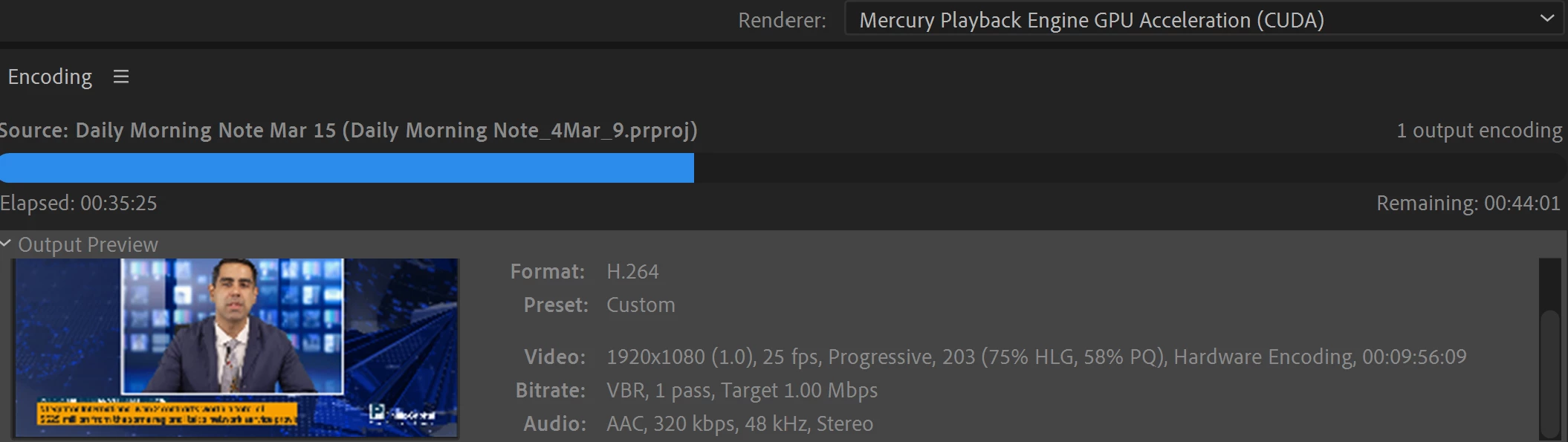
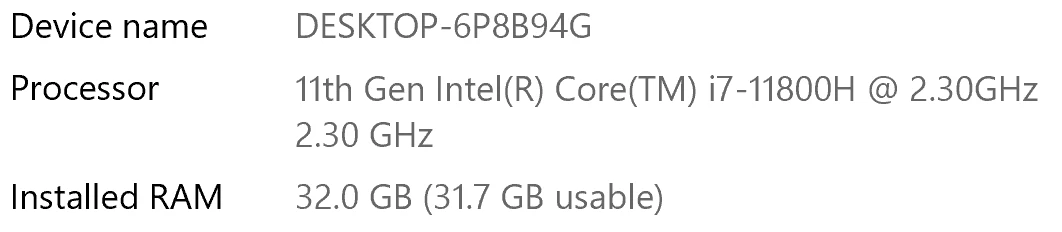
I have been waiting for more than 30 mins for the final video to be rendered. It's already 40 mins and it's barely 50% rendered. Never had this issue before. My laptop specs are as below and my GPU is RTX 3070.


Anyone knows how to solve this sudden issue?


Correct answer Fergus H

Hi all, 
Despite receiving test files from many of you (thank you!), we have not been able to reproduce this problem at Adobe. That's a bit unusual and certainly frustrating - to you and us - but we do think this issue has been fixed in the latest beta of After Effects and Media Encoder. We'd love to get your feedback on that. Creative Cloud betas are specifically designed to run alongside the release versions and are available in the "Beta apps" section of Creative Cloud Desktop. More information is here: https://helpx.adobe.com/x-productkb/global/creative-cloud-beta.html

The v23.x beta of After Effects also has the ability to directly export H.264 - without having to use Media Encoder - so your feedback on this would be useful too. More information is available here: https://community.adobe.com/t5/after-effects-beta-discussions/feature-focus-exporting-h-264-from-the-after-effects-render-queue/td-p/13117618


Regards,

Fergus

463 replies

Participating Frequently
June 2, 2023

I solved the problem by just installing After Effects 2019. Everything that came later than that version [abuse removed by moderator]
Renderings now are 20 ways faster.


Participating Frequently
June 2, 2023

I solved the problem by just installing After Effects 2019. Everything that came later than that version can go away forever for me.
Renderings now are 20 ways faster.

[Abuse and profanity removed by moderator]

Inspiring
June 2, 2023

I honestly think these software programs just get worse and worse.  They just make up things to change so that everyone has to upgrade and keep spending money.  It was all so much better before subscriptions when a hobbyist could purchase the master suite and not have to upgrade until they feel like it. Now theyve just forced everyone to pay every year for products that continue to get worse and don't take into account that many people who were paying were doing this for fun but now cannot continue. If it's not broken don't fix it. Thats my motto.

Participating Frequently
June 2, 2023

You are totally right.

JIGNZ
Participant
May 31, 2023

Same problem here, but from Premiere to AME queue, Media Enconder takes like 20 minutes for an export that takes 3 minutes in Premiere.  2023 version of all, but this happen since older versions. 

Adobe Employee
June 1, 2023

Can you share your system specs (OS, CPU, GPU)?

JIGNZ
Participant
June 2, 2023

Macbook Air 2020, M1, 8gb Ram O.S. Ventura 13.3.1 

I experienced the same issue before on other system specs. 

Participant
May 23, 2023

I had an simple example of how slow Media Encoder 2023 is, I had an 15 second TV commercial which was a PAL HD MXF file and dragged it into Media Encoder 2023 to export a 2 pass H264 5 MBPS VBR MP4 to email to my client and it took 1 minute 27 seconds. I then dragged the same MXF into Media Encoder 2020 and exported with the same settings and it took 15 seconds, so the later version is 6 times slower - that's progress!

Adobe Employee
May 23, 2023

That is definitely a performance bug then. Would you be able to share this media file for our team to investigate. I can send you instructions via private message in this forum.

Participant
May 8, 2023

I have the same issue, an AE project rendering for hours that on another PC (Windows 10 with a weaker GPU) only took a few minutes. Restart and Update didn't solve anything.

Specs: Windows 11, Processor: AMD Ryzen 9 39000XT, GPU: NVIDIA RTX 2080 Ti, 32GB Ram

Riptopian_Animations
Participant
May 6, 2023

I have the same issue, but probably 1000x times worse. I want to render a 30 second animation and apparently it's gonna take 149 hours?! That's ridiculous!!! 

Adobe Employee
May 6, 2023

I am very sorry for your bad experience. Could you please provide you specs (operating system, CPU, GPU)? Would you be able to share your project for vcerification? I couls send you a private message with instructions in this forum.

kglad
Community Expert
Community Expert
April 7, 2023

< moved from download and install >

Participating Frequently
April 6, 2023

Multi-frame rendering on Adobe Media Encoder very slower than after effects Render

Windows 10 Pro 21H2

Driver nvdia: 516.94

48-core AMD Threadripper CPU, 96 GB of RAM, RTX 3090 GPU, and all hardrives are SSD.

After effects 22.2

Adobe Media Encoder 22.6.4


An editor told me the AME encoder is more slow than after effects on this machine. Should Adobe Media Encoder encode as fast as the After Effects Render with the multi-frame rendering option activated? When i am encoding from after effects and one 1080p composition  takes 10-5 min to complete on a mov file but on the AME takes almost 1h-40min. The cpu on After Effects encoding reach to the 20% and the ram reach the 80Gb but on AME encoding the cpu reach the 2 % and the ram 5Gb on the AME process and on After proccess reach 2% and 20 GB. When i send a composition to the AME queue, the AME puts the codec h264 and it doesn't keep the codec and the container especified on AFter Effects when i sent it. Is it normal? 

Do you have noticed this diferent times of encoding? Or maybe something wrong on this machine?

Regards and thank you.

Amy the Stuv
Community Manager
Community Manager
October 2, 2026

Hello ​@adriang49384077 

I merged your question here so that we could gather all information pertaining to this issue and make it easier for us to provide you with updates.

Thank you for bringing it to our attention,

Amy

Participating Frequently
March 28, 2023

Just experienced the same issue, its super slow for a MOV > MP4 1080p it now takes forever, hardware encode is on. AMD 5900 + RTX 3090

EckiAME
Community Manager
Community Manager
March 31, 2023

What kind of effects are you using? Lumetri? External plugins? 

Participant
March 14, 2023

Hi there, same issue here. I did a bunch of updates at once (huge mistake, I know), PR/AE/ME to the latest versions and also  Mac OS 13.2.1 on my 2018 Macbook. Before that, everything was going reasonably well. 

Now I can't use ME to render out my PR projects anymore. It would take over 2 hours for a simple 5 min edit, which takes only about 15 minutes using the "native" PR export. No magic in this project, just some footage with a little bit of Lumetri, some Dynamic Link AE imports (lower thirds).

Totally destroys my workflow. Looking forward for a quick fix here. 


Participating Frequently
March 22, 2023

i would just revert your update. if you want a newer version of the video suite than you were on before, i've been using 22.1 (the most recent version i was on before updating broke my rendering) with no issues. adobe cc desktop app should let you install and pin older versions.