Participant
March 15, 2022
Answered

P: Extremely Slow Render/Export on Adobe Media Encoder 2022

  • March 15, 2022
  • 463 replies
  • 124824 views

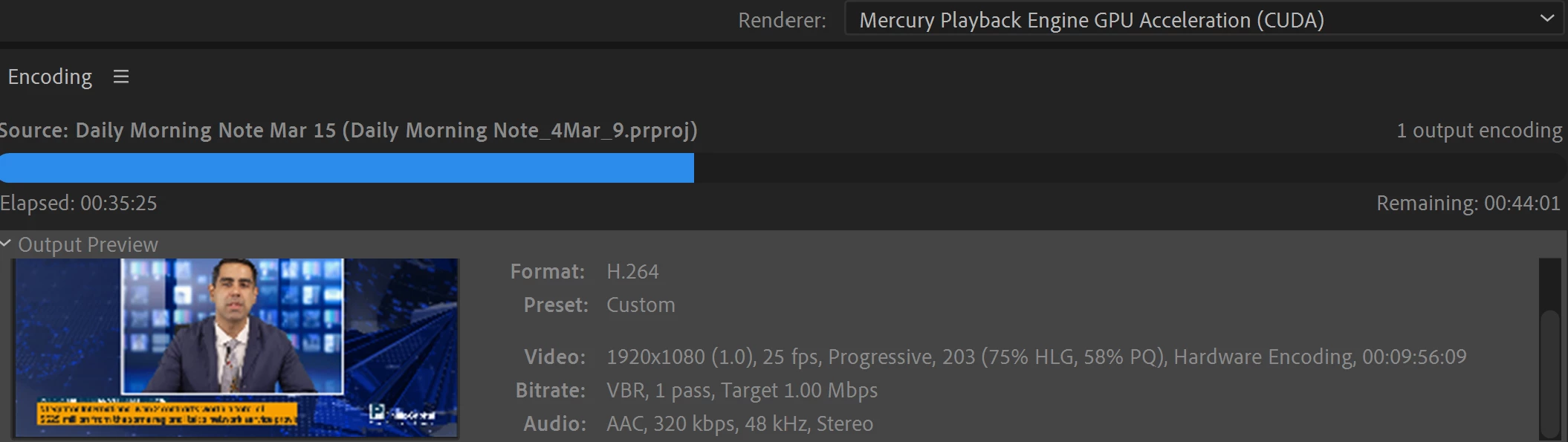
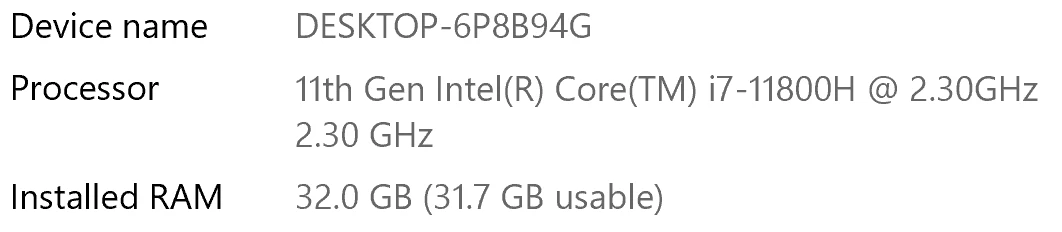
I have been waiting for more than 30 mins for the final video to be rendered. It's already 40 mins and it's barely 50% rendered. Never had this issue before. My laptop specs are as below and my GPU is RTX 3070.


Anyone knows how to solve this sudden issue?


Correct answer Fergus H

Hi all, 
Despite receiving test files from many of you (thank you!), we have not been able to reproduce this problem at Adobe. That's a bit unusual and certainly frustrating - to you and us - but we do think this issue has been fixed in the latest beta of After Effects and Media Encoder. We'd love to get your feedback on that. Creative Cloud betas are specifically designed to run alongside the release versions and are available in the "Beta apps" section of Creative Cloud Desktop. More information is here: https://helpx.adobe.com/x-productkb/global/creative-cloud-beta.html

The v23.x beta of After Effects also has the ability to directly export H.264 - without having to use Media Encoder - so your feedback on this would be useful too. More information is available here: https://community.adobe.com/t5/after-effects-beta-discussions/feature-focus-exporting-h-264-from-the-after-effects-render-queue/td-p/13117618


Regards,

Fergus

463 replies

Participant
November 13, 2024

I have just updated to 2025 and noticed a drastic difference in render times. I think I may stick with 2024 for now.

EckiAME
Community Manager
Community Manager
November 13, 2024

Can you share what media and presets you use, as well as your specs (OS, CPU, GPU, memory)?

Participant
November 14, 2024

M1 Pro, 32GB Ram, macOS Sequoia, 1TB Hard drive. Not sure where I find CPU anf GPU, but I've never had an issue with the rendering speeds in 2024. 

H264, hardware encoding, 1080x1920. 

Averdahl
Community Expert
Community Expert
November 7, 2024

I noticed that you use Software Encoding and that may explain it since it is much slower than Hardware Encoding. Try to set the Performance to Hardware Encoding and see if it helps.


Participant
November 7, 2024

Thanks for your comment, i changed to Hardware, however that has not seemed to have made a difference.

Oliver
EckiAME
Community Manager
Community Manager
November 8, 2024

Can you please share your specs (OS, CPU, GPU, memory) and maybe some performance comparisons?

Participant
November 7, 2024

Media Encoder Extrememly slow to render since new update v25

Hello, I recently updated the new version v25 of media encoder and videos that usually export in a few minutes are now taking hours. I am exporting from After effects and have used the same process / settings as previous versions, so dont undertand what is going wrong. Any help would be much appreciated to resolve this.  I have attached a screenshot of a current export. Thank you.

Oliver
Amy the Stuv
Community Manager
Community Manager
October 2, 2026

Hello ​@OBDDESIGN 

I merged your post here to gather all pertinent information regarding this issue and make it easier to provide you with updates regarding it.

Thank you for bringing this to our attention,

Amy

Participant
October 9, 2024

I'm stuck with this export. Is there anything that can be done to speedup? 

I've changed the background of the video and replaced with an image. Other than that, no effects are used. Video is roughly 60seconds long. 

Used after effects to change the background, pushed to encoder to export. 

Thank you in advance. 


Participant
October 9, 2024

A while ago, and I mean a few years ago, I had this problem and spent a whiole researching the issue.

At the time, I documented what I learnt and found these notes to be helpful.

  • Media Encoder the update selected "Mercury Playback Engine Software Only" so make sure you select under

    Preferences/General/ Video Rendering " Mercury Playback Engine GPU Acceleration (Metal) Recommended.

    Check in premiere as well, apply the same setting and then restart.

  • Media Encoder Preferences > General > Uncheck "Import sequences natively" and try export again.

  • Deactivate parallel encoding


  • Put source and target on different physical hard drives


  • The source file needs on a fast drive - and I mean fast, 2GB/s minimum, better 3GB/s (M.2 NVMe with 4xPCIe for example), with 3GB/s+ it may also be possible to keep source and target on same physical drive.
Participant
September 2, 2024

Same here. I am trying to export a simple 2 minute avi file from Premiere CC 2024 to ME. I am encoding to H264 for youtube It was taking 10 minutes before I killed it. It use to fly across. Now it goes in short spurts. 


I have  a Ryzen 7 7800x3D 8 core processor, 128 GB of DDR5 ram and all SSD drives. I should be flying but I feel like I am on a Win 98 SE machine with IDE hard drive

EckiAME
Community Manager
Community Manager
September 3, 2024

Would you be able do do a screen recording and provide a short sample project? I will file a bug. I can send you the instructions via private message in this forum.

Which AME 24.x version were you using? Is it the same in AME 25.0 beta?

Participant
September 8, 2024

I don't have a screen recorder. It is a straight forward avi to h264 medium adaptive export. I am using ME 24.6.1 (Build 2). I do not have 25 beta.  It seems to be working faster today.  Last week, a 2 hour video was going to take a few hours.  Today it looks like it will be around 30 minutes. I notice that it is encoding in bursts. I don't seem to recall it doing that in the past. Does that sound normal? And for the record, when I exported this video taken from my phone, it blew right through without any hiccups,though it is only a few seconds long

Participating Frequently
September 2, 2024

I'm experiencing the same lag with Premiere Pro, playback and export. A one minute video is taking five minutes to export, and anthing longer than 30 minutes is taking in excess of three hours.
My CPU is maxed out, and GPU at 0-5% use - again the RTX 3070.
I've uninstalled the app, tried different versions - it all the same laggy performance.
I'll try the beta app to see if that's any better. 

EckiAME
Community Manager
Community Manager
September 2, 2024

Can you please share your specs (OS, CPU, GPU, memory)?

Participating Frequently
July 26, 2024

Same here. Again in 2024
Quite frustrating

Adobe Employee
August 20, 2024

Can you post direct vs. AME export times? Can you share the project? I can private message you the instructions.

Participant
December 13, 2023

Having the same issue, rendering a 2:30 comp, slim LED screen 240x1680px. Around 40 minute render time and 4 screens to export!


Ryzen 9

RTX 3080

64GB RAM

EckiAME
Community Manager
Community Manager
December 13, 2023

Are you rendering to MP4? Is the export time also worse than before if you try to export directly from After Effects?

Jacob.5
Inspiring
October 5, 2023

I am still having a similar issue even after updating Premiere. I'm exporting a series of 5-10 videos from Premiere, queued in Media Encoder, and the first video exports fine, but all of the remaining videos will export with no video, only audio and a black screen. If I interrupt this batch export and re-queue every video in ME, the videos will then take around 30 minutes just to export the first 2-3 seconds of the video. At this point I have to stop and re-queue all the remaining videos and repeat the process with only the first video exporting in a normal amount of time and correctly rendering both video and audio. The batch export feature in ME is essentially useless at this point because only the first video exports correctly.

Adobe Employee
October 5, 2023

Sorry to hear that. Can you please provide your system specs (os, cpu, gpu) and app versions? I guess you are queuing jobs from Premiere Pro by "using "Send to AME". Can you try the menu command (File > Export > Send to AME) and compare the results with the export panel's "send to ame"?

Jacob.5
Inspiring
October 5, 2023

Macbook pro Max M1

macOS Monterey v12.6.7

32GB memory

10 core CPU

24 core GPU

Adobe Premiere v23.6 (latest version)


Currrently attempting a batch export with Premiere beta v24.1.0 (build 42) and Media Encoder beta v24.1 (build 40). We'll see how it goes but I've run into many more bugs with the beta versions so this seems like a very incomplete solution to a very persistent problem.


Participating Frequently
July 20, 2023

An interesting thing happened. I was going to post that I had the same problem as others, so I tested rendering from Premiere Pro via Media Encoder. With release 2022 (PP 22.6.4, ME 22.6.4) there was nothing surprising, I rendered a 23 minute clip in 11 minutes.

However, when I opened the same project in PP 2023 (v23.5) and rendered it, it finished in less than 8 minutes with a 23 minute clip. So faster than the 2022 version!

However, if I render from the project I made with PP 2023, it takes at least 90 minutes to render a 28 minute clip.

Dear Adobe! It is possible that the issue is not with rendering, but somewhere earlier in the sequence creation.

Adobe Employee
July 20, 2023

That is a very interesting find. Thank you! Would you be able to share more detailed steps:

* Which source media?
* Which effects? Are there additional third party plugins?
* Which export perset?
* Which OS, CPU and GPU? How much memory?
* Did you use export mode or did you open the project in AME?

Participating Frequently
July 20, 2023

The projects are very similar.

The effects I use: Dip to white/black, Cross Dissolve, Constant Gain/Power
I do not use any third party plugins.


The source media is also the same for all projects:
Type: MPEG Movie
File Size: 3,97 GB
Image Size: 3840 x 2160
Frame Rate: 25.00
Source Audio Format: 48000 Hz - Compressed - Stereo
Pixel Aspect Ratio: 1.0
Alpha: None
Color Space: Rec. 709
Color Space Override: Off
Input LUT: None
Video Codec Type: MP4/MOV H.264 4:2:0


You can download export preset from here: https://drive.google.com/file/d/10zG7jGoi-or8nsO1uT__IdSSLYnYOkwJ/view?usp=sharing

I start rendering from PP using the export mode. I tried to start the render directly from ME, but it was no faster.


The working environment is as follows:

  • CPU: 12th Gen Intel(R) Core(TM) i9-12900H
  • RAM: 32,0 GB DDR5 (26 GB for Adobe apps)
  • GPU: NVIDIA GeForce RTX 3070 8 GB GDDR6
  • OS: Windows 11 Home