Participant
March 15, 2022
Answered

P: Extremely Slow Render/Export on Adobe Media Encoder 2022

  • March 15, 2022
  • 463 replies
  • 124823 views

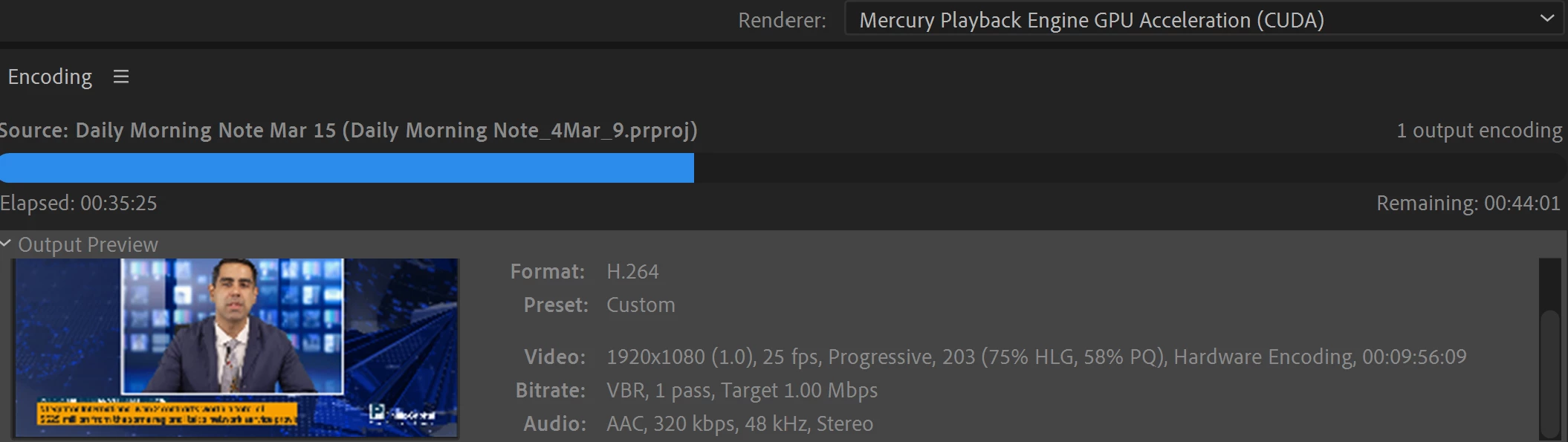
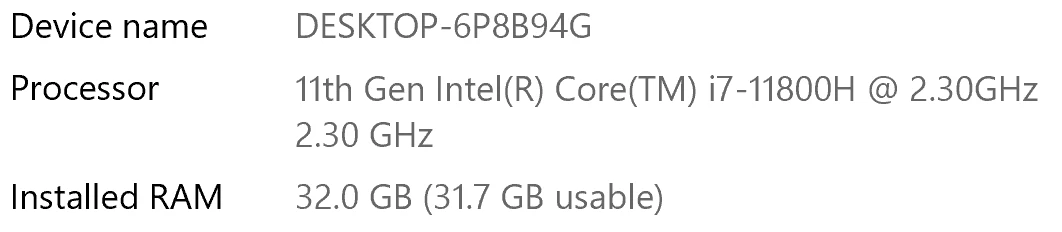
I have been waiting for more than 30 mins for the final video to be rendered. It's already 40 mins and it's barely 50% rendered. Never had this issue before. My laptop specs are as below and my GPU is RTX 3070.


Anyone knows how to solve this sudden issue?


Correct answer Fergus H

Hi all, 
Despite receiving test files from many of you (thank you!), we have not been able to reproduce this problem at Adobe. That's a bit unusual and certainly frustrating - to you and us - but we do think this issue has been fixed in the latest beta of After Effects and Media Encoder. We'd love to get your feedback on that. Creative Cloud betas are specifically designed to run alongside the release versions and are available in the "Beta apps" section of Creative Cloud Desktop. More information is here: https://helpx.adobe.com/x-productkb/global/creative-cloud-beta.html

The v23.x beta of After Effects also has the ability to directly export H.264 - without having to use Media Encoder - so your feedback on this would be useful too. More information is available here: https://community.adobe.com/t5/after-effects-beta-discussions/feature-focus-exporting-h-264-from-the-after-effects-render-queue/td-p/13117618


Regards,

Fergus

463 replies

Participant
December 27, 2024

I created a Clip (about 3 Minutes long).

Rendering with Media Encoder took about 4h (H.264 / CBR 20,00 MBit/s).

I hade to change some Pictures and rerendered it again with the same settings and it took only 40 Minutes.

Today I had to rerender it again and its running since more than 2h and still more than 1h to do.

When the rendering starts the CPU is used 100%, and says 40 Minutes, but after 20% of rendering its slowing down extremly - CPU is at 26% and GPU at 20%.

Don´t understand why this is happening. CUDA is activated, RAM is set to 100GB.

My System: Geforce RTX 4090 / i7-12700K / 128 GB RAM


Inspiring
December 14, 2024

Same problem here... Since AME 25 i need 45min to render a simple story 1080x1920, H264 hardware encoding, just simple cuts, no effects....
Render time direct in premiere pro : less than 1 min

Render time in AME : 45min


W11 pro, Intel(R) Core(TM) i7-8700 CPU @ 3.20GHz, 64go RAM, RTX 4070 12go 

Problem is from the update, same everytime... Not the configuration...

Inspiring
December 27, 2024

I've also experienced similar long render times recently (on AME 25.1).  A 2 hour Premiere Pro sequence (no effects, just simple cuts and some cross dissolves) was taking 50 hours to render...fortunately I had the time to wait, so I just let it finish.  Just now I was rendering a 45 min video that had an estimated 10 hour render time in AME, but then I had a brief power cut that interrupted everything, so I had to start over, and now the same video is now estimated at 1 hour.  It's almost as if the computer reboot freed up some memory or something.

Inspiring
December 27, 2024

Bro' just render directly from premiere pro, u will save a lot of time, untill they don't accept that the AME 25 is full bugged, i stopped using it... Doing all my renders from the premiere export menu, it saves me hours and hours !

Participant
December 10, 2024

Can confirm AME v25.1 it pins the CPU at 100% but doesn't touch the GPU or th RAM, when using the built in renderer in Premiere I see GPU at 90-100% and Ram shooting up 70-80%. Mac M1 MAX, 32GB Ram, MacOS Sonoma. I used the app Stats to get this info in real time whilst rendering a 4k Timeline. AME is useless like this. 

EckiAME
Community Manager
Community Manager
December 10, 2024

What kind of source media, effects, and output format do you use? I will try to reproduce.

December 19, 2024

I Am Having the same Slow Rendering problem in Encoder (Hardware Setting is Enabled) Output is h.264

Specs Are

5900X / 64 GB Ram / 3070Ti / NVME Drives

Butr the same project If I try to export from Adobe Premiere Pro it's fast with same above setting utlizing All GPU

Where the problem Is Media Encoder Kindly resolve the Bug & Make a good Update


Participant
December 9, 2024

Same problem here. I noticed that when rendering in Premiere Pro, it works as usual and the GPU is utilized, but when rendering in AME, it takes 5 times longer, and the GPU isn’t being used. The settings are identical, and hardware encoding is enabled.
Version 25.1, Win11, i-5 12400F, 32Gb RAM, Geforce 3060

Participant
January 11, 2025

To solve the problem, I moved Lumetri Color from the adjustment layer to the video files. Everything started working properly right away. Apparently, the issue is related to the adjustment layer.

audcon
February 7, 2025

This is what made the difference for me as well, Mac Studio (M2 Max, Sonoma). Also, what the heck Adobe? Premiere and Media Encoder 2025 have been such a botched update, I cannot even count the hours I had to chase mysteriously disappearing dissolves or crazy slow exports anymore. Also, it has been months since the 2025 versions were first released, this thread is 3 months old- and still nothing?

Participating Frequently
November 29, 2024

2025 UPDATES ARE A MESS!  FORCED TO USE THEM- freeze, don't finish encoding, slow, errors, using more space?! - tried to be loyal , but when you pay this much and there is SO much messed up? what is the POINT? 


Known Participant
November 29, 2024

Same here. 

Very slow exoprt times. 

I think i'll return to v24 for now

EckiAME
Community Manager
Community Manager
December 2, 2024

I would like to look into your issues. Do you have a sample project and comparison numbers for me? Also: what are your specs (OS, CPU, GPU, memory)?

Participant
November 26, 2024

I'm also encountering really slow render times, such as taking 10 minutes just to create proxy file of a single 30 second clip. 


Exporting a finished video is taking 20-30 minutes for a bunch of single clips linked together, couple of text layers and a colour layer. Would normally take 1-2 minutes tops before this update.


Adobe Media Encoder 2025 / Premier Pro 2025

Windows 10

i7-10700

32GB RAM

256GB  SSD

RTX 3060 - 12GB

GPU Acceleration in use...

Participating Frequently
November 26, 2024

Same here. Adobe Encoder 2025 is an order of magnitude slower than previous iterations. Happens with any project file I've tried. Converted old ones and newly created ones.

(20+ year Premiere Editor here)

EckiAME
Community Manager
Community Manager
November 26, 2024

What are your specs (OS, CPU, GPU, memory)?

Participant
November 24, 2024

Same problem as others users. Render really slow with Media Encoder.


I have notice that when I include text layers in AE, the render process in Media Encoder is really extensive.


I have try just with 1 video layer 1920x1080

10 minutes video

1 layer of subtitle

The render process with Media encoder 2025 is about 1 hour.

With Media Encoder 2024 4 minutes.


My computer:

MacStudio Apple M1 Max

32 gb RAM

MasOs Sonoma 14.5


Any advice?

Thanks for the support!

EckiAME
Community Manager
Community Manager
November 25, 2024

Did not repro for me in ProRes on my MacBook Pro (M1 Max). Can you share the project? I can private message you the instructions in this forum.

Participant
November 25, 2024

Hi, thanks for answer. I have tried but company do not let me to share files.


Could you help me in other way?


Thanks

Thijs12345
Participant
November 19, 2024

I got the same issue Rendering a 25 second video takes more then 4 minutes. While exporting the same video takes 10 seconds in Media Encoder 2024. I got Macbok pro M3 MAX 64gb RAM

EckiAME
Community Manager
Community Manager
November 21, 2024

Can you share the files? I can private message you the instructions via private message in this forum.