
Participant
February 9, 2023
Answered

Adobe podcast AI

  • February 9, 2023
  • 5 replies
  • 8283 views

Hello, I would like to use Adobe Podcast AI for voice overs.  The program sounds fantastic, but I do have a question.  Can I determine what kind of audio file is created.  Example: i upload an MP3 and the final product I always get is a Wav file. Can I get the final file product in mp3 format instead?
    Correct answer Harmony J

    Hi @Brett283339681omx, Harmony here from the Adobe Podcast team 👋


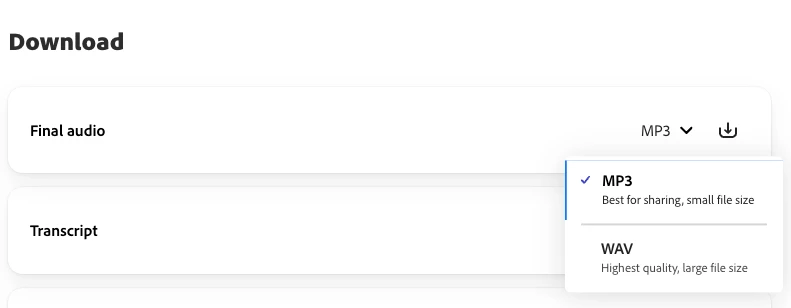
    With Studio, you can choose if you'd like to download an .mp3 or .wav file: 


    Let me know if you have any additional questions and I'll be happy to help!

    5 replies

    Harmony J
    Community Manager
    Harmony JCommunity ManagerCorrect answer
    Community Manager
    October 9, 2024

    Hi @Brett283339681omx, Harmony here from the Adobe Podcast team 👋


    With Studio, you can choose if you'd like to download an .mp3 or .wav file: 


    Let me know if you have any additional questions and I'll be happy to help!

    Harmony Jiroudek, Customer Education & Success | Adobe Podcast
    Participant
    March 19, 2024
    1.  
    Participant
    February 9, 2023

    Would I maintain the same quality of audio to the human ear if I recorded and exported my original audio file in wav format, so when I upload it to Adobe podcast AI I'm not converting or compressing it.


    once that's done I would take the enhanced file and convert it into mp3

    kglad
    Community Expert
    Community Expert
    February 9, 2023

    depends on your ear, but there's no substitute for testing.

    Participant
    August 28, 2024
    IMG_20240516_203829_368.jpg
    SteveG_AudioMasters_
    Community Expert
    Community Expert
    February 9, 2023

    On the app it says that you will get the returned file as a Wav file - it only mentions MP3 as a potential source.


    Yes, the results are very good, but the thing that's most impressive about the AI process is the amount of de-skilling it's going to cause!

    kglad
    Community Expert
    Community Expert
    February 9, 2023

    thank you, @SteveG_AudioMasters_ 


    for @Brett283339681omx, if it's important you can change the file type in audition.

    Participant
    February 9, 2023

    Would it help any then if I recorded the original an a Wav file first, uploaded it to Adobe Podcast AI (where it remains a wav file), and then convert or compress it into an mp3 file after it’s been enhanced in Adobe?

    That way I'm only changing the format once technology (I believe so anyway).  Or am I missing something, and uploading a wav file to Adobe podcast AI somehow "changes" that wav file during its enhancement?...

    kglad
    Community Expert
    Community Expert
    February 9, 2023

    in the future, to find the best place to post your message, use the list here, https://community.adobe.com/


    p.s. i don't think the adobe website, and forums in particular, are easy to navigate, so don't spend a lot of time searching that forum list. do your best and we'll move the post if it helps you get responses.


    <moved from using the community>

    Participant
    February 9, 2023

    Thank you I appreciate it, I guess we'll wait and see if I get any responses...

    kglad
    Community Expert
    Community Expert
    February 9, 2023

    you're welcome.  and yes, we'll see if this is the best place to move your message.  (there's no podcast forum so i was hoping, at least, one audtion expert might have started podcast testing.)