
Participant
August 15, 2025
Question

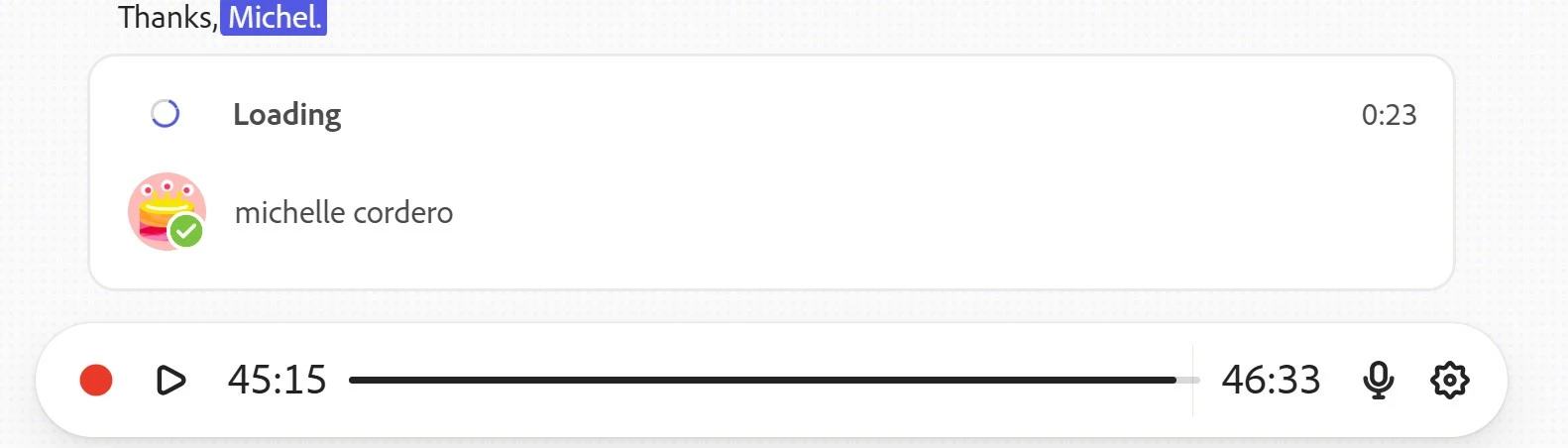
Adobe Podcast Stuck in "Loading"

  • August 15, 2025
  • 4 replies
  • 415 views

Hello, I am hoping someone can help.  I recorded a podcast using Adobe Podcast.  Recording and editing went well.  I hit record again to a 23 sec closing statement and it is not transcribing and now it is perpetually stuck in loading mode.  I can hear the audio, but there is not transcription. The loading circle will spin for hours if I allow it.  I have cleared all cookies, restarted and rebooted my laptop as well as trying different browsers and nothing.  Since it is stuck in Loading, I am uable to download the MP3 file. Has anyone experienced this before? This took great effort scheduling with mulitple people and would be highly difficult to re-record due to scheduling challenges.  Thanks! Michelle
4 replies

Participant
October 16, 2025

After 6 productions without any problems, I now have the same problem as described above, where the loading process gets stuck. I found a workaround: “Download original recording” under “Export files.” This allowed me to re-upload the “stuck” recording—it was transcribed, so I can now work with the recording and edit it. However, I still have no way of deleting the “stuck” field. I have tried all the options suggested above: restarting, deleting cookies, logging in again... What else could I do?


Participant
September 27, 2025

This is happening to me too, has anyone found a solution?

Participant
September 3, 2025

Sorry. Yes, that happened to me at least 10 times. So, now I record elsewhere and then upload it then enhance it. That seems to work mostly.


Participant
August 19, 2025

I have a similar issue, were you able to download your files? 

Participant
August 20, 2025

I have not, but have been informed that the engineers are looking at the issue.