
Dupperzzz
Participant
April 10, 2026
Question

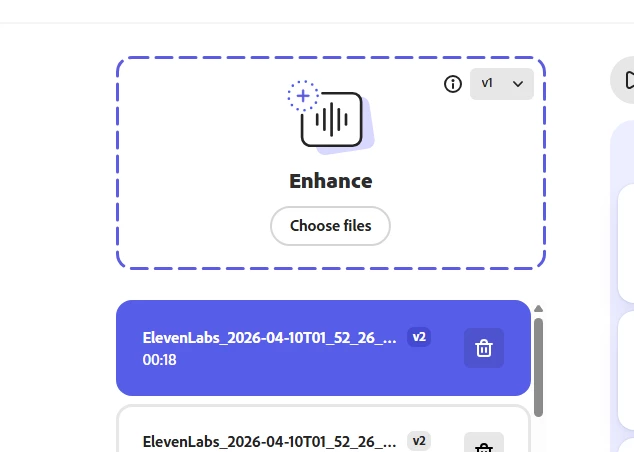
v1 enhance not working
  • April 10, 2026
  • 5 replies
  • 63 views

When I try to enhance an audio with the v1 enhance it automatically changes to v2, does anyone else have this problem?

    5 replies

    Harmony J
    Community Manager
    Community Manager
    April 10, 2026

    Hi ​@Dupperzzz, ​@Garrett30813054dnw4 , ​@Kuba_Mokrusa3961, and ​@Pavery85, just wanted to share we just pushed out a fix and you should now be able to use v1 again. 

    Harmony Jiroudek, Customer Education & Success | Adobe Podcast
    Harmony J
    Community Manager
    Community Manager
    April 10, 2026

    Hi ​@Dupperzzz , thank you for reaching out! Our engineering team is aware of the issue and working on a fix – I’ll share an update as soon as the fix goes out. Appreciate your patience!

    Harmony Jiroudek, Customer Education & Success | Adobe Podcast
    Kuba_Mokrusa3961
    Participant
    April 10, 2026

    Seems to be fixed now, thanks a lot!

    Garrett30813054dnw4
    Participant
    April 10, 2026

    I spoke with Adobe Help yesterday - allowed them to access my PC and try it themselves. They ultimately gave me some BS runaround about “maintenance”, but at the end of the day 2 things are potentially happening. 

    1. (Likely) the system is just bugged. It’s Adobe, it’s probably broken and Adobe Help is unaware. 
    2. They are retiring V1 and defaulting to V2 - but Adobe Help has not been notified and the option is still there for some reason. 
    Kuba_Mokrusa3961
    Participant
    April 10, 2026

    I hope they don’t plan on removing V1, that would be a big mistake.

    Pavery85
    Participant
    April 10, 2026

    I am having the exact same problem. I’m hoping it is a server issue or something on their end. V2 sucks...V1 ALL THE WAY!!! Did I mention V2 is bad?

    Kuba_Mokrusa3961
    Participant
    April 10, 2026

    Yep, I have the same issue.