
Participant
February 13, 2021
Answered

Cannot change the viewport value via keyboard

  • February 13, 2021
  • 2 replies
  • 444 views

Hi,

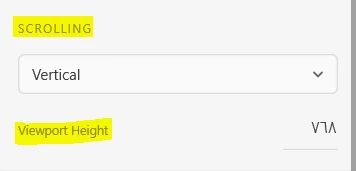
I'm new to Adobe XD.  I'm facing a problem which is I cannot change the value of the viewport through the keyboard and it has to be manually.  I mean, when entering a value for the viewport then press Enter the value doesn't change.  The only way to change the value is to grip viewport by the mouse and change up or down. 

Someone suggested to change "H" to change the viewport value but that changes the height of the page not viewport value.

The version I have is 36.2.32.5 Starter.

Is it a technical problem ?
    This topic has been closed for replies.
    Correct answer Harshika Verma

    Duplicate post: https://community.adobe.com/t5/adobe-xd/how-to-change-the-viewport-value-via-keyboard/td-p/11827318


    Hence locking this post.

    2 replies

    Harshika Verma
    Community Manager
    Harshika VermaCommunity ManagerCorrect answer
    Community Manager
    March 3, 2021
    Rishabh_Tiwari
    Legend
    February 15, 2021

    Hi there,


    Thanks for reaching out. Please ensure that the Viewport height value should be less than the "H" value and then try changing it. If it still doesn't work, please share a small video of what exactly is happening at your end? We'll try our best to help you with it.


    Regards

    Rishabh