
Participating Frequently
February 20, 2020
Question

[Design]- Shadows are breaking in the share links in XD.

  • February 20, 2020
  • 5 replies
  • 1819 views

If I use the object 'with Shadow', it is not rendered properly in the shareable link (refer the image below). I have been facing this issue recently after the version update 25.3.12.1. It is impacting my work. Any help??
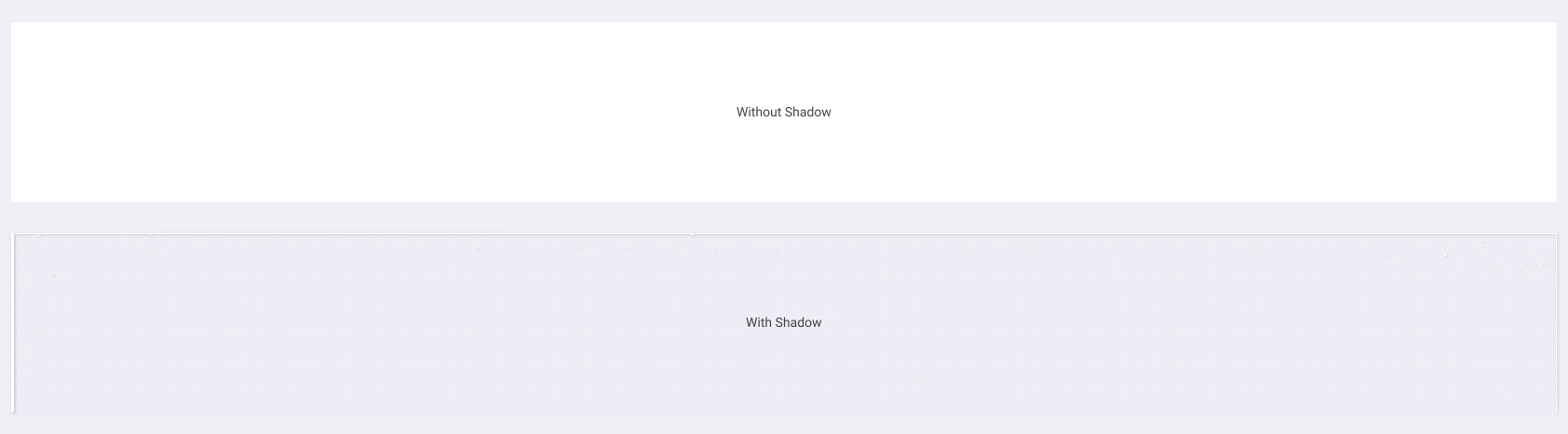
I have observed this issue is appearing in Full screen with 100%. If I zoom the browser In/out it looks fine. 


<The Title was renamed by moderator>

This topic has been closed for replies.

5 replies

Participant
September 15, 2021

I am also facing the same issue, and manys previously created links are broken because of this.


Device: Mac OS 11.5.2

Tried different browsers as well.


Participant
September 15, 2021

This is completely breaking the WYSIWYG experience. The drop shadows breaks in the link only, it doesnt show any indication in the working document (or) in the desktop preview mode

Participating Frequently
January 20, 2021

@HARSHIKA_VERMA Can you please address this issue as the earliest as many of us are facing this till now?

Simeon Andreev
Participant
February 16, 2021

Same issue here and no one is doing a thing. This is a pretty important feature especially when your design rely on shadows.

Participant
August 3, 2021

I have a tip how you can solve the problem. Whenever you create an object with a shadow you have to create an outer line for the object.

Participant
January 19, 2021

J'ai le même problème. Sur mac aucun soucis d'affichage quand j'ouvre le lien, tandis que sur PC peut importe le navigateur, tous les blocs qui ont une ombre portée deviennent pixélisés / transparents ... C'est très gênant. 

Participant
July 26, 2021

I am also experiencing the same issue. Shadow goes away once you switch to full screen browser. I checked on Chorme, Firefox, Edge. but no luck. Please look into this issue. OS is Windows 10

@HARSHIKA_VERMA 

Participant
November 18, 2020

I'm experiencing the exact same issue...

Participating Frequently
November 19, 2020

Till date, I'm facing the same issue and no resolution given yet. Hope they will answer soon.

HARSHIKA_VERMA
Community Manager
Community Manager
February 20, 2020

Hi there,


We are sorry to hear you are experiencing issue with shadows in XD link. I am unable to reproduce the issue at my end on windows machine on the latest version of XD. Would you mind telling if it's happening with a specific file or all the files?

What is the OS and XD version of your machine? Is it possible for you to share a short video of the workflow for better understanding?


We will try our best to help.


Thanks,

Harshika

Participating Frequently
February 20, 2020

Hello Harshika,

Thanks for your reply. It is not happening for all the files to say. Even this one was working fine before but the issue suddenly pitched in with no reason. I didn't even update that link in recent days. 


Adobe XD version - 27.1.12.4

OS - Windows 10


I'll share the link for your reference:

https://xd.adobe.com/view/3074362c-0536-4c77-51de-ffabb514443d-4645/?fullscreen

(open in full screen view)


I tried this link in Chrome ver.79 & Firefox ver.72 browsers


If you want, I send the file as Direct message.


HARSHIKA_VERMA
Community Manager
Community Manager
February 27, 2020

Hi Balamurugan,


Sorry for the dealy in response. I opened the link in chrome browser and this is how it is shown at my end. Please see the attached image below


Is it similar at your end as well? If not, please share the file with me over a private message. I will investigate at my end.


Thanks,

Harshika