SproetS
Inspiring
December 16, 2022
Answered

Error while opening XD: Adobe XD.app is corrupted and cannot be opened on macOS Ventura

  • December 16, 2022
  • 2 replies
  • 1329 views

Hello, I just get a job to design a website but I found out Adobe XD is not working.

I deinstalled XD via Adobe CC app and re-installed it. I rebooted the machine and threw away the preferences. What to do?

It gives the message:

Adobe XD.app is corrupted and cannot be opened.
 
<Title renamed by moderator>
 
 
This topic has been closed for replies.
Correct answer HARSHIKA_VERMA

Thank you for sharing the requested info and screenshot of the error, @SproetS.


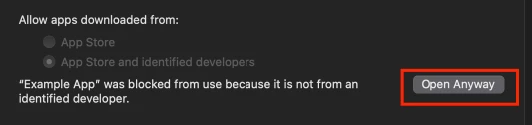
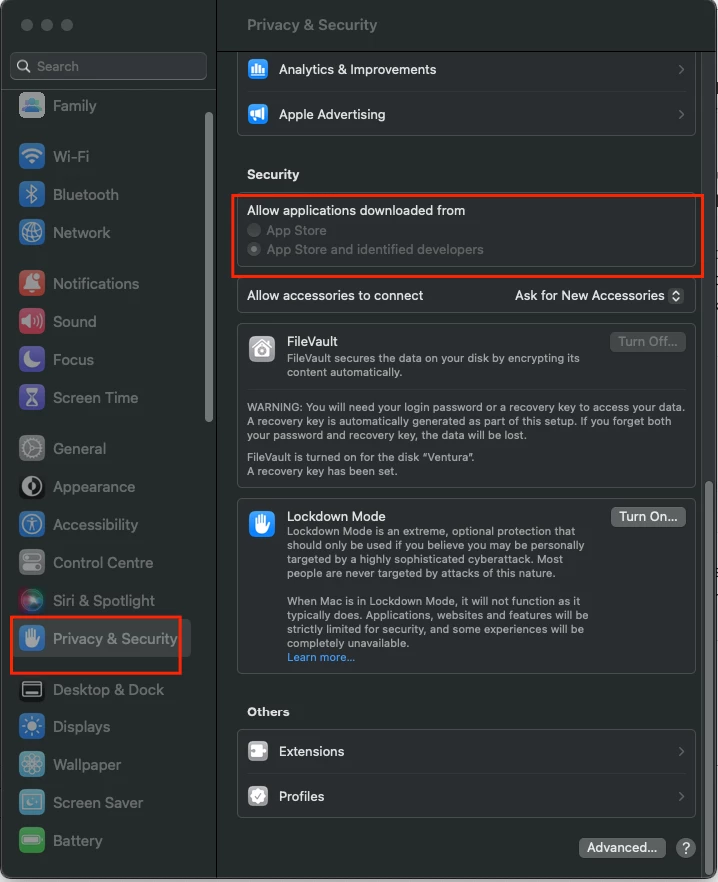
Please go to System settings> Privacy and Security >Security>Select App store and identified Developer> Open Anyway.


Please see the screenshot below for reference-


Let us know if that helps.


Thanks,

Harshika

2 replies

HARSHIKA_VERMA
Community Manager
Community Manager
December 20, 2022

Hi @SproetS,


We would like to follow up on your issue. Are you able to open XD after doing a clean installation?


We will try our best to help.


Thanks,

Harshika

SproetS
SproetSAuthor
Inspiring
December 21, 2022

Ha Harshika, thanks for the reply. No, after re-install via Adobe CC app and the cleaning of preferences XD still will not open. Otere Adobe apps have no problems.

Sorry, I use Adobe CC in Dutch, the screenshot complains about the date the app is downloaded...

Mac OSX Ventura 13.0.1

MacBook Pro Intel i9

HARSHIKA_VERMA
Community Manager
HARSHIKA_VERMACommunity ManagerCorrect answer
Community Manager
December 27, 2022

Thank you for sharing the requested info and screenshot of the error, @SproetS.


Please go to System settings> Privacy and Security >Security>Select App store and identified Developer> Open Anyway.


Please see the screenshot below for reference-


Let us know if that helps.


Thanks,

Harshika

AkinGn
Community Expert
Community Expert
December 16, 2022

Hi @SproetS, as I see in this conversation (although the error message you get is not exactly the same) as @HARSHIKA_VERMA mentioned, I'd also suggest doing a clean uninstall-reinstallation with the cleaner tool here: https://helpx.adobe.com/in/creative-cloud/kb/cc-cleaner-tool-installation-problems.html? 
Hope this helps!