


lazypong
Participant
February 20, 2017
Answered

how can i set the artboard horizontal scrolling

  • February 20, 2017
  • 8 replies
  • 48575 views

1.When i set the artboard landscape,but the artboard scrolling no horizonetal can select.
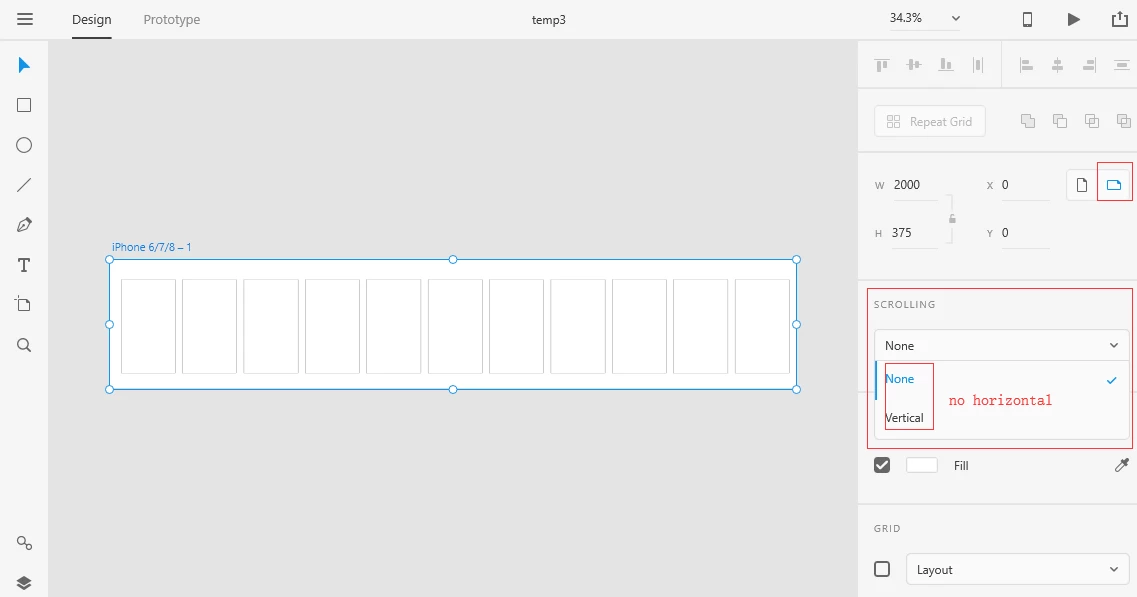
2.Upload the prototype into creative cloud,see it in xd mobile app,the prototype can't  horizontal scrolling.and be viewed in one screen.

!

how can i set the artboard horizontal scrolling,and can see the prototype full screen, and can horizontal scrolling.

thanks.

This topic has been closed for replies.
Correct answer Preran

The feature Scroll Groups introduced in XD 30.0 now allows you to create scroll groups that can scroll horizontally, vertically, and in both directions! For more info, see https://helpx.adobe.com/xd/help/create-scroll-groups.html

8 replies

Participant
January 9, 2024

Hi! I would like to know if its possible to make a transition to another page with a scroll down to a Y position.


Rishabh_Tiwari
Community Manager
Community Manager
January 10, 2024

Hi,


Thank you for reaching out. I am afraid, the Scroll To action only works within the same artboard. As of now, XD don't have the option link to a specific element on a different artboard. Having said that, let me assure you, I'll share your feedback with the team. 

Thanks

Rishabh

Preran
Community Manager
PreranCommunity ManagerCorrect answer
Community Manager
June 16, 2020

The feature Scroll Groups introduced in XD 30.0 now allows you to create scroll groups that can scroll horizontally, vertically, and in both directions! For more info, see https://helpx.adobe.com/xd/help/create-scroll-groups.html

Participating Frequently
November 4, 2019

Hi, adobe team
   I'm face an issue when I want to dragback
ex:  I have three artboards each one has a picture
I can drag from pic 1 to pic 2 , from pic 2 to pic 3 and dragback from pic 3 to pic 2 BUT the prolem is here I can't dragback  from pic 2 to pic 1 .

Please tell me what I can do
Thanks a lot

Atul_Saini
Community Manager
Community Manager
November 4, 2019

Hi Mohamedz, 


Thank you for choosing Adobe XD and sharing the screenshot. As you have mentioined that you are unable to drag back from artboard 2 to artboard 1. Please try the steps mentioned here:- https://community.adobe.com/t5/Adobe-XD/Horizontal-Scrolling-in-Adobe-XD/td-p/10602069 and ensure that you are connecting the artboard as show in the video. Please update this discussion in case it still doesn't workout for you. 


Thanks,

Atul_Saini

Participating Frequently
November 6, 2019

Hi Atul_Saini,
         I know this video and I watched it before but the problem still here if I have a lot of picture because each element has just one move . What about if the the user wants to drag between a lot of 3, 4, 5 or more of pictures . I tried to solve it but I can't . In the video you posted to me he duplicated the 2nd artboard to move from 3rd artboard to 2nd one but what will happen if he has 4th or 5th atrboard ? I think the solution is duplicate the others to can comeback or dragback . I hope that my isea or explain is clear to understand .
I'm waiting the answer .
Thanks

hosseynn18740575
Participant
July 27, 2019

Hi Adobies

I've been trying for 30 minutes now to scroll a group of objects horizontally on a prototype I'm designing but there seems to be no solution?

Is this true? No horizontal scrolling in XD?

Thank you all

Ares Hovhannesyan
Community Expert
Community Expert
July 28, 2019

Thank you for using XD. Here in the forum is the discussion about that topic. how can i set the artboard horizontal scrolling

Participant
March 1, 2019

Hey guys,

I am trying to do a similar action that you were talking about here, however the Animate feature doesn’t help.

i want to do a lateral scroll for either text or photos, just like in the top part of IMDB or Fiverr app. No effects, just scroll horizontaly.

Any ideas on updates?

Thanks!

Sergiu

Participant
September 20, 2019

Hold down the left mouse button when the cursor is almost touching the vertical toolbar to the left or right (depending upon your requirement) of the screen. The viewport will scroll horizontally and you will be able to see your artboard(s) 


However, I'm not sure whether it is platform dependent (I'm on Win 10).
HTH
Miles

Inspiring
November 7, 2018

Personally, I love Adobe XD, but I am astounded that they are implementing things like voice control, when they don't even have horizontal scrolling yet.

How do people do mobile prototypes with cards that need to scroll horizontally? I guess they don't....?

Are there workarounds for this? Would love to know how people are handling this missing feature....

Thanks!

Participating Frequently
November 7, 2018

Hi, dstoltz - completely understand and you're not alone! If you haven't yet, go ahead and add your vote for this feature here

Inspiring
November 7, 2018

The new Drag/Auto-animate is a step in the right direction,  but if you have, for example, 6 cards - you can drag them horizontally, but would not be able to stop the drag on say the middle card - it just animates from 1 to 6 and then stops....cool for the animation - but not quite there yet ;-)

Thanks!

Atul_Saini
Community Manager
Community Manager
June 12, 2018

Hi Lazypong,

As per the description and screenshots, it looks you wish to view all the artboards at one place and want to scroll horizontally to each artboard on the same screen as in design or prototype panel. As of now, you are able to see just one artboard at one point when you publish it.

Please confirm if this is the issue.

Thanks,

Atul_Saini

lazypong
lazypongAuthor
Participant
June 13, 2018

Hi,Atul_Saini

thank you.

I wish to view one artboard, the artboard consists of multiple mobile screens, i want to scroll horizontally the artboard.

Such as:

ezgif1.gif - Google Drive

or this:

ezgif2.gif - Google Drive

N

Atul_Saini
Community Manager
Community Manager
June 13, 2018

Hi Lazypong,

In the time that the feature makes it to XD, see the workaround solution in this post Make it share it : Horizontal Scrolling in Adobe XD

The feature that you are looking for is already under review. I would request you to please take a look at this feature request: - Carousel / Side-scroll – Adobe XD Feedback : Feature Requests & Bugs.

Please vote for this feature if it meets your requirement and feel free to update this discussion in case you need any further assistance.

Thanks,

Atul_Saini

jusssable
Participant
February 20, 2017

I want to make the cards in the screen scroll horizontally. Is it possible with experience design cc?

elainecc
Community Manager
Community Manager
February 21, 2017

Not at the moment. You should upvote in UserVoice to let us know you're interested: Carousel / Side-scroll – Adobe XD Feedback : Feature Requests & Bugs

-Elaine