loucass31997555
Participant
Mar 21, 2019 8:24 AM UTC
Answered

Issue Opening Adobe XD (Your developer license has expired. To continue to use this app, please renew your license.)

Hi can anyone help with this > I got this error today after opening XD once I tried to open it again and receive a license expired Popup saying  ("Your developer license has expired. To continue to use this app, please renew your license.") Please note my creative cloud license is up to date and there doesn't seem to be any issues with my account. thanks

This topic is closed to new replies. Start a new post to keep the conversation going.
Preran
PreranCorrect answer
Legend
Mar 26, 2019 10:04 PM UTC

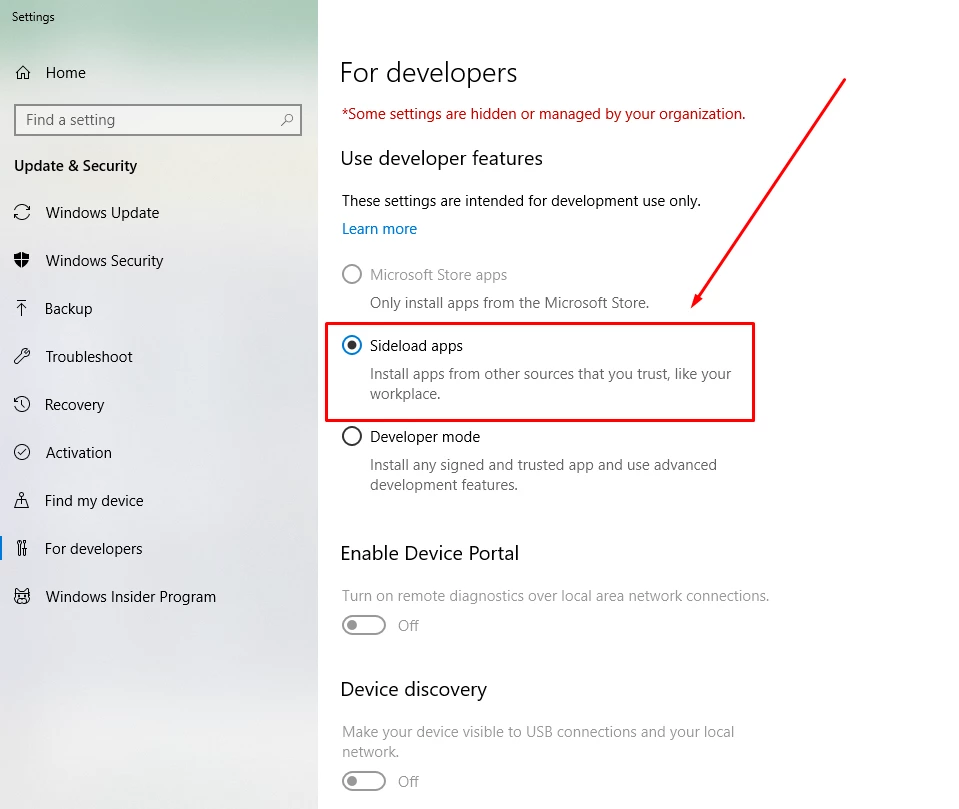
Can you try enabling side loading of application as described in the screenshot below? Let us know of it helped.

76 replies

Participant
Jul 7, 2021 3:10 PM UTC

while opening XD I'm getting the message "Your developer license has expired, To continue please renew your license", and not able to open in Offline mode also why??, without a license, we can open and edit xd files right??


Translate
Rishabh_Tiwari
Legend
Jul 7, 2021 4:04 PM UTC

Hi harish,


Sorry to hear about the trouble. Please try the suggestions shared here https://community.adobe.com/t5/adobe-xd/issue-opening-adobe-xd-your-developer-license-has-expired-to-continue-to-use-this-app-please-renew/td-p/10409593 and let us know if this helps or if you need any further assistance.


Regards

Rishabh

Translate
Participant
Feb 13, 2021 5:31 AM UTC

Thanks man, it works fine.

Translate
marist21444812
Participating Frequently
Jan 7, 2021 1:21 PM UTC

I worked for me

Translate
Tobias Swe
Participant
Oct 2, 2020 12:42 PM UTC

It solved my problem. My O.S is in Swedish so it took a while before I found the setting.

 
In Swedish the error is:

Din utvecklarlicens har gått ut. Förnya din licens om du vill fortsätta använda den här appen.

Search for Utvecklarinställningar in Windows.
And change to Separat inläsning av appar

Translate
charlie macke
Participant
Oct 2, 2020 6:53 AM UTC

Thank you so much! No idea why this happened but glad this solved it. Thank you!

Translate
Participant
Oct 1, 2020 9:01 AM UTC

Thank you so much for saving the day

Translate
Participant
Sep 30, 2020 6:58 AM UTC

Happened to me too, the accepted answer fixed the issue.

Translate
Participant
Sep 27, 2020 3:09 AM UTC

Enabling the sideload apps fixed the issue. Thanks so much! 

Translate
Participant
Aug 10, 2020 9:25 AM UTC

This was helpful. Thank you.

Translate
Inspiring
Jul 23, 2020 10:48 PM UTC

This worked; but why did this change happen?

Translate