
Participant
August 26, 2020
Answered

Keyboard Shortcuts switches between Design, Prototype and share mode

  • August 26, 2020
  • 11 replies
  • 2987 views

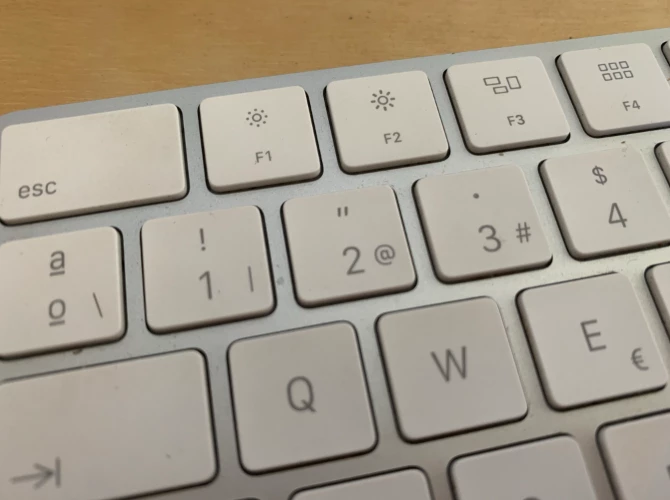
My keyboards default language/layout is Latin American spanish because of this I need to type option(alt)+2 to get "@" or option(alt)+3 to get #, But now when i do so the app switches between design, prototype and share mode and not only it's annoying but it also affects how keyboards function with preset key combinations to enter symbols/special characters. 


{Renamed By MOD}

This topic has been closed for replies.
Correct answer Arun Kaza

Please note that we are working on the keyboard shortcut issue still being seen on windows platform. It would be available soon in one of the upcoming releases. 


Best,

Arun

11 replies

Known Participant
September 21, 2020

Adobe XD team surprises me every update. Learn how windows works...


First things first - old bug, still (from about 5-6 updates) not fixed:
Shift + Alt (grammar) + S

It's set as "save as...", NEVER use grammar Alt as shortcut! This should be a polish "Ś".


Second - who was so genius to set Alt+1 / Alt+2 / Alt+3 as shortcuts to design/prototype/share?

From years, adobe xd don't have any glyphs panel. Many experienced designers know shortcuts to most popular glyphs, but now you ruined even that...


Example: "–" (long dash) = Alt + 1 + 5 + 0 (Alt150)


Guess what happens when u hit number "1" with Alt held down...


Offcourse for my favourite admin:
Windows 10 Pro
Adobe XD: 4.3.57.2

HARSHIKA_VERMA
Community Manager
Community Manager
September 22, 2020

Hi there,


We understand your frustration and we would feel the same in your situation. We have seen issues regarding the shortcuts in past. Would you mind sharing the screenshot of your about XD info page as it looks like the issue is fixed with XD 33 release?


We will try our best to help.


Thanks,

Harshika

Known Participant
September 23, 2020

No difference - both issues still exist.

Known Participant
September 11, 2020

Please please please change the Switch to Share mode shortcut on a Mac:

  • ⌥3


On a Mac keyboard (UK layout) this the the key sequence for the # (hash) character.....needed suprisingly often in UI design....


Currently I have to go off to another application (any) type the # there and copy and paste it back into XD....delightful!!


please fix this....


Community Expert
September 11, 2020

This was fixed with version 32.2 - can you update your XD and see if it's fixed?

Participant
September 16, 2020

Hello, 
Just update to 33.0.12 version of XD but always the problem : I can't use ALT + numeric keyboard. 
I'm on Windows 10. Thanks in adavance 🙂 

Rishabh_Tiwari
Community Manager
Community Manager
September 4, 2020

Hi All,


Thank you for your patience. This issue has been addressed in the latest release of XD which is 32.2.22. Please update this discussion in case if you need any further assistance.


Regards

Rishabh

Joel Ventura
Participant
September 4, 2020

Hi all. 

With new update, the shortcut option+2 appeared. it happens that now, everytime i try to type an email address for example, it toggles to Prototype Mode.

I am on a Mac

How can i put this shortcut off?
Thanks

Rishabh_Tiwari
Community Manager
Community Manager
September 4, 2020

Hi Joel,


Sorry to hear about the trouble. Could you please update XD to the latest version which is 32.2.22 and let us know if it works or if you are still facing any issue with shortcuts?


Regards

Rishabh

Inspiring
September 3, 2020

I can't type a hashtag in this version of Xd... It brings up the share panel instead. 


The key command shortcuts should be overridden when you're typing - I need to be able to type certain characters!

Rishabh_Tiwari
Community Manager
Community Manager
September 3, 2020

Hi there,


Sorry to hear about the trouble. We have already escalated it to the Engineering team and they are working on it. The fix should be available in future releases.


Regards

Rishabh

Participant
August 31, 2020

Since the new shortcuts to acces the design, prototype and share tabs were added, I'm unable to press Option+3 to type down the hash symbol "#". This is quiet inefficient since i have to type the symbol outside the application and proceed to paste it in the XD file.

HARSHIKA_VERMA
Community Manager
Community Manager
August 31, 2020

Hi there,


We understand it could be frustrating for you. The team is already aware of the issue and is working on the bug logged. You will definitely see the improvements in the future releases of XD.


We are sorry for the inconvenience.


Thanks,

Harshika

Inspiring
August 29, 2020

When i edit text i need special characters like € (alt + 0128), guess what i get after latest update, i get switched to prototype mode and no way to use special chatacters only option to copy paste them from other place. Please disable mode switching shortcuts in text edit mode!

HARSHIKA_VERMA
Community Manager
Community Manager
August 31, 2020

Hi there,


We are sorry for the frustration. The bug is logged for the issue and the team is investigating on it. You will definitely see the improvements in the future releases of XD.


We are sorry for the inconvenience.


Thanks,

Harshika

Participant
August 26, 2020

Hi @Rishabh

How we can download the previous version ?
In the adobe cloud app manager, the dotted button not show this options. Do you have a link for download it 

Rishabh_Tiwari
Community Manager
Community Manager
August 27, 2020

Hi Rodrigo,


Thanks for reaching out. To install the previous version of Adobe apps, please refer to this article:https://helpx.adobe.com/download-install/using/install-previous-version.html


Let us know if this helps or if you need any further assistance.


Regards

Rishabh

Joely10623436
Community Expert
Community Expert
August 26, 2020

Seriously, who @ the XD team came up with this move? Shortcuts with ALT/Option + a number.


On Swiss/French Keyboards the # is made like this.


And still no custom Shurtcuts/Prefs in XD 😞


@Preran

HARSHIKA_VERMA
Community Manager
Community Manager
August 26, 2020

Hi there,


We apologize for the frustration. We have already highlighted the issue with the team and logged a bug for the issue. The team is working on it and we will definitely update you as soon as we hear any updates from the team.


We are sorry for the inconvenience.


Thanks,

Harshika

Rishabh_Tiwari
Community Manager
Community Manager
August 26, 2020

Hi there,


We're so sorry to hear about the trouble. We have already highlighted this to the Engineering team and they are investigating this. We'll update this discussion as soon as we hear from them.


Regards

Rishabh