
Participant
January 22, 2020
Answered

[Panel]- Color Picker completely white / only shows lighter colors in XD.

  • January 22, 2020
  • 4 replies
  • 3096 views

Hello!


I've had this strange bug for the past couple of weeks where my color picker is sometimes completely white or only shows the lighter colors. I can still use hex values for the darker colors, but I just can't "see" them in the color picker.
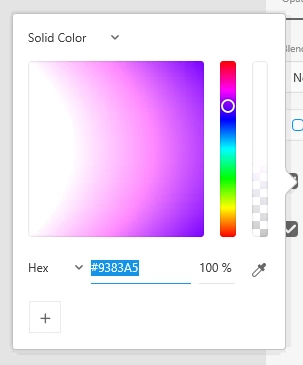
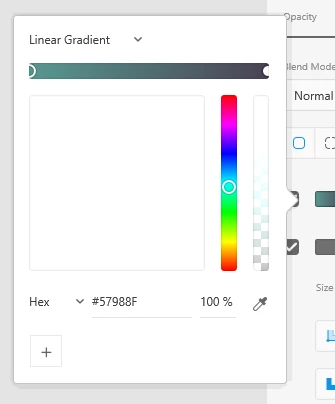


I'm currently using Adobe XD 25.3.12, but I've also tried using older versions to see if the issue remains, but with no luck. My graphic card drivers are up to date, I've tried using a different monitor to see if somehow it was my monitor causing the issue, but it was still there. 


It's been frustrating trying to work while having a Color Picker that doesn't entirely work. So I'm hoping someone could help me figure out what is causing this problem. Any ideas?


Thanks!


[Split from another discussion as a separate question/discussion by moderation.]


<The Title was renamed by moderator>
This topic has been closed for replies.
Correct answer Uplynxed

For those looking for a solution to this, here is what worked for me after 4 days of troubleshooting:


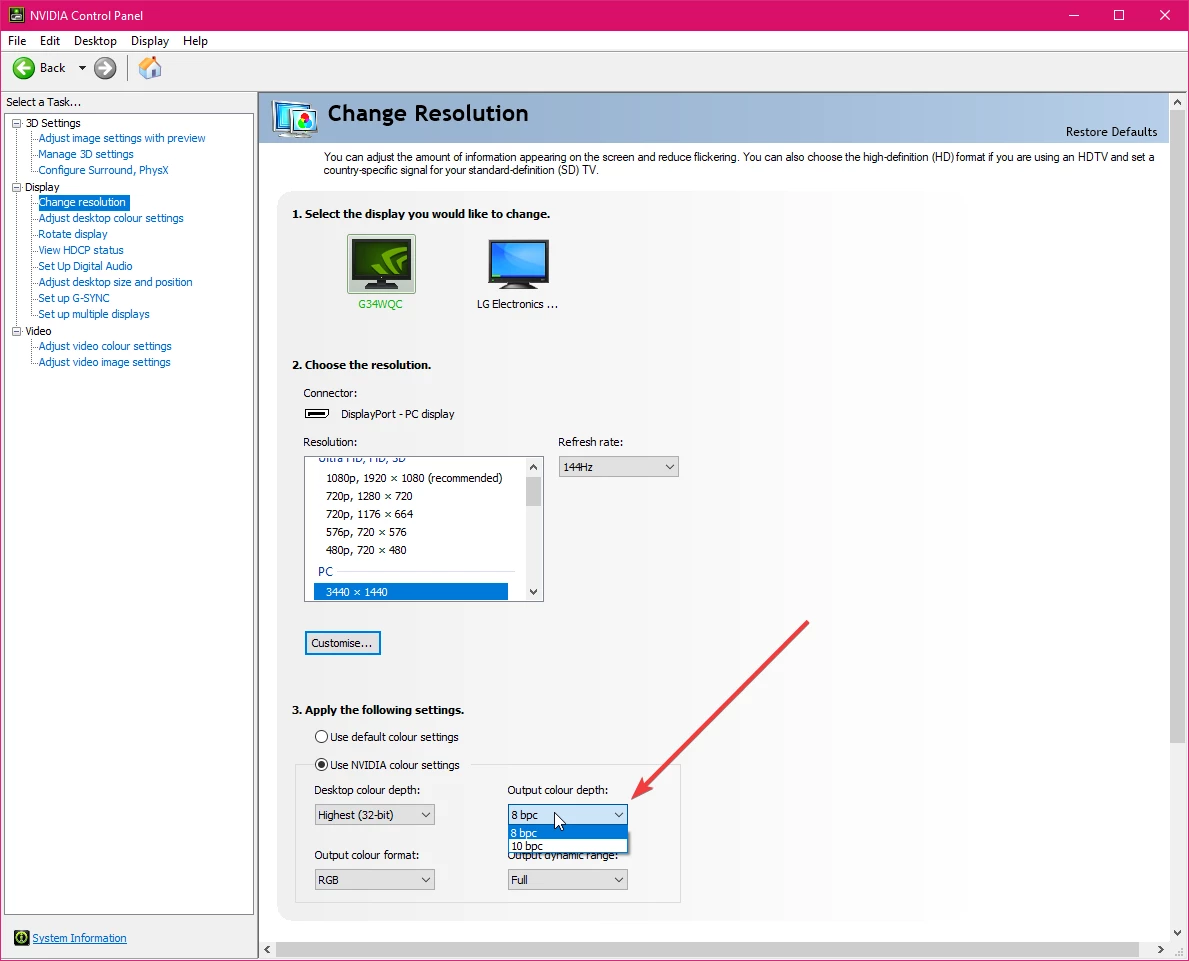
Turn off 10bit color mode, switch it to 8bit.

On windows, with an Nvidia GPU, I changed this in the Nvidia Control Panel.


The weird thing for me is that sometimes it'd work with 10bit and then the next time I'd start XD it'd break again. It seems like it is an issue with Windows 10 UWP apps in general as transparency effects in other apps using the "fluent design" framework were having similar issues as well.


Hope this helps some people out.

4 replies

Uplynxed
UplynxedCorrect answer
Participating Frequently
January 24, 2021

For those looking for a solution to this, here is what worked for me after 4 days of troubleshooting:


Turn off 10bit color mode, switch it to 8bit.

On windows, with an Nvidia GPU, I changed this in the Nvidia Control Panel.


The weird thing for me is that sometimes it'd work with 10bit and then the next time I'd start XD it'd break again. It seems like it is an issue with Windows 10 UWP apps in general as transparency effects in other apps using the "fluent design" framework were having similar issues as well.


Hope this helps some people out.

Uplynxed
Participating Frequently
January 24, 2021

Since I don't seem to able to edit my first post I'll reply to it for Mac OS users:

It seems Apple has removed the ability to switch color bit depth, but there are free tools that can do that from what I saw in a quick google search.

Participant
April 28, 2020

Hi, i would like to ask if theres a fix for this. im currently experiencing tha same thing. im using windows 10 as well.

Rishabh_Tiwari
Legend
April 28, 2020

Hi Eugene,


Sorry to hear about the trouble. Could you please share a few more details like:


  1. The version of Adobe XD.
  2. Do you use external monitors? If yes, have you tested on the Primary monitor?
  3. Adobe XD is yet not color-managed, it should use sRGB throughout, please ensure that the color profile is set as sRGB.
  4. Also please ensure that the graphics card driver is up to date as per the manufacturer's website.


Regards

Rishabh

Participant
April 29, 2020

Hi Rishabh, thanks for the quick feedback. below are my anwers to your questions


  1. The version of Adobe XD. - 28.7.12
  2. Do you use external monitors? If yes, have you tested on the Primary monitor? - Yes, Samsung LU28E590DS/XP. Yup, using this as my primary monitor
  3. Adobe XD is yet not color-managed, it should use sRGB throughout, please ensure that the color profile is set as sRGB. - It is using sRGB throughout
  4. Also please ensure that the graphics card driver is up to date as per the manufacturer's website. -  It is up to date.
HARSHIKA_VERMA
Community Manager
Community Manager
January 23, 2020

Hi there,


We are sorry for the trouble using color picker in XD. In additon to what Anita has asked, would you mind confirming if you are experiencing the similar issues mentioned in this post: https://community.adobe.com/t5/adobe-xd/panel-color-picker-picks-up-the-light-color-in-adobe-xd/td-p/10729788? If so, please try the workaround solution mentioned and let us know if that helps.


Thanks,

Harshika

cedrvanhAuthor
Participant
January 24, 2020

Hello,


Unfortunately the workaround in that thread didn't fix my issue.

Preran
Legend
January 27, 2020

Most issues of this nature are resolved by updating graphic drivers. Can you visit the manufacturer's site and confirm that you have the latest installed on your computer? If you do, I suggest gettig in touch with our tech support team using this link https://adobe.ly/2WYE62m for further investigation. Use the chat button to get started.


Feel free to let us know if you need more info or assistance.


Thanks,

Preran

Community Manager
January 23, 2020

Hi,

Thankyou for reporting the issue. It's really an unusual behaviour. I would like to know some more information regarding it:

1. System OS version 

2. Is there any reproducing steps, like it happens after sleep or keeping XD idle for few minutes or continous working for hour 

3. Could you please attach Gif of all steps if happens again

4. Is the issue is happening with specific file or random files. If with specific, could you share it.

Any of these would be helpful for us to investigate.

Thank you,

Anita Subedi

cedrvanhAuthor
Participant
January 23, 2020

Hello,


I'm currently using Win 10 v. 1903.

The issue seems to be always there. It occurs on all my files, even new ones.