


View multiple margins in one go ? Designer Headache vs Developer Headache
Hi,
We are new to Adobe XD. We are making the UI layout for developers to execute (for mobile app).
Before using Adobe XD, we used the template provided by Apple and added various measurements next to the visual directly like this:
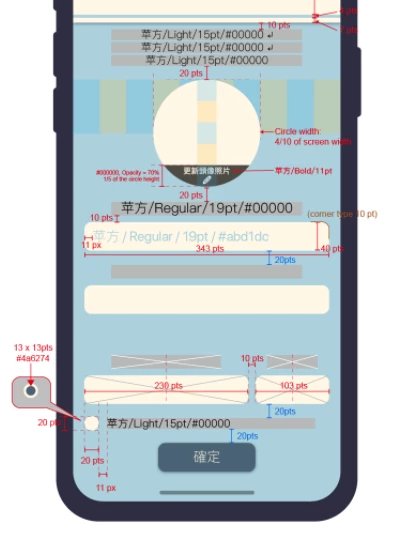
In the meantime, we are trying to use Adobe XD to see if it would be beneficial for the development.
Here is a reference we made in XD.

Now, the developers said they feel more difficult to read the margins of different elements.
They can only tab on the element and move around to see the margin differences of different elements.
Not to mention if they tap on the "text field" inside the button, they are not getting the right dimension difference between other object; they need to tap on the button in order to make get the numbers right.
Is therey anything we could do to help solving this situation?
I look forward to the community wisdom on this!
Thank you!
 AdChoices