


Participant
September 21, 2020
解決済み

[Help] Visualize all spacing of a group of UI elements instead of checking one by one

  • September 21, 2020
  • 返信数 2.
  • 458 ビュー

Our developers told us that they like we marked all the spacing in the UI elements directly:
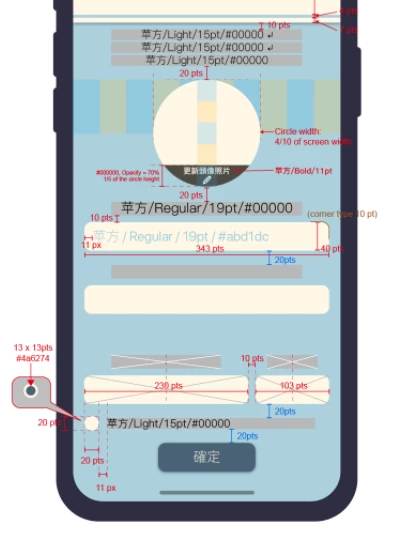
so that they can view it intuitively without any trouble.


However, after we tested out using Adobe XD:
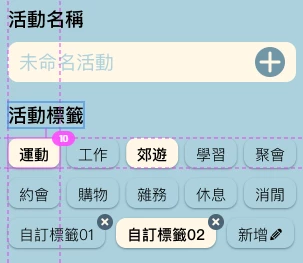
They felt big headache looking for each spacing as they need to carefully move the mouse to different positions to find out.


Is there anyway or plugin to resolve this difficult?

Thank you.

このトピックへの返信は締め切られました。
解決に役立った回答 Harshika Verma

Hi there,


Sorry for the delay in response. We would suggest submitting your feedback here: https://adobexd.uservoice.com/forums/353007-adobe-xd-feature-requests on our XD UserVoice so that our engineering team can look into the request.


This is the best way of communicating with them for any feature ideas and improvements.


Hope it helps.


Thanks,

Harshika

返信数 2

Participant
September 22, 2020

Same issue here.
Not sure if this is possible, yet it would be nice if multiple elements can be co-selected and display the corresponding dimensions simultaneously. 

Harshika Verma
Community Manager
Community Manager
October 12, 2020

Hi there,


Sorry for the delay in response. We would suggest submitting your feedback here: https://adobexd.uservoice.com/forums/353007-adobe-xd-feature-requests on our XD UserVoice so that our engineering team can look into the request.


This is the best way of communicating with them for any feature ideas and improvements.


Hope it helps.


Thanks,

Harshika