


Participant
Jan 9, 2017 8:55 AM UTC
Answered

Wacom tablet issues with Xd on Windows?

Hi,

iI can't use my Wacom Intuos Pro tablet with Adobe Xd (windows 10).

I can navigate through the interface, but can't use the tablet on the artboard.


It seems the pen events are not recognized by the Xd workspace.

Can anyone else confirm this issue?

Is this a bug or should this be a feature request.

What can I do to make things work?


Thanks.
This topic is closed to new replies. Start a new post to keep the conversation going.
t_sandersCorrect answer
Participant
Jan 31, 2018 10:05 AM UTC

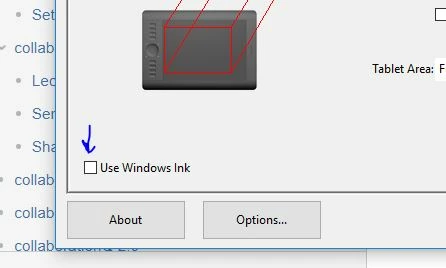
At the feature request (Pen and touch support in windows 10 – Adobe XD Feedback : Feature Requests & Bugs ) a workaround is described. It works for me!

Wacom users can turn off "Windows Ink" in the settings, which enables the pen / touch support in XD. However, this disables some other features of your tablet.

If I knew this earlier...........

19 replies

Participant
Aug 16, 2020 10:04 AM UTC

Hey. This was useful. 

I use Wacom One tablet.

And this worked for me as well. 

Thanks,

Deepak

Translate
Participant
Apr 10, 2018 5:14 AM UTC

THANK YOU SO MUCH.  You have just dramatically increased my quality of life.  Kudos.

Translate
t_sandersAuthorCorrect answer
Participant
Jan 31, 2018 10:05 AM UTC

At the feature request (Pen and touch support in windows 10 – Adobe XD Feedback : Feature Requests & Bugs ) a workaround is described. It works for me!

Wacom users can turn off "Windows Ink" in the settings, which enables the pen / touch support in XD. However, this disables some other features of your tablet.

If I knew this earlier...........

Translate
Participant
Mar 16, 2019 5:24 PM UTC

Thank you a thousand times!! I was starting to feel really bugged about this.

Translate
brunop38512733
Participant
Jan 23, 2018 12:37 PM UTC

Any updates?

Translate
Participant
Nov 15, 2017 7:11 AM UTC

Any news?

Excited for XD but it's pretty much wasting my drive space while it fails to operate with a pretty common Adobe suite computer setup!

Translate
Participant
Nov 14, 2017 2:48 AM UTC

Hi,

Is there any news regarding Wacom with windows 10?

I am still having the same issues.

Thanks,

R

Translate
Participant
Aug 29, 2017 7:16 PM UTC

Please, give to us quickly those features, we need it!!!

Thanks.

Translate
boazkatan
Participant
Jun 14, 2017 7:58 AM UTC

Hi,

Is there any news regarding Wacom ? or someone have estimated dated? that it will work on Win 10?

Thanks,

Boaz.

Translate
elainecc
Participating Frequently
Jun 15, 2017 10:40 PM UTC

Nothing to share publicly. We'll be keeping the UserVoice site updated.

-Elaine

Translate
Participant
Jun 1, 2017 10:54 AM UTC

I have the same problem with a Huion tablet on Windows 10. Are you already working on that feature? Can we expect to be able to work with our tablets soon?

Thank you very much.

You are making a very good job.

Patricia Saco

Translate
Rafał Borowski
Participating Frequently
Apr 25, 2019 11:51 AM UTC

Have you managed to make it work with XD? I wanted to buy HUION Kamvas Pro 20 but if it does not work with XD then I guess I'm gonna pass...

Translate
-------Rafal Borowski Design - www.borowski.design
永祥薛90234772
Participant
May 19, 2017 2:17 AM UTC

I have the same issue. Usually, When I press the space key on my keyboard. and press the left button on a mouse. I can move the whole workspace in Adobe photoshop(or illustrator). But in Adobe Experience Design(Beta). There is no reaction.

Thanks for the answer from Adobe team. and I appreciate the develop team. Adobe CC is easy to use.

Roger Xue

Translate