
Participant
January 9, 2017
Answered

Wacom tablet issues with Xd on Windows?

  • January 9, 2017
  • 11 replies
  • 8592 views

Hi,

iI can't use my Wacom Intuos Pro tablet with Adobe Xd (windows 10).

I can navigate through the interface, but can't use the tablet on the artboard.


It seems the pen events are not recognized by the Xd workspace.

Can anyone else confirm this issue?

Is this a bug or should this be a feature request.

What can I do to make things work?


Thanks.
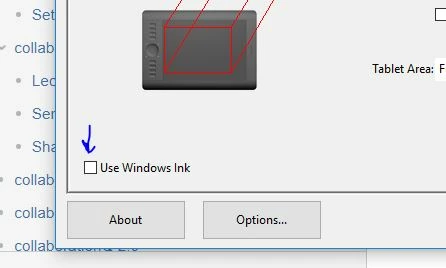
This topic has been closed for replies.
Correct answer t_sanders

At the feature request (Pen and touch support in windows 10 – Adobe XD Feedback : Feature Requests & Bugs ) a workaround is described. It works for me!

Wacom users can turn off "Windows Ink" in the settings, which enables the pen / touch support in XD. However, this disables some other features of your tablet.

If I knew this earlier...........

11 replies

fratila_vlad
Participating Frequently
January 9, 2017

Hi,

We are still working on perfecting the Touch and Pen workflows. For the moment, they are disabled in the design workspace.

They will be available in a future release.

Thanks,

Vlad

Participant
January 18, 2017

Um...don't need to be snippy here, but if I can't use touch or my pen, how exactly am I supposed to use the product at all?

elainecc
Participating Frequently
January 19, 2017

Hi, rmarye

Unfortunately, if you're only on touch and pen workflows, you can't quite use Adobe XD yet. However, most of the hardware that we're aware of has a trackpad or mouse. While it's suboptimal for people like you, we're hoping that the final pen and touch implementation will help you in your design process.

Definitely upvote this story to get the latest news on when we deliver this feature. Pen and touch support in windows 10 – Adobe XD Feedback : Feature Requests & Bugs

Hope that helps!

-Elaine