
Correct White Notification Icons on Android
Hi,
It seems I still cannot set the correct notifications for Andorid in Adobe Air SDK 21.0.0.215
From my understanding in order for this to work we need to supply certain icon sizes as entirely white.
Source from here: Customizing Notifications · OneSignal Push Notification Service Documentation
Starting with Android 5, the OS forces the notification icon to be all white when your app targets Android API 21+. If you don't make a correct small icon, it will most likely be displayed as a solid white square or circle in the status bar.
Android 3.0 and higher
These icons are expected to be entirely white.
res/drawable-mdpi-v11/ic_stat_onesignal_default.png24x24 pixelsres/drawable-hdpi-v11/ic_stat_onesignal_default.png36x36 pixelsres/drawable-xhdpi-v11/ic_stat_onesignal_default.png48x48 pixelsres/drawable-xxhdpi-v11/ic_stat_onesignal_default.png72x72 pixels
In my app_name-app.xml file I can set 36x36, 48x48, 72x72 fine. But as soon as I supply 24x24 it get the follwing error:
Unexpected or unknown element in the application descriptor file.
application.icon.image24x24 is an unexpected element/attribute
When I set the 36x36, 48x48, 72x72 as entirely white icons and test a notification my icon still appears wrong so this makes me feel the 24x24 size is the missing key here (Tested on devices Samsung S7 and S5).
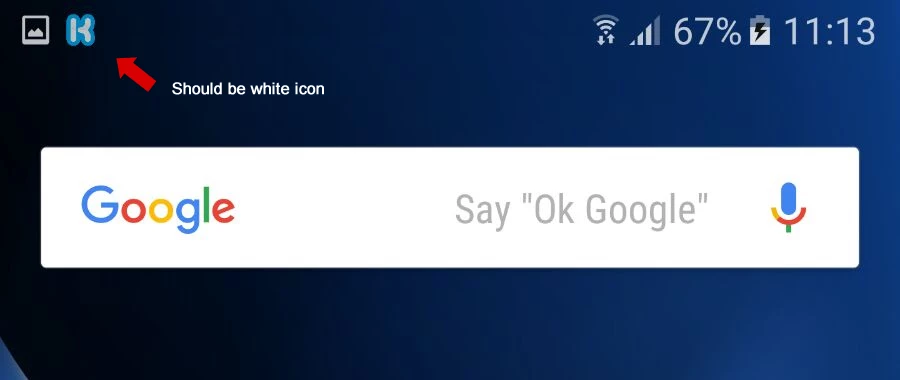
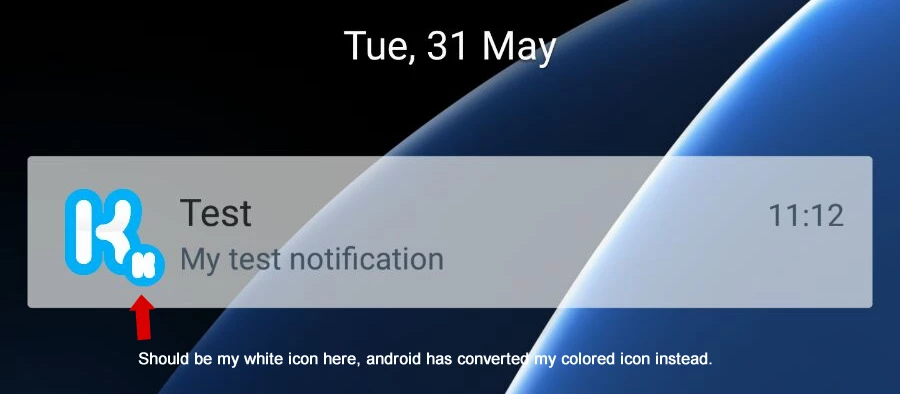
Can we get this fixed so we can supply that size when we package? Or forgive me if I have missed the obvious here.
I hope someone can help. We are now on Android 6+
Related post: Android: Add alternative Icon for notifications
Related feature request: Feature#4060095 - Add custom resources on Android
Thanks


 AdChoices