

Oleg Korchagin
Inspiring
April 29, 2019
Answered

Animate CC 19.0, 19.1, 19.2 critical issue - can't start AIR app

  • April 29, 2019
  • 1 reply
  • 737 views

Hi,

I can't run any AIR application using Animate CC 19.*. Even template simple AIR application for iOS.

With Animate 2015.2, Animate 18.0.2 - everything works fine. But with Animate CC 19.* i get this message:

"Error initializing Java Runtime Enviroment. You may need to reinstall Flash"

--------------------------

Windows 10 x64

java version "1.8.0_131"

Java(TM) SE Runtime Environment (build 1.8.0_131-b11)

Java HotSpot(TM) 64-Bit Server VM (build 25.131-b11, mixed mode)
This topic has been closed for replies.
Correct answer kglad


repair the 64bit versions.

if that fails, using a browser that allows popups and cookies,  contact adobe support during pst business hours by clicking here and, when available, click 'chat', http://helpx.adobe.com/x-productkb/global/service-ccm.html

1 reply

kglad
Community Expert
Community Expert
April 29, 2019

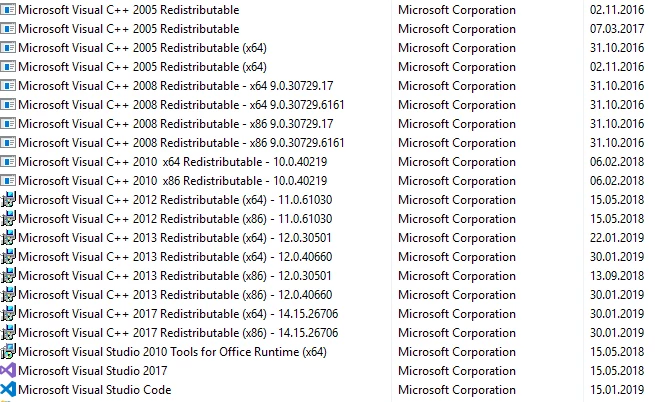
see if you can update your os and fix the problem.  if not, one of the ms visual c++ programs (2017,2013,2012) needs to be installed or repaired.

Oleg Korchagin
Inspiring
April 29, 2019

Hi,

Thanks for your advice.

I have latest OS Windows 17134.706

And i have the same issue on other my windows desktop. And on both of them previous version of Animate run AIR application fine.

kglad
Community Expert
Community Expert
April 30, 2019

and your c++?