


June 5, 2020
Question

Flash keeps on adjusting the timings of the video

  • June 5, 2020
  • 1 reply
  • 485 views

So, one day when I was going to export a MAD video (AVI), with all the timings straight, I went to publish it. But when I did, it just adjusted all the timings the wrong way, like a thing that was supposed to be at frame 1 was at frame 27, etc.


Is it the sound format wrong? Also when I export the SWF it just says Java has not enough memory to export, but when I modified the jvm.ini file (like it asked me to) all came up was this:
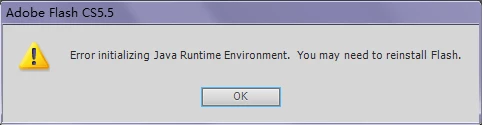
help me! 

This topic has been closed for replies.

1 reply

n. tilcheff
Legend
June 5, 2020

Best way to get your stuff out of Flash is to export a PNG sequence and audio separately and then re-combine them and render video in Premiere.


Full dtails in this thread:  https://community.adobe.com/t5/animate/export-issue-stops-mid-export/td-p/10424361?page=1


Nick - Character Designer and Animator, Flash user since 1998 | Member of the Flanimate Power Tools team - extensions for character animation
June 14, 2020

Only problem: I don't know how to use Premire.


Is that a problem because I dont have FFMPEG? (whatever it is called) I heard once or twice that I needed FFMPEG.


I'll try GIF and convert it to MP4.


I can use VideoPad to add in the audio.

June 14, 2020

Thank goodness that worked! I managed to convert it, and get the audio (audio exporting works fine on Flash) and then here it is! I also joined it on VideoPad so that is a win-win