


signifiernyc
Participant
November 16, 2019
해결됨

How can i adjust frame height in the timeline in Animate 2020?

  • November 16, 2019
  • 1 답변
  • 2727 조회

How can i adjust frame height in the user interface timeline in Animate 2020?
For whatever reason the new Animate has very tall frames which make it hard to select multiple layers visually. Is there a way to adjust the frame height so it doesn't take so much screen space? 
And as a side note --who asked for this change, why does Adobe waste resources on revisions no one asked for...
이 주제는 답변이 닫혔습니다.
최고의 답변: n. tilcheff

Hi mate,


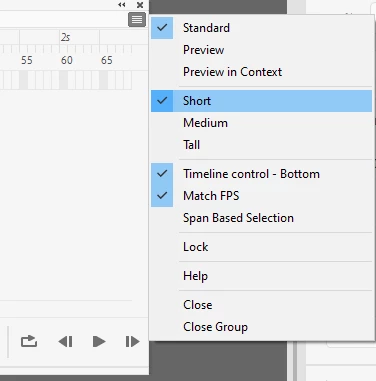
From the hamburger menu in the top-right corner of Timeline:

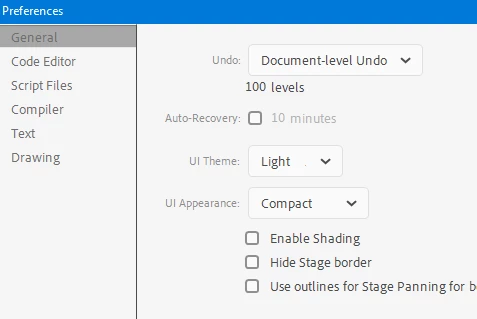
Also some additional setting is available in Preferences which will compact the toolbar a tiny little bit:


I don't want to repeat myself, but here is my opinion if it is of interest:

https://community.adobe.com/t5/animate/why-is-the-ui-in-animate-cc-2020-so-big/m-p/10733845#M198687


1 답변

n. tilcheff
Legend
November 16, 2019

Hi mate,


From the hamburger menu in the top-right corner of Timeline:

Also some additional setting is available in Preferences which will compact the toolbar a tiny little bit:


I don't want to repeat myself, but here is my opinion if it is of interest:

https://community.adobe.com/t5/animate/why-is-the-ui-in-animate-cc-2020-so-big/m-p/10733845#M198687


Nick - Character Designer and Animator, Flash user since 1998 | Member of the Flanimate Power Tools team - extensions for character animation
signifiernyc
signifiernyc작성자
Participant
November 23, 2019

Thank you, your help is appreciated.