Good morning JC,
First of all I wanted to thank you for getting back to us so quickly. Sadly the fix doesn't seem to have helped. I'm including screen shots to show you the issue and hopefully offer clarity.
As a recap we need to move a button across a horizontal bar. As the button is moved there is a contrasting color added to the left side of the button to help visually show the location of the button and its position away from its starting point. We would expect the button's starting point to start at the left end of the horizontal bar. For ease of communication lets call that starting point as position 0. As the button slides right we would expect an accumulation, and as the button is slid left we would expect the opposite.
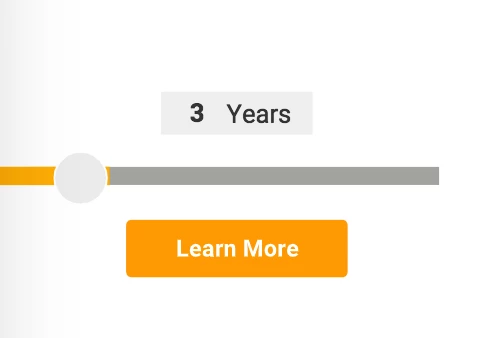
As you can see, on a new page load the button isn't lined up with the left most point of the horizontal bar. The contrasting color is preloaded and extends past the button a hair. When the button is clicked and dragged (mouse button held down) we get an unwanted behavior:
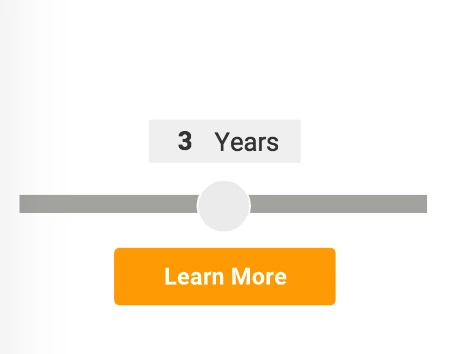
There is no ability to drag the button across the bar and instead the button snaps to center. The code you had previously supplied us with did allow for the button to move both left and right but the yellow fill was always off. Now the button fails to slide at all. Please let me know your thoughts and thank you again!
UPDATE: 11/01/2021
Please see two new approaches that are more versatile, extensible, and modular in the following answer:
https://community.adobe.com/t5/animate-discussions/html5-range-slider/m-p/12489403#M348638
__________________________________________________________________________
Hi.
I do appreciate your feedback.
I have to apologize again! I tend to code this answers here very fast and sometimes I forget small details. This time I forgot to consider the stage.scaleX when setting the mouse down offset.
I could swear I was testing this code with responsive settings on. -_-'
this.button.on("mousedown", function(e)
{
e.target.offsetX = (e.stageX / stage.scaleX) - e.target.x; // UPDATED
}.bind(this));
this.button.on("pressmove", function (e)
{
e.target.x = this.clamp((e.stageX / stage.scaleX) - e.target.offsetX, this.bar.x, this.bar.x + this.bar.nominalBounds.width);
this.setProportion(e.target.x);
}.bind(this));
this.setProportion = function (posX)
{
this.bar.highlight.scaleX = (this.button.x - this.bar.x) / this.bar.nominalBounds.width;
}.bind(this);
this.clamp = function (value, min, max)
{
if (value < min)
return min;
else if (value > max)
return max;
else
return value;
}
setTimeout(this.setProportion, 0);
Please let me know if it works now and if I didn't forget anything this time!
Regards,
JC




 AdChoices