
JSFL alpha value for layer
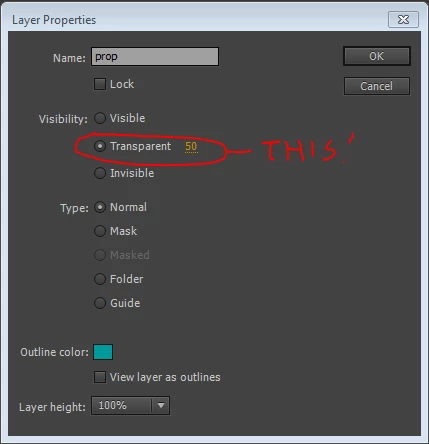
hi All, in the new versions of animate there's the option to make the layer transparent, the default its set to 50%. see picture below.
I need to do a panel in jsfl with a button that automatically set the transparency of the layer
In the history panel I see the jsfl code:
var t = fl.getDocumentDOM().getTimeline();
var l = t.layers[t.currentLayer];
l.layerType='normal';
l.name='prop';
l.locked=false;
l.visibility='transparent';
l.color='#009999';
l.height=100;
l.outline=false;
l.alpha=50;
the very last command is the alpha value, but if I try to re-use the same code on another layer it's doing nothing...
or at least the code change the property of the layer but is not enabling the transparency...
can you help me to understand how to make a code that turns on the transparency, please?
thanks


 AdChoices