Inspiring
March 9, 2022
Answered

Magnifying Lens - HTML5 Canvas

  • March 9, 2022
  • 3 replies
  • 1305 views

Having another go at this... 


At this stage, I'm after an example of a mgnifying glass, preferrably draggable, done in Animate HTML5 Canvas.


I note that @Colin Holgate  has done one a few years ago in Animate HTML5 Canvas:


http://colin.scienceninja.com/magnify_Canvas.html


As a result of this thread:


https://community.adobe.com/t5/animate-discussions/mask-with-other-movieclip/m-p/9221137


But the actual Animate file for the Canvas version wasn't made available by Colin.


Any help/code/examples to do a magnifying glass in HTML5 Canvas would be appreciated. 

    This topic has been closed for replies.
    Correct answer JoãoCésar17023019

    Hi.


    I don't know if this is what you're looking for, but here is a suggestion.


    Preview:
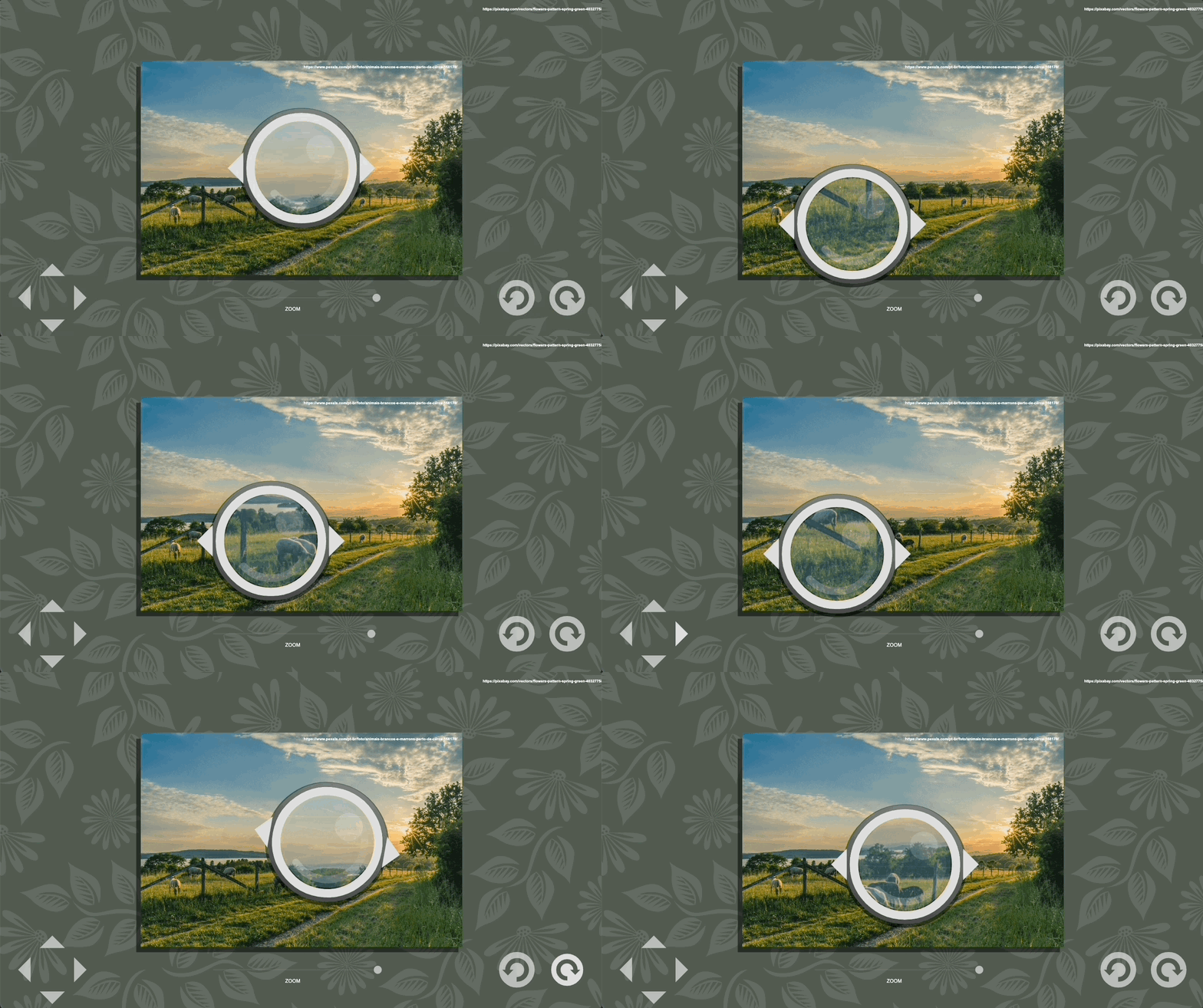
     

    Try it:

    https://bit.ly/36jjTOA


    JS / Javascript code:

    var root = this;
    var minScale = 1;
    var maxScale = 2;
    var scale = maxScale;
    var minBlurX = 1;
    var maxBlurX = 3;
    var minBlurY = 1;
    var maxBlurY = 3;
    var blurX = minBlurX;
    var blurY = minBlurY;
    var blurQuality = 1;
    var moveOffset = 2;
    var rotateOffset = 2;
    var lens, imageData, img, bitmap, lensBounds, dPad, left, right, up, down,
    	rotateLeftButton, rotateRightButton, rotateLeft, rotateRight, slider;
    
    function main()
    {
    	createjs.Touch.enable(stage);
    	stage.mouseMoveOutside = true;
    	
    	container = root.container;
    	
    	lens = root.lens;
    	lens.visible = true;
    	lens.mouseChildren = false;
    	lensBounds = lens.hit.nominalBounds;
    	lens.on("mousedown", onMouseDownLens);
    	lens.on("pressmove", onPressMoveLens);
    	
    	dPad = root.dPad;
    	dPad.on("mousedown", onDPadMouseDown);
    	dPad.on("pressup", onDPadPressUp);
    	
    	slider = root.slider;
    	slider.on("pressmove", onPressMoveSlider);
    	
    	rotateLeftButton = root.rotateLeftButton;
    	rotateLeftButton.on("mousedown", onRotateMouseDown);
    	rotateLeftButton.on("pressup", onRotatePressUp);
    	
    	rotateRightButton = root.rotateRightButton;
    	rotateRightButton.on("mousedown", onRotateMouseDown);
    	rotateRightButton.on("pressup", onRotatePressUp);
    	
    	createjs.Ticker.on("tick", onTick);
    	
    	root.stop();
    	createImage();
    }
    
    function onMouseDownLens(e)
    {
    	var mousePos = getMousePos(e.currentTarget);
    	e.currentTarget.offset = { x: mousePos.x - e.currentTarget.x, y: mousePos.y - e.currentTarget.y };
    }
    
    function onPressMoveLens(e)
    {
    	var mousePos = getMousePos(e.currentTarget);
    
    	e.currentTarget.x = mousePos.x - e.currentTarget.offset.x;
    	e.currentTarget.y = mousePos.y - e.currentTarget.offset.y;
    	setBounds();
    	createImage();
    }
    
    function onDPadMouseDown(e)
    {
    	if (e.target === dPad.left)
    		left = true;
    	else if (e.target === dPad.right)
    		right = true;
    	else if (e.target === dPad.up)
    		up = true;
    	else if (e.target === dPad.down)
    		down = true;
    }
    
    function onDPadPressUp(e)
    {
    	left = right = up = down = false;
    }
    
    function onPressMoveSlider(e)
    {
    	var mousePos = getMousePos(e.target);
    	var width = e.currentTarget.bar.nominalBounds.width;
    	var ratio;
    	
    	e.currentTarget.button.x = clamp(e.currentTarget.bar.x, mousePos.x, width);
    	ratio = e.currentTarget.ratio = e.currentTarget.button.x / width;
    	
    	scale = minScale + (maxScale - minScale) * ratio;
    	blurX = minBlurX + (maxBlurX - minBlurX) * (1 - ratio);
    	blurY = minBlurY + (maxBlurY - minBlurY) * (1 - ratio);
    			
    	createImage();
    }
    
    function onRotateMouseDown(e)
    {
    	if (e.currentTarget == rotateLeftButton)
    		rotateLeft = true;
    	else if (e.currentTarget == rotateRightButton)
    		rotateRight = true;
    }
    
    function onRotatePressUp(e)
    {
    	rotateLeft = rotateRight = false;
    }
    
    function onTick()
    {
    	if (left)
    		moveLens(-moveOffset, 0);
    	else if (right)
    		moveLens(moveOffset, 0);
    	else if (up)
    		moveLens(0, -moveOffset);
    	else if (down)
    		moveLens(0, moveOffset);
    	
    	if (rotateLeft)
    		rotateLens(-rotateOffset);
    	else if (rotateRight)
    		rotateLens(rotateOffset);
    	
    	if (left || right || up || down)
    	{
    		setBounds();
    		createImage();
    	}
    }
    
    function moveLens(offsetX, offsetY)
    {
    	lens.x += offsetX;
    	lens.y += offsetY;
    }
    
    function rotateLens(offset)
    {
    	lens.rotation += offset;
    	lens.container.rotation = -lens.rotation;
    }
    
    function createImage()
    {
    	var w = lensBounds.width;
    	var h = lensBounds.height;
    	
    	container.cache(lens.x - w * 0.5, lens.y - h * 0.5, w, h, scale);
    	imageData = container.cacheCanvas.toDataURL("image/png");
    	img = new Image();
    	img.src=imageData;
    	img.onload = onLoad;
    	container.uncache();
    }
    
    function onLoad(e)
    {
    	var width = lensBounds.width * scale;
    	var height = lensBounds.height * scale;
    	
    	if (bitmap)
    		remove(bitmap);
    	
    	bitmap = new createjs.Bitmap(e.currentTarget);
    	bitmap.regX = width * 0.5;
    	bitmap.regY = height * 0.5;
    	bitmap.x = 0;
    	bitmap.y = 0;
    	lens.container.addChild(bitmap);
    	bitmap.filters = [ new createjs.BlurFilter(blurX, blurY, blurQuality) ];
    	bitmap.cache(0, 0, width, height);
    }
    
    function remove(target)
    {
    	if (!target)
    		return;
    	
    	target._off = true;
    	target.parent.removeChild(target);
    	target = null;
    }
    
    function setBounds()
    {
    	var width = lib.properties.width;
    	var height = lib.properties.height;
    	
    	if (lens.x < 0)
    		lens.x = 0;
    	else if (lens.x > width)
    		lens.x = width;
    	
    	if (lens.y < 0)
    		lens.y = 0;
    	else if (lens.y > height)
    		lens.y = height;
    }
    
    function getMousePos(target)
    {
    	return target.parent.globalToLocal(target.stage.mouseX, target.stage.mouseY);
    }
    
    function clamp(min, value, max)
    {
    	if (value < min)
    		return min;
    	
    	if (value > max)
    		return max;
    	
    	return value;
    }
    
    main();


    Download / FLA / source / files:

    https://bit.ly/3tQ0blq


    I hope it helps.


    Regards,

    JC 

    3 replies

    JoãoCésar17023019
    Community Expert
    JoãoCésar17023019Community ExpertCorrect answer
    Community Expert
    March 12, 2022

    Hi.


    I don't know if this is what you're looking for, but here is a suggestion.


    Preview:


    Try it:

    https://bit.ly/36jjTOA


    JS / Javascript code:

    var root = this;
    var minScale = 1;
    var maxScale = 2;
    var scale = maxScale;
    var minBlurX = 1;
    var maxBlurX = 3;
    var minBlurY = 1;
    var maxBlurY = 3;
    var blurX = minBlurX;
    var blurY = minBlurY;
    var blurQuality = 1;
    var moveOffset = 2;
    var rotateOffset = 2;
    var lens, imageData, img, bitmap, lensBounds, dPad, left, right, up, down,
    	rotateLeftButton, rotateRightButton, rotateLeft, rotateRight, slider;
    
    function main()
    {
    	createjs.Touch.enable(stage);
    	stage.mouseMoveOutside = true;
    	
    	container = root.container;
    	
    	lens = root.lens;
    	lens.visible = true;
    	lens.mouseChildren = false;
    	lensBounds = lens.hit.nominalBounds;
    	lens.on("mousedown", onMouseDownLens);
    	lens.on("pressmove", onPressMoveLens);
    	
    	dPad = root.dPad;
    	dPad.on("mousedown", onDPadMouseDown);
    	dPad.on("pressup", onDPadPressUp);
    	
    	slider = root.slider;
    	slider.on("pressmove", onPressMoveSlider);
    	
    	rotateLeftButton = root.rotateLeftButton;
    	rotateLeftButton.on("mousedown", onRotateMouseDown);
    	rotateLeftButton.on("pressup", onRotatePressUp);
    	
    	rotateRightButton = root.rotateRightButton;
    	rotateRightButton.on("mousedown", onRotateMouseDown);
    	rotateRightButton.on("pressup", onRotatePressUp);
    	
    	createjs.Ticker.on("tick", onTick);
    	
    	root.stop();
    	createImage();
    }
    
    function onMouseDownLens(e)
    {
    	var mousePos = getMousePos(e.currentTarget);
    	e.currentTarget.offset = { x: mousePos.x - e.currentTarget.x, y: mousePos.y - e.currentTarget.y };
    }
    
    function onPressMoveLens(e)
    {
    	var mousePos = getMousePos(e.currentTarget);
    
    	e.currentTarget.x = mousePos.x - e.currentTarget.offset.x;
    	e.currentTarget.y = mousePos.y - e.currentTarget.offset.y;
    	setBounds();
    	createImage();
    }
    
    function onDPadMouseDown(e)
    {
    	if (e.target === dPad.left)
    		left = true;
    	else if (e.target === dPad.right)
    		right = true;
    	else if (e.target === dPad.up)
    		up = true;
    	else if (e.target === dPad.down)
    		down = true;
    }
    
    function onDPadPressUp(e)
    {
    	left = right = up = down = false;
    }
    
    function onPressMoveSlider(e)
    {
    	var mousePos = getMousePos(e.target);
    	var width = e.currentTarget.bar.nominalBounds.width;
    	var ratio;
    	
    	e.currentTarget.button.x = clamp(e.currentTarget.bar.x, mousePos.x, width);
    	ratio = e.currentTarget.ratio = e.currentTarget.button.x / width;
    	
    	scale = minScale + (maxScale - minScale) * ratio;
    	blurX = minBlurX + (maxBlurX - minBlurX) * (1 - ratio);
    	blurY = minBlurY + (maxBlurY - minBlurY) * (1 - ratio);
    			
    	createImage();
    }
    
    function onRotateMouseDown(e)
    {
    	if (e.currentTarget == rotateLeftButton)
    		rotateLeft = true;
    	else if (e.currentTarget == rotateRightButton)
    		rotateRight = true;
    }
    
    function onRotatePressUp(e)
    {
    	rotateLeft = rotateRight = false;
    }
    
    function onTick()
    {
    	if (left)
    		moveLens(-moveOffset, 0);
    	else if (right)
    		moveLens(moveOffset, 0);
    	else if (up)
    		moveLens(0, -moveOffset);
    	else if (down)
    		moveLens(0, moveOffset);
    	
    	if (rotateLeft)
    		rotateLens(-rotateOffset);
    	else if (rotateRight)
    		rotateLens(rotateOffset);
    	
    	if (left || right || up || down)
    	{
    		setBounds();
    		createImage();
    	}
    }
    
    function moveLens(offsetX, offsetY)
    {
    	lens.x += offsetX;
    	lens.y += offsetY;
    }
    
    function rotateLens(offset)
    {
    	lens.rotation += offset;
    	lens.container.rotation = -lens.rotation;
    }
    
    function createImage()
    {
    	var w = lensBounds.width;
    	var h = lensBounds.height;
    	
    	container.cache(lens.x - w * 0.5, lens.y - h * 0.5, w, h, scale);
    	imageData = container.cacheCanvas.toDataURL("image/png");
    	img = new Image();
    	img.src=imageData;
    	img.onload = onLoad;
    	container.uncache();
    }
    
    function onLoad(e)
    {
    	var width = lensBounds.width * scale;
    	var height = lensBounds.height * scale;
    	
    	if (bitmap)
    		remove(bitmap);
    	
    	bitmap = new createjs.Bitmap(e.currentTarget);
    	bitmap.regX = width * 0.5;
    	bitmap.regY = height * 0.5;
    	bitmap.x = 0;
    	bitmap.y = 0;
    	lens.container.addChild(bitmap);
    	bitmap.filters = [ new createjs.BlurFilter(blurX, blurY, blurQuality) ];
    	bitmap.cache(0, 0, width, height);
    }
    
    function remove(target)
    {
    	if (!target)
    		return;
    	
    	target._off = true;
    	target.parent.removeChild(target);
    	target = null;
    }
    
    function setBounds()
    {
    	var width = lib.properties.width;
    	var height = lib.properties.height;
    	
    	if (lens.x < 0)
    		lens.x = 0;
    	else if (lens.x > width)
    		lens.x = width;
    	
    	if (lens.y < 0)
    		lens.y = 0;
    	else if (lens.y > height)
    		lens.y = height;
    }
    
    function getMousePos(target)
    {
    	return target.parent.globalToLocal(target.stage.mouseX, target.stage.mouseY);
    }
    
    function clamp(min, value, max)
    {
    	if (value < min)
    		return min;
    	
    	if (value > max)
    		return max;
    	
    	return value;
    }
    
    main();


    Download / FLA / source / files:

    https://bit.ly/3tQ0blq


    I hope it helps.


    Regards,

    JC 

    FlatChatAuthor
    Inspiring
    March 13, 2022

    @JoãoCésar17023019   Looks like it is exactly what I'm after!


    I'll start looking at this then have a go at applying it to my project.


    I may have some questions down the track.


    Many thanks for your help with this JC, greatly appreciated!


    Peter

    FlatChatAuthor
    Inspiring
    March 10, 2022

    Anything, no help or examples?

    FlatChatAuthor
    Inspiring
    March 11, 2022

    Just after an example or some help with this...

    FlatChatAuthor
    Inspiring
    March 9, 2022

    Note that I'm needing to the magnify glass/lens in code, not using tweens etc.  Also, the magnification factor needs to be variable.