CodeDeveloperOM
Inspiring
March 30, 2022
Answered

video stop () by HTML5 canvas

  • March 30, 2022
  • 5 replies
  • 934 views

HTML5 canvas 

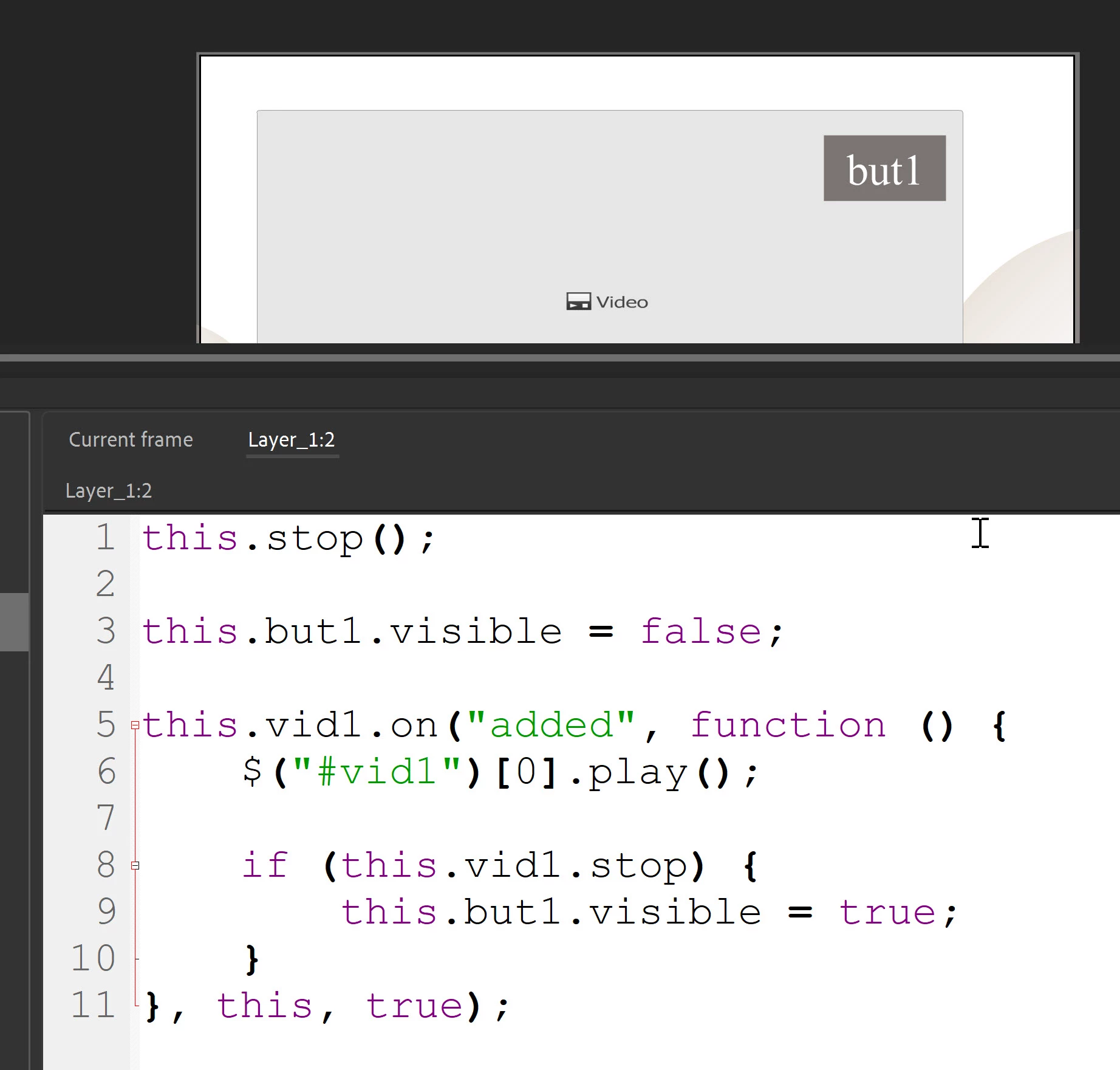
When the video stops, I want to show the button

Why is the code not working?


use video component for play video

this.stop();

this.but1.visible = false;

this.vid1.on("added", function () {
	$("#vid1")[0].play();
	
	if (this.vid1.stop) {
		this.but1.visible = true;
	}
}, this, true);


This topic has been closed for replies.
Correct answer CodeDeveloperOM

this.stop();

this.but1.visible = false;
this.vid1.onadded = function () {
$("#vid1")[0].play();

};

var video;
function checkInitF() {
video = document.querySelector("#vid1");
if (video) {
video.addEventListener("ended", function () {
videoEnded();
alert("good");
});
} else {
video = $("#vid1")[0];
setTimeout(checkInitF, 100);
}
}
checkInitF();


function videoEnded() {
//this.but1.visible = true;
exportRoot.but1.visible = true;
}

5 replies

CodeDeveloperOM
Inspiring
April 5, 2022


@ClayUUID  @Joseph Labrecque @kglad   @JoãoCésar


this.stop();

this.but1.visible = false;
this.vid1.onadded = function () {
$("#vid1")[0].play();
};

///////////////
var vid1 = document.getElementById("vid1");
this.vid1.onended = function () {
alert("The video has ended");
this.but1.visible = true;
};


???

CodeDeveloperOM
CodeDeveloperOMAuthorCorrect answer
Inspiring
April 6, 2022

this.stop();

this.but1.visible = false;
this.vid1.onadded = function () {
$("#vid1")[0].play();

};

var video;
function checkInitF() {
video = document.querySelector("#vid1");
if (video) {
video.addEventListener("ended", function () {
videoEnded();
alert("good");
});
} else {
video = $("#vid1")[0];
setTimeout(checkInitF, 100);
}
}
checkInitF();


function videoEnded() {
//this.but1.visible = true;
exportRoot.but1.visible = true;
}

CodeDeveloperOM
Inspiring
April 3, 2022

@ClayUUID  @Joseph Labrecque @kglad   @JoãoCésar

quote

HTML5 canvas 

When the video stops, I want to show the button

Why is the code not working?


use video component for play video


this.stop();

this.but1.visible = false;

this.vid1.on("added", function () {
$("#vid1")[0].play();
}, this, true);
////////////////
this.vid1.on("ended", function() {
alert("Video Finished");
});

////////////////

$("#vid1").on("loadedmetadata", function() {
alert("Video loaded");
this.currentTime = 10;
this.but1.visible = true;
});


$("#vid1").on("timeupdate", function() {
var cTime=this.currentTime;
if(cTime>0 && cTime % 2 == 0){ //Alerts every 2 minutes once
alert("Video played "+cTime+" minutes");

this.but1.visible = true;});

var perc=cTime * 100 /// this.duration;
if(perc % 10 == 0) {      //Alerts when every 10% watched
alert("Video played "+ perc +"%");

this.but1.visible = true;
}}


CodeDeveloperOM
Inspiring
April 3, 2022
Legend
March 30, 2022

It's not working because it's completely wrong. How would an if statement that runs once detect a video ending?

https://developer.mozilla.org/en-US/docs/Web/API/HTMLMediaElement/ended_event


CodeDeveloperOM
Inspiring
March 31, 2022

@ClayUUID 


this.stop();

this.but1.visible = false;


this.vid1.on("added", function () {
$("#vid1")[0].play();
});


this.vid1.addEventListener("ended", function () {
this.but1.visible = true;

});

Why is the code not working?

Legend
March 31, 2022

Because, unless you bind it, "this" in event handlers points to the global window object.

Community Expert
March 30, 2022

Just to confirm, is your button instance name but1 ?