
Participant
October 10, 2021
Question

Absolutely the least intuitive piece of software I have used, and I have used previous versions.

  • October 10, 2021
  • 2 replies
  • 144 views

Even leaving comments is frustrating.


What does "Enter a Body" and a Bunny icon mean in a text field.


I had a simple project, cut up a long audio track, save the project (with assets), and then burn chapters to DVD or multiple CDs.

Got soo close.

Burning this to CD results in Chapter 5 first every time.

The arrow next to name flips the order of displayed tracks but not the order that they ar burned in.
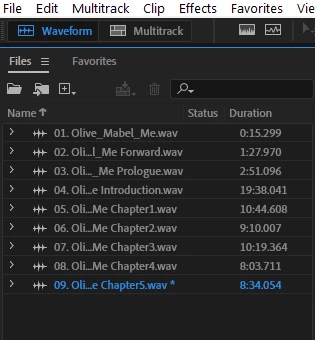
I used to know how to use Audition, and Cool Edit 2000 before Adobe bought it.

After a dozen DVDs and CDs, I'm going to use Audacity.


This topic has been closed for replies.

2 replies

SteveG_AudioMasters_
Community Expert
Community Expert
October 10, 2021

Create marker ranges, highlight the list in the Marker panel and right-click. Select Insert Into CD Layout, and that's where you control the order, etc - in the CD layout panel.


My apologies for you having to learn something new; this is the price of progress. Where have you seen a bunny icon and anything about 'entering a body'?

Participant
October 16, 2021

Thank you for reminding me that the price of progress is having to learn something new.
One would think I would have learned that after using Adobe products for 30 years.

Intuitive is not a term I would use for any Adobe product.

The Bunny Icon/body phrase was found when I was searching for help online.

I finished my project by downloading Audacity.

Paul Bennett
[PII removed by moderator]

Community Expert
October 10, 2021

You are just copying over the files to disc, is the order not dependant on the Windows OS?