
Known Participant
April 17, 2018
Answered

Acond Digital DeReverberate Plugin in Audition

  • April 17, 2018
  • 1 reply
  • 685 views

Hello all --

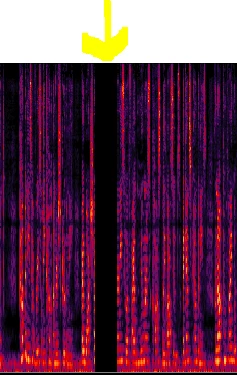
I just downloaded the demo version of Acon Digital DeReverberate to clean up the echo in my audio. It has done a fantastic job of getting rid of the echo, however, when I apply the settings to my audio, small pieces of the audio are completely deleted throughout the clip.

It doesn't happen when I'm previewing within the Acon plugin, only when it's applied. Has anyone had this happen to them and know how to prevent it from happening?

Before I got rid of the echo, I also got rid of the hiss and air conditioner in the room using the Noise Reduction Process twice.

Here is a screenshot of the audio that has been deleted after the settings from the plugin have been applied.

Thank you!
    This topic has been closed for replies.
    Correct answer ryclark

    That is probably because you are using the Demo version. Acon don't want you to use their plugin to actually change the audio without you paying for it I'm afraid.

    Quote from their operation manual. "The demo mode is fully functional with exception of short passages with muted audio output at irregular intervals".

    1 reply

    ryclark
    ryclarkCorrect answer
    Participating Frequently
    April 17, 2018

    That is probably because you are using the Demo version. Acon don't want you to use their plugin to actually change the audio without you paying for it I'm afraid.

    Quote from their operation manual. "The demo mode is fully functional with exception of short passages with muted audio output at irregular intervals".

    Known Participant
    April 17, 2018

    You know, I actually wondered if that was the case. I really appreciate you getting back to me.

    Have a great day!