Participant
February 6, 2022
Answered

Adobe Audition 2022 - "Detected Dropped Samples"

  • February 6, 2022
  • 2 replies
  • 6968 views

Greetings community,


Something I'm struggling with using Adobe Audition is a very strong lag/chop with the message "Detected Dropped Samples" at the bottom-right of the software. This does not happen when I first start a session but more-so once I'm pretty stacked on tracks. It runs smooth and I have a great time mixing the tracks as I go (verse, verse addlivs, chorus, chorus addlivs, etc). BUT, once I get pretty stacked on all the different type of tracks and live effects, samples start to drop and the choppy lags happens! (I'm guessing my computer is weak??) 


This is when I do the ol' go-to solution from all other posts and adjust the latency! I put it all the way to 500 just to see would there be a difference.. .. no!  Put it all the way at 30, computer pretty much crash! 


My question is, what is a solution to "speed" up Adobe to get the song finished once a session gets pretty stacked on tracks? What are some tricks? I don't have a Mac Book Pro nor a gaming computer with 1,000 RGBs! I have a HP laptop > Intel(R) Core(TM) i5-8265U CPU @ 1.60GHz 1.80 GHz > 8.00 GB RAM > 64-bit operating system, x64-based processor with 48 GB of memory free! I run a 48000 Hz sample rate session and equipment are all at 48000 Hz (mic, speakers, etc)! How do i speed up this software when a session gets pretty stacked/busy?? 

This topic has been closed for replies.
Correct answer SteveG_AudioMasters_

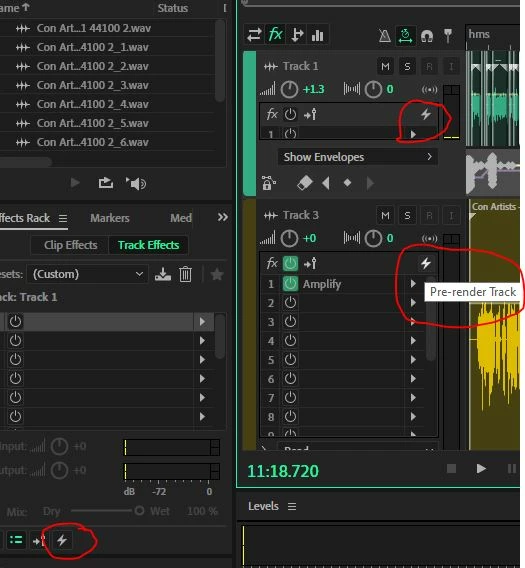
Generally the solution is to pre-render your tracks...

That's what the little lightning bolt is for. If you pre-render all the effects in a track, then playback is much less dependent on processing power, and only really limited by your HD. If you want to change anything, you can unrender it again, change whatever you want and then re-prerender it. The more tracks you do this to, the smoother things will get.

2 replies

joeb7866159
Participant
May 11, 2022

Related Question (and possible obvious one) - when I mixdown a session to a new file - is it possible there wull be dropped samples? Or is that only when playing back?


thanks

Participant
June 28, 2023

Did you ever get an answer to this? because I have this question. 

SteveG_AudioMasters_
Community Expert
SteveG_AudioMasters_Community ExpertCorrect answer
Community Expert
February 6, 2022

Generally the solution is to pre-render your tracks...

That's what the little lightning bolt is for. If you pre-render all the effects in a track, then playback is much less dependent on processing power, and only really limited by your HD. If you want to change anything, you can unrender it again, change whatever you want and then re-prerender it. The more tracks you do this to, the smoother things will get.

Participant
February 6, 2022

You, my friend, deserve an award! It worked! I pre-rendered everything in the multitrack and it FIXED the dropped samples!!!! Thank you!!

Participant
February 25, 2022

I signed in just to thank @SteveG_AudioMasters_ 👏👏👏  a real Audition OG!!! 🏆🎖️🥇


Never before I have used that feature until today. You saved me HOURS of work and a headache.