Participant
Nov 24, 2021 3:32 PM UTC
Answered

Adobe Audition loses "clip gain" aftering Merge Clips

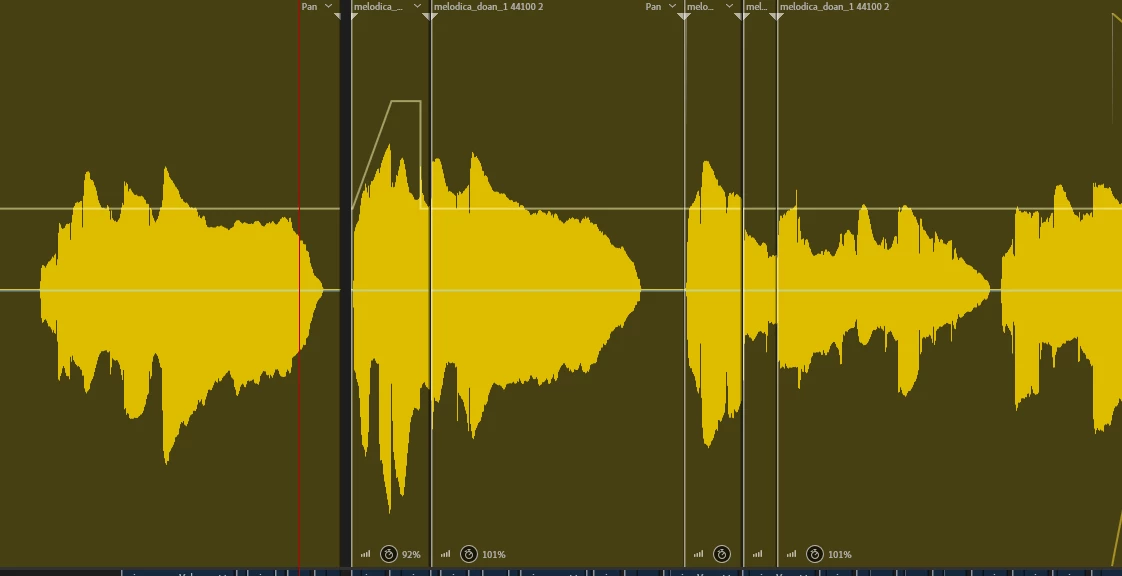
I have many small audio pieces for ONE track (please check my image). And I use "clip gain" to control the volumn/gain for each specific segment (please check my image - the yellow line). After completing the mixing process. I neeed to "Merge Clips" for ALL pieces on the SAME track. It will be easier to manage the project later.


BUT, aftering "Merge Clips", clip-gain-line is a straight line. All my volume/gain tweaks are gone. So please help me, how can I use "Merge Clips" and still keeping the "clip gain"?


Thank you.
 

This topic is closed to new replies. Start a new post to keep the conversation going.
SteveG_AudioMasters_
SteveG_AudioMasters_Correct answer
Community Expert
Nov 24, 2021 6:55 PM UTC

Have you tried Multitrack>Bounce to new track> then either selected track, or selected clips? This should preserve everything you've applied.

2 replies

SteveG_AudioMasters_
Community Expert
SteveG_AudioMasters_Community ExpertCorrect answer
Community Expert
Nov 24, 2021 6:55 PM UTC

Have you tried Multitrack>Bounce to new track> then either selected track, or selected clips? This should preserve everything you've applied.

Translate
Tran98A7Author
Participant
Nov 25, 2021 5:32 AM UTC

Hello @SteveG_AudioMasters_ 

It works now.

Thank you so much.

Translate