
Known Participant
Aug 8, 2017 9:43 PM UTC
Answered

All Elements In Audition 3.0 Window

I've been using Audition 3.0 for several years. When I'd open it, it looked like this
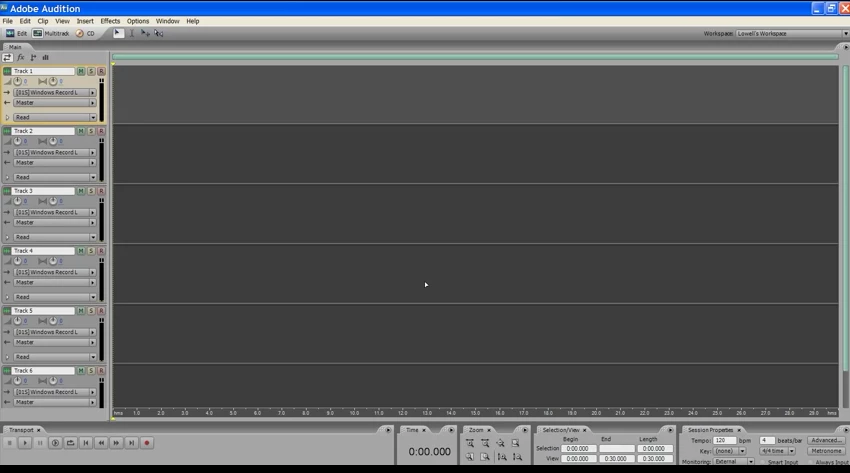
Today I clicked some wrong button somewhere and got a blank, empty window: Main, Transport, Time, Zoom, Selection/View, Sessions Properties are all missing.

How do I get them back? Is there some Default setting somewhere that sets up the window like above?

This topic is closed to new replies. Start a new post to keep the conversation going.
ryclark
ryclarkCorrect answer
Participating Frequently
Aug 10, 2017 10:12 AM UTC

Try 'Reset Current Workspace' from bottom of the same Workspace menu. If that doesn't work you can always drag the panels back into there relevant positions by clicking on the name at the top of the panel and dragging it to where you want it. A blue potion frame will show up on the edge of the nearest where you want to replace the boxes.

4 replies

ryclark
Participating Frequently
Aug 9, 2017 10:27 AM UTC

Go to the Window menu, select Workspace and click on Multitrack View (Default).

Translate
Known Participant
Aug 9, 2017 12:59 PM UTC

Hi ryclark ~

Yes, but that still leaves me without the Main, Transport, Time, Zoom, Selection/View, and Sessions Properties tabs . . and when I choose Window > Transport, Zoom and Time they appear like this, which isn't what I want

What I want is to reset my untitled.ses so that it looks exactly like in my original image (original posting), which I assume (hope!) to be a default setup for a new .ses.

EDIT:

I've just discovered that Transport, Time, Zoom, and Selection/View are there in Edit view but not Multitrack view. How can I get them back in Multitrack view?

Translate
ryclark
ryclarkCorrect answer
Participating Frequently
Aug 10, 2017 10:12 AM UTC

Try 'Reset Current Workspace' from bottom of the same Workspace menu. If that doesn't work you can always drag the panels back into there relevant positions by clicking on the name at the top of the panel and dragging it to where you want it. A blue potion frame will show up on the edge of the nearest where you want to replace the boxes.

Translate