
Participant
November 26, 2018
Question

All mics recording on armed track

  • November 26, 2018
  • 1 reply
  • 266 views

Hi, we have a mixer connected to the computer and Audition with separate lines.

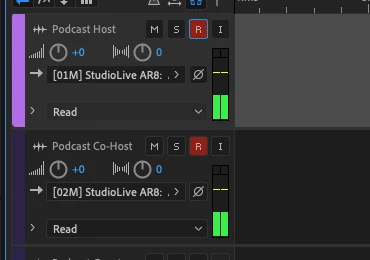
We select which line we want to use on the track - mic 1 on track 1, mic 2 on track 2 etc.

However all mics are coming through on each track we arm.  In this picture we've selected mic 1 on track 1 and mic 2 on track 2 but both mics come through at full volume on both tracks.

Thanks in advance.
This topic has been closed for replies.

1 reply

SteveG_AudioMasters_
Community Expert
Community Expert
November 27, 2018

For a start, what mixer is it? We need a model number here. Does it have a single stereo feed from it, or individual channel outputs? If it's the former, all you will ever be able to do is what you've described - have all mic inputs routed to the same track. If your mixer has individual channel outputs, then you have to select the appropriate one per track.

The VoidAuthor
Participant
November 28, 2018

Hi We are using PreSonus AR8 mixer https://www.presonus.com/products/StudioLive-AR8-USB

It looks like it only has 1 USB output so couldn't do the job?  Do you think?

What would you recommend for individual outputs?

SteveG_AudioMasters_
Community Expert
Community Expert
November 28, 2018

https://forums.adobe.com/people/The+Void  wrote

Hi We are using PreSonus AR8 mixer https://www.presonus.com/products/StudioLive-AR8-USB

It looks like it only has 1 USB output so couldn't do the job?  Do you think?

I'm not so sure. In the PreSonus blurb is the line:

'Connect a StudioLive AR8 USB mixer to your computer via USB 2.0, and you have an 8x4 multitrack digital recorder, ready to capture all input channels plus the main mix to a Mac or Windows PC with professional, 24-bit/96 kHz quality.'

What you need to do at this point is click on the little arrow on the right of StudioLive AR8 and see what's shown there.