



Answered
Attempting to export a multitrack mixdown in .aac format, but unable to do so
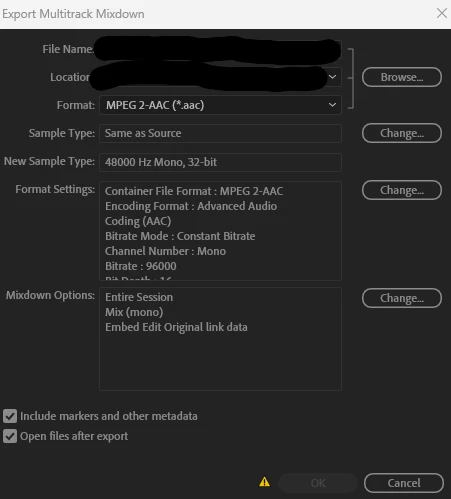
I have been asked to begin exporting episodes of a podcast that I edit in .aac format to meet the requirements of a new hosting service. However, Audition will not let me do so. When I select “MPEG 2-AAC (*.aac)” in the Format dropdown, I get a yellow warning sign next to the “OK” button that reads “The currently selected filter cannot save all files in the needed format” which is preventing me from progressing.
I have tried a few things.
- I exported the file as an .mp3 and then opened it in Audition and exported that file as an .aac file. This was rejected by the host, saying that it was not encoded as an .aac file.
- I used Adobe Media Encoder to convert the .mp3 file to .aac. This was rejected by the host with the message “This file has an M4A extension but it does not appear to be an M4A file based on its contents.”
Any help on how to proceed with exporting the file as .aac would be appreciated. Included below is a screenshot of the Export Multitrack Mixdown dialog box.

 AdChoices