


Participant
April 23, 2021
Question

Audio Clamping Issue When Recording

  • April 23, 2021
  • 1 reply
  • 947 views

Hello!

First let me apologize, as I am not an audio person, so I'm not going to get terminology perfect here.


I record a podcast every week, and I don't change my settings at all. I run from my mic into a mixer, and then from that mixer into my soundcard. I also record this podcast with two other people who join me remotely via a video conference call.


Some weeks we have no problems. Other weeks we will be recording along fine, and suddenly (seemingly) Audition will start "capping" the recording for lack of a better term. What I mean is that it will start clamping the waveform so that the peaks cap out at a certain level as seen just below the pink line that I have added in this image.
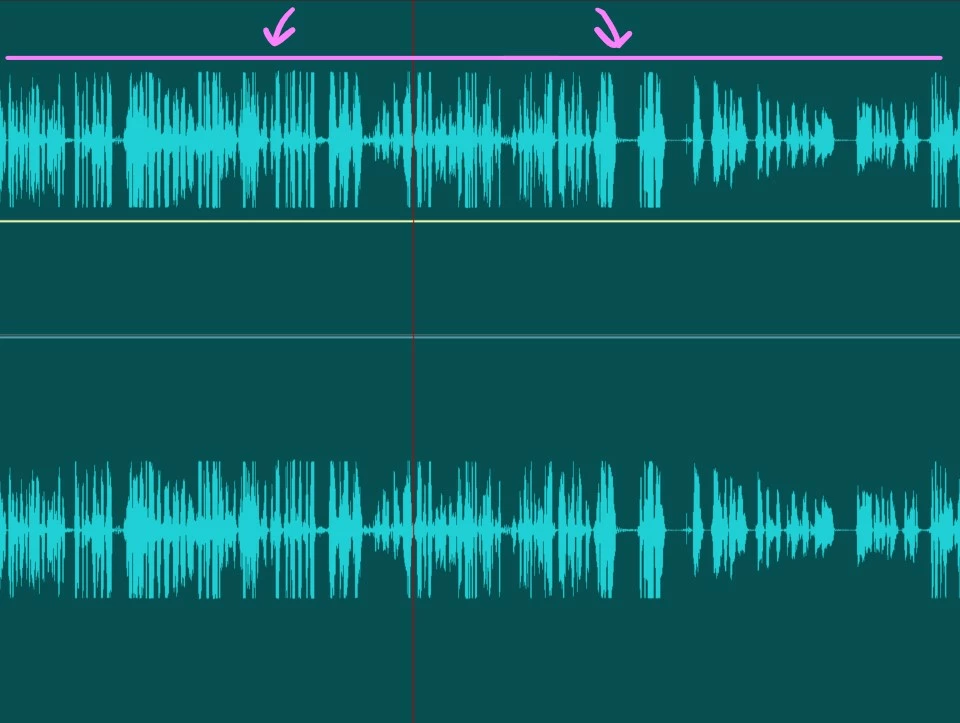
 

A "healthy" recording looks morel like this:
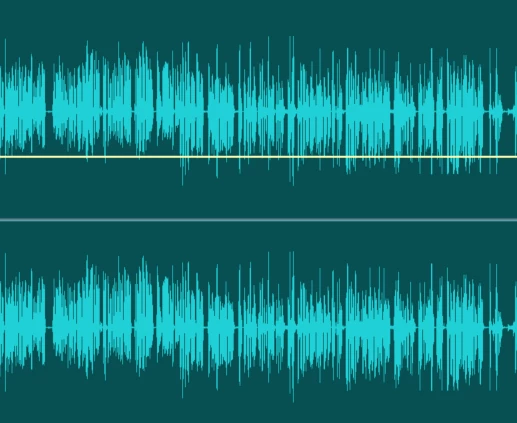
 

When I hit record and we start talking, there are no flat edges like the top image, and the lines go far above the pink line like they do in the lower image, but at a certain point Audition almost tries to correct something and starts clamping things like you see in this picture.


The result is that my playblack sounds fuzzy and distored even though we aren't any where near the red on any of the meters when we are talking.


Can someone tell me how to fix this or possibly ask any follow-up questions of me that I can answer to clarify. I'm sorry that I don't know the proper terms here.


Thank you!

-Dave

1 reply

SteveG_AudioMasters_
Community Expert
Community Expert
April 23, 2021

I'm pretty sure that whatever is causing this, it isn't Audition, because Audition has a bit of a reputation for recording exactly what is fed to it from your sound device. It has no means whatsoever for altering any signals on the way in.


We wouldn't call that capping - that looks like what we'd call limiting. With the sort of setup you are describing, you could end up with this sort of effect by over-driving your sound device - in other words, the mixer is feeding too much signal to it. But since you've said that no meters are going into the red, then I'd guess that whatever is causing the limiting is happening early on in the mixer, before the output stage. All you need for that to happen is the mic gain to be turned up too far so it clips the next stage - or something along those lines, anyway. If that's the case, then turning the mic gain down and the mixer output level up will fix this.


Really, to get any further we'd need all the details of how you are working - what mic and mixer, what sound device, and incidentally, whether this is a Mac or a PC (not that in this instance it makes any difference).

Dave5FBDAuthor
Participant
April 23, 2021

Thank you so much, Steve. Even knowing this probably isn't Audition helps a great deal, as it means I can stop staring at settings in Audition's menus for a solution! 😉


My Setup:

  • Windows 10 PC
  • Shure SM7B Microphone running into a Behringer Xenyx 1202FX mixer via channel 1.
  • Channel 1 gain and level both at around 75% and full main mix at aroud 0.
  • I run two RCA male Y cables that each convert down to one 3.5 and connect to the ins and outs of my soundcard.
  • I'm not sure of actual make/model of the sound card, and Device Manager simply shows it as "High Definition Audio Device."
    • If there is some way to find that out that you know of, please let me know.
    • I did do a driver search and found no better options.
  • For the other two guys on my show, we run through a video conferencing service and I record directly from that video conference. They do not run through the mixer first.


That last bullet is the weird one, since they aren't affected by my mixer at all. The limiting (thank you for educating me) can happen for any of the 3 of us. Sometimes it's exactly the opposite where I will start recording, nobody will change any settings while we are speaking, but slowly the recording will just beging to get quieter. Here is an example:

Notice how we start out loud on the left, and slowly drop off towards the right. You can even see where I've compensated in post with the little yellow adjustment line to try to amplify us back up.


Hopefully it's been established by now that I'm not fancy about any of this. So it isn't a thing where I'm goofing around with settings while we record and adjusting things. I literally just press record and we start talking. I just want that to be clear, so that you don't think I mess with anything as we record.


The extra-maddening thing here is that we'll record 3 weeks just fine and then suddenly have a recording like we did last night where this happens. Does Windows have some kind of weird setting that could cause this?


Really appreciate your feedback and help.


SteveG_AudioMasters_
Community Expert
Community Expert
April 23, 2021

How are you recording the video conference and the output from the mixer at the same time?