
Known Participant
May 30, 2022
Question

Audio Session Mixdown Quality Problem

  • May 30, 2022
  • 1 reply
  • 1361 views

Okay. So… Audition audio mixdown of mastered multi-tracks all works fine.

The mixed-down WAV, when opened in Audition sounds perfect… in Audition, however if you test the music on a different player (Media Player, Itunes player, Edge player, Google player, stereo, car stereo, etc) it sounds wildly different (not just slightly different) – with maddeningly variable results.

The bass is way up, it all sounds muggy and heavy.

I have looked at the 32bit an 48000hz settings but could it be to do with these extra settings (I am unfamiliar with the differences shown in the screenshot):
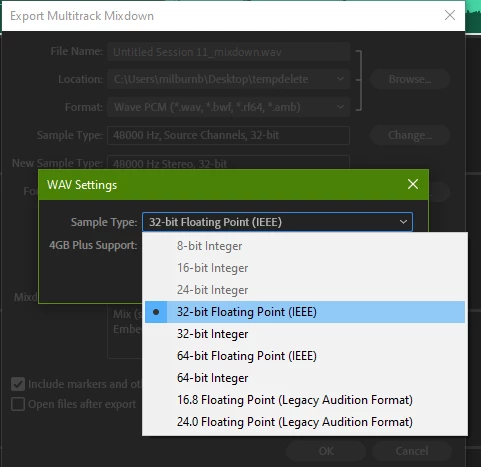
 

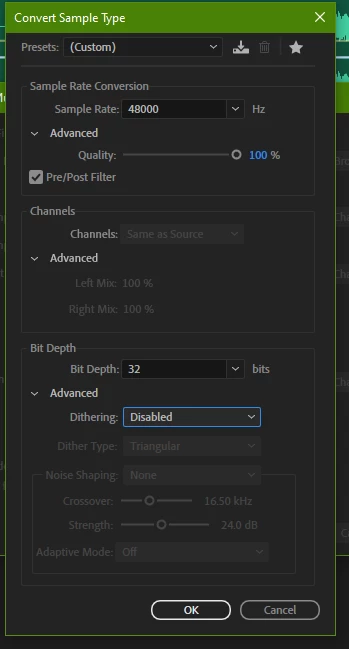
I did find a secret Quality slider in the advanced settings that told me I was only exporting at 50% so I put that up to 100%.

Perhaps the forum can advise me on Dithering and whether this could be the cause of such differing playbacks:


Most people I share the music with are NOT going to be opening it in Audition so it’s a massive problem.

Previously I have always worked in Cubase and have not encountered this – how it sounds in the Cubase edit is how it sounds everywhere else when I test it the mastered WAV.


I have seen elsewhere people struggling with this in different ways but can the forum suggest ways to get a consistent and professional result when played outside of Audition? I want a faithful WAV of the mastering.

This topic has been closed for replies.

1 reply

SteveG_AudioMasters_
Community Expert
Community Expert
May 30, 2022

If you mix the result down to a more 'normal' distribution format - say, 16-bit 48 or 44.1k wav files, or even to an MP3 is that difference still there? Exporting as a 32-bit FP might cause some of these other players some difficulty, although I would in this day and age expect them to cope adequately with it.

evocrimAuthor
Known Participant
May 30, 2022

Thanks for the reply, I began exporting at 16bit and 44100 because that has been my default for so long but I upped them both to see if a change in quality would be apparent. The same results though. Could you direct me to any guidance on what effect the dithering may or may not have? As I say it all sounds good within Audition, even the mixed down WAV file. I would expect some variation of course, that's why I've always tested music in as many different places as possible, but it just sounds horrible outside of Audition.

SteveG_AudioMasters_
Community Expert
Community Expert
May 30, 2022

The dithering would make no difference to a 32-bit file, as it's a way of disguising the drop-off from the noise floor of the least significant digit to absolute zero. With 32-bit files that happens below the limit of what can be digitised, so it's not an issue. With 16-bit files this isn't always the case; it's possible for a reverb tail to stop abruptly at -96dB, and if you whack the volume up sufficiently, you might hear it. What the dither does is to artificially extend the file noise floor downwards so this doesn't happen - at least audibly.


But, it doesn't make a shred of difference to the sound of the file, other than at a level you could only hear whilst deafening yourself at 0dB. On any recording with a 'normal' noise floor - say -60 or 70db - you wouldn't hear the effect anyway, because the source noise floor would disguise the drop-off completely, unless you'd inserted artificial digital silence at any point.


In Audition, what driver class are you using to play back? One thing that can happen is that files in Audition play correctly if directly addressing the driver. Other players can't always do this, and rely on Windows to resample the file before playing it out though your sound device - whether it needs to happen or not. And generally that sounds pretty poor, very much along the lines you're suggesting.