


Participant
August 15, 2017
Question

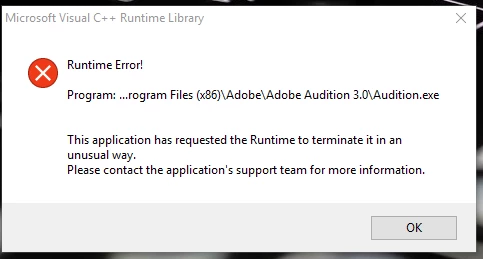
Audition 3.0 fresh installation runtime error on windows 10

  • August 15, 2017
  • 8 replies
  • 18243 views

Hello, I have a problem with my audition 3.0, I install it in my new PC (Dell Inspiron 15 5000 series ) with windows 10 and i keep getting a Microsoft  visual C++ Runtime library error. I have installed all Visual C++  Redistributable. Uninstall and install again. but haven't manage to fix it. It doesn't create the setting folder in the AppData folder so i can try the method of deleting or renaming the folder. I installed it in a friends computer with windows 10 and it seems to be working fine there.

Any help is appreciated

Best Regards

Leo

Operating system: Windows 10 home

processor: i7-7500U

Ram: 16GB

Graphics: Intel HD graphics 620
This topic has been closed for replies.

8 replies

Participant
September 6, 2024

Control Panel

Region

Formats

English (United States) <- change to this and do not modify anything else.


Apparantly Windows updates sometimes break this and returns to default for your region.


Microsoft does not write perfect software and sometimes their fixes breaks something else, which they do not test for or care about. Adobe is not much better in any regard. But here we all are.

Participant
April 19, 2021

Dear All,


I have found the problem with Windows 10! With five computers I had two that would not load Audition 3. I had trawled the internet in desperation and almost given up that I coudl get my beloved Audition 3.1 installed on these Windows 10 computers. But here is my solution and it has worked on all machines so far.

Go to 'Control Panel'. Open 'Administrative Tools'. Go to 'Services'. Click on 'Program Compatibility Assistant Servce'. STOP the service temporarily. Then install Adobe Audition 3.0 and then the 3.1 update. Finally, add any additional filters (I use flac) and restart your computer. Adobe 3.1 is installed and working. Wonderful!

amerks
Participant
January 28, 2021

Same issue here. I tried to install Adobe Audion 3.0 on a clean Windows 10 Edition Windows 10 Pro
Version 20H2 OS build 19042.746 Windows Feature Experience Pack 120.2212.551.0.

Same error at startup. I debugged the software in Visual Studio 2008 (ancient) and found out that in a function called _Setgloballocale in locale.cpp (Visual C++ runtime). 

Luckily I had an old Windows PC with same version where Audobe Audition still worked strange enough. So I looked at the language settings and it turned out Adobe Audtion 3.0 works only with this settings :


March 1, 2021

I could not get my registered Adobe Audition 3.0 to work on Windows 10 but it was a simple fix.  Go to the App & Browser control and turn the darn thing off.  Problem solved.

Participating Frequently
August 20, 2019

Hi PeterP,

Sadly I don't have kb4495667 installed so it cannot be removed...

Whats next?

Anyone?

Christian

ryclark
Participating Frequently
August 21, 2019

As this is a rather old thread can you remind us where you are having the problem with AA3? Is it when trying to install Audition or when trying to run the software?

Participating Frequently
November 16, 2019

Hi ryclark,


The installation of Audition 3.0 goes completely smooth and without any errors. It's during the startup the Runtime error occurs... The strange thing is that Audition 3.0 installs AND runs fine on some other WIN 10 Pro 64-bit machines, but not on the one I'm doing the editing on. Any ideas - this is still bugging me deeply, and probably lots of other people too. Finding a solution would make many people happy 🙂


Cheers, Christian

Participating Frequently
June 27, 2018

Hi ryclark,

Thanks for your insights. I tested the Windows Process monitor. It produces a ton of data, but my skills are not enough to decode anything useful from the plentiful list of events...

I have now installed Adobe Audition 3.0 on FOUR WIN10 Pro N 64bit PC:s. On three it works, on my audio workstation PC it does not (gives the dreadful Runtime Error dialog - se top of this post)!!!

PLEASE ANYONE - what is different on this one PC where Audition does not work???? I have tried everything that I can imagine - what have I missed?  If I only knew which version of the runtime library Audition 3.0 reguires then I could double check that I have it installed...

All comments warmly welcome. I am not the only one struggling with this. There must be a simple solution for this !!! !!! !!!

Christian

SirRichardTheLionheart
Participant
March 25, 2019

I have been struggling with this for a few days since a new Windows update Using XP Service Pack 3 seemed to pull it out of a continuous loop of audio driver errors and runtime errors. Hope this helps - also running as Admin. I still use Audition 3 because I love it and have got to know it so well over the last 10 years!! I want to keep using it as long as possible.

SirRichardTheLionheart
Participant
March 28, 2019

Well after multiple new crashes I found a few things helped. I actually STOPPED running as Admin and:

1 - I deleted the latest Flash update as of March 2019,

2 - if you uninstall and then reinstall Audition outside of the Program Files X86 folder it also helps stabilize it a lot - so to be clear you are most likely installed in X86 - uninstall and then force reinstall into program files regular or simply throw it in a folder where you do all your sessions. Spent a day smoothly editing after a session crash so bad it literally would not reopen any session  - literally every session opened with a run time error, or asio host error.

The above solution is holding out so far.

I'm finally posting here after years of help from this forum, but it's almost dead men walking. With no support and ever changing systems I fear my beloved Audition 3 is truly on it's final days - apart from keeping an older clean running XP machine around just for editing... My mastering rack I built in Audition is after years of honing and trial and error, but now stellar and my finished productions sound world class:
Golden Slumbers CarryThat Weight The End Tribute To Paul McCartney By Richard Cummins by Richard Cummins | Free Listenin…

I hope to keep it running even if for final Mastering. I am purchasing Studio One.4 because I am forced to move forward and learn a new system - wish I didn't have to. Thank you Adobe for a decade of a great DAW.

Participant
December 30, 2017

I have exact the same problem, with a fresh install of AA 3.0 after the Fall Creators Update, did not have this before the Fall Creators update.....

If AA 3.0 was installed before the Fall Creators update it keeps running correct after that update.

System: HP EliteBook 840 G3 Windows 10 Pro version 1709 build 16299.125.

I'm using also the downloaded version ADBEAudition_ESD1_WWEFGJIS.exe with product key.

Installation via double click the components.msi file to overcome compatibiliy issues with Audition 3.0 Setup.exe

Installation successful, but at first start see picture.

Hopefully somebody finds a solution.

Regards, Harm in the Netherlands.

Participating Frequently
May 31, 2018

Hi all,

ANYONE.

This is sooo annoying. My legit version of Adobe Audition 3.0 worked fine on my Windows 10 Pro 64 bit OS. However, windows was migrated from WIN7 to WIN10 and Audition was installed before that. NOW when I had a motherboard crash I had to format my C drive and install WIN10 from scratch. Adobe Audition 3.0 installs OK but when starting I get the same as here above:

"Runtime Error!....."

There must be something simple that causes this. Is the proper Microfost C++ library missing ???

How do I find out which version of the C++ runtime librabry Audition requires?

ADOBE: I will not even consider upgrading to CS before this is handled properly !!!

Anyone who has a clue what to do next?????

I have a started project that I need to finish very soon and this hounts me. It seems to be a common problem since many people are complaining. There must be a simple solution hanging around.

Grateful for ANY input

Christian

John T Smith
Community Expert
Community Expert
May 31, 2018

Two ideas that MAY work to install and/or run old programs in Windows 10

-RIGHT click the program icon or EXE and select a compatibility mode in the pop up option window

-or Run as Administrator http://forums.adobe.com/thread/969395 to assign FULL Windows permissions may help... this says Encore, but is sometimes required for ALL Adobe programs (this is NOT the same as using an Administrator account) so follow the instructions for your specific program

Participant
August 16, 2017

Hi Ryclark thanks for the answer.

I have tried both the cd that i have at home and a installer i got online some time ago from adobe page  (ADBEAudition_ESD1_WWEFGJIS) and none of them work.

I opened the event viewer -windows logs- applications and i run the program, but no error messages  appear in the event viewer.

Best regards

Leo

ryclark
Participating Frequently
August 16, 2017

Even if the CD version installs it won't work due to closure of Adobe's Activation Servers for AA3. Hence the downloadable version that you have which uses the provided Serial No. to work without activation. However without knowing what the problem is that Windows is objecting to it is a bit difficult to get you any further.

But here are two suggestions that might help. First right click on the Audition Installer .exe and select Run as Administrator. If that doesn't work there have been some suggestions that clicking directly on the 'components.msi' file in the Audition 3.0 installation folder rather than the 'Audition 3.0 Setup.exe' might make it work for you.

Participant
August 17, 2017

I Ryclark, thanks again, for the help.

I tried what you suggested, even try to run in compatibility mode but no change. when i try to  install with ti components.msi file i got this error message,

Best regards

Leo

ryclark
Participating Frequently
August 15, 2017

Where have you got the Audition 3 installation file from? Is it a copy that you bought some time ago? We would really need to know a bit more about which Runtime file Audition's installer seems to think is missing. You may be able to find more info by looking into Windows Event viewer under Applications/Error.

simonlchabi
Participating Frequently
March 8, 2023

I have just had a very similar showstopping System error from trying to launch it it was asking for MSVCP71.dll    //  My copy of Adobe Audition 3 is now totally unuseable!!! I bought your Audition cd package years ago & I still need it!! Am I going to get some replacement? 
I got my Aud3 installer from a link from yourselves to the downloadable AuditionCC after I had complained to you, ADOBE that my CD version of Audition would not run  My Audition 3 has for years years launched allright & run faultlessly up to now  I think it cost me about €300 back then & I think I have a right to ask for a replacement to this excellent but now inoperable app!
So what now?

Participant
March 8, 2023

Try this solution whioch I posted here in 2021:


I have found the problem with Windows 10! With five computers I had two that would not load Audition 3. I had trawled the internet in desperation and almost given up that I coudl get my beloved Audition 3.1 installed on these Windows 10 computers. But here is my solution and it has worked on all machines so far.

Go to 'Control Panel'. Open 'Administrative Tools'. Go to 'Services'. Click on 'Program Compatibility Assistant Servce'. STOP the service temporarily. Then install Adobe Audition 3.0 and then the 3.1 update. Finally, add any additional filters (I use flac) and restart your computer. Adobe 3.1 is installed and working. Wonderful!