



Chasdj
Participant
Sep 19, 2019 9:20 PM UTC
Answered

Audition 3.0 stops playing when I switch browser window

If Audition 3.0 is playing and I open my email or anything else...Audition stops playing...How can i set it to continue playback evein if i'm in another window...I'm using windows 10...i unchecked the ASIO Driver abd it still stops playing...

 

    This topic is closed to new replies. Start a new post to keep the conversation going.
    SteveG_AudioMasters_
    SteveG_AudioMasters_Correct answer
    Community Expert
    Sep 19, 2019 9:54 PM UTC

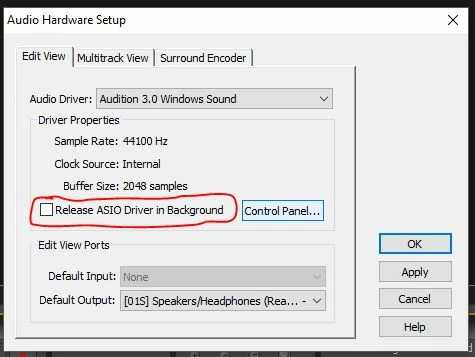
    You need to take the check out of 'Release ASIO driver in Background':

    6 replies

    SteveG_AudioMasters_
    Community Expert
    SteveG_AudioMasters_Community ExpertCorrect answer
    Community Expert
    Sep 19, 2019 9:54 PM UTC

    You need to take the check out of 'Release ASIO driver in Background':

    Translate
    Chasdj
    ChasdjAuthor
    Participant
    Sep 20, 2019 4:00 AM UTC
    I unchecked the box and it didn't fix the problem
    Translate
    SteveG_AudioMasters_
    Community Expert
    Community Expert
    Sep 20, 2019 10:28 AM UTC
    I've tried this with Audition 3 and Windows 10 here, and it doesn't stop playing when you move the focus to the browser. I can only assume that if yours doesn't do this, that it's a Windows setting somewhere. Not sure where that would be, though.
    Translate