
Participant
December 19, 2018
Answered

Audition Audio Question

  • December 19, 2018
  • 1 reply
  • 495 views

I am working on my first attempt at a podcast.

I have some music on one track. I have lowered the volume of the music on that track when the audio begins on another track. It all sounds exactly like I want it to on Audition. However, when I export it to an mp3 file & it plays back on iTunes, the volume isn't adjusted.

Can you help me figure out what I'm doing wrong?

Thanks in advance!
    This topic has been closed for replies.
    Correct answer ryclark

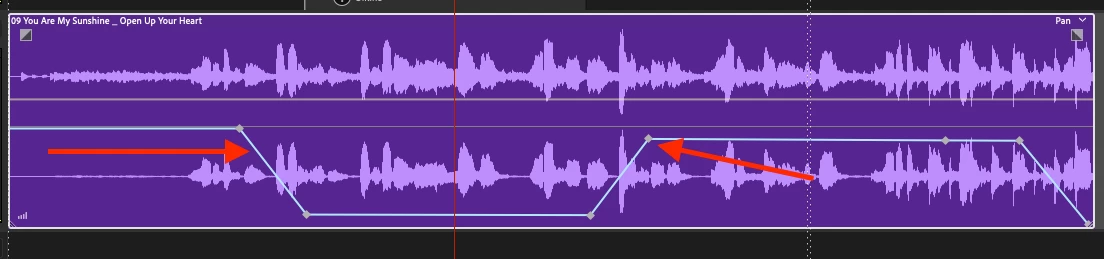
    I'm just using the line marked with an arrow...


    But the blue Envelope line that you have arrowed is in fact the Pan Envelope (it say Pan at the top right of the clip) not the yellow Volume Envelope, which is the one that you need if you want to make Volume changes.

    1 reply

    ryclark
    Participating Frequently
    December 20, 2018

    Need more information on how your session is set up. Perhaps you can post a screen grab here of what it looks like. Normally the Mixdown/Export is generate via the Master track in Audition. So if that is what you are listening to on the output of your audio interface you should get what you hear in the saved mix. So check your Track routing to make sure that all your Tracks are being routed out to the Master and that the Master track only is being output to your audio interface.

    Participant
    December 20, 2018

    Does this help? Thanks for your help!!

    ryclark
    Participating Frequently
    December 20, 2018

    That all appears to be correctly set up. How are you lowering the volume on the Music track?