
sefidle
Participating Frequently
January 19, 2017
Answered

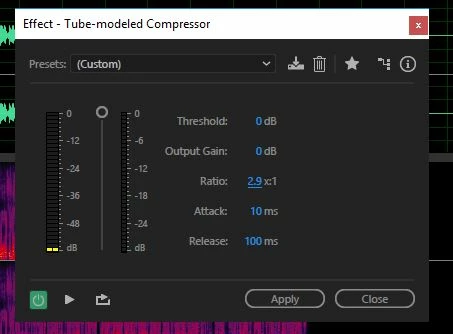
Audition CC 2017 changed a Tube Modeled Compressor.

  • January 19, 2017
  • 1 reply
  • 705 views

Is there any way to reinstall an older version of an Audition plugin in addition to the most recent one?

I use the TMC on a lot of things but it has taken away the ability to add a decimal point to the ratio.

Please tell me that there is!
This topic has been closed for replies.
Correct answer SteveG_AudioMasters_

sefidle wrote:

Interesting. I can't imagine that WIN 10 would make any difference, but that functionality is definitely not there on my PC.suggestions

Any suggestions?

It definitely is there!

But, if you just try to roll the numbers with a mouse, you won't get any. There are two ways that you will, though. The first is to roll the mouse with the Ctrl key held down, and the second is to click on the number itself, where it will open up as a box you can type in.

1 reply

ryclark
Participating Frequently
January 19, 2017

You can't roll back any of Audition's built in plugins because they are coded into Audition unless you roll back the whole installation. However I can add decimal places here to the Ratio settings in the TMC plugin in the latest version of Audition CC 2107 running on a Win 7 PC. So that facility hasn't actually gone from Audition.

sefidle
sefidleAuthor
Participating Frequently
January 19, 2017

Interesting. I can't imagine that WIN 10 would make any difference, but that functionality is definitely not there on my PC.suggestions

Any suggestions?

SteveG_AudioMasters_
Community Expert
SteveG_AudioMasters_Community ExpertCorrect answer
Community Expert
January 20, 2017

sefidle wrote:

Interesting. I can't imagine that WIN 10 would make any difference, but that functionality is definitely not there on my PC.suggestions

Any suggestions?

It definitely is there!

But, if you just try to roll the numbers with a mouse, you won't get any. There are two ways that you will, though. The first is to roll the mouse with the Ctrl key held down, and the second is to click on the number itself, where it will open up as a box you can type in.