

MaxDirect Audio, LLC
Known Participant
June 23, 2017
Answered

AUDITION CC 2017_STOPPED RESPONDING AND LOST PARTS OF AUDIO FILE

  • June 23, 2017
  • 2 replies
  • 3339 views

Good evening,

I am running Audition CC_2017.1.1; Build 10.1.1.11; and I have encountered an issue I thought had been resolved.  While recording in "waveform" a straight forward narration project (no music, sfx, plugins, or favorites) Audition stopped working and stopped recording in the middle of the session.  I had previously manually saved the audio file to disk (internal) as it is a long file and I do this as a normal practice.  So when I had to force quit the program to recover, I wasn't concerned about the file.  However, when I started Audition again, and was prompted to "cancel, delete or continue" with the file replacement, I chose to "continue".  When I opened this file which is supposed to be a "recovery" file for just such occurrences, I noticed that the audio file had significant parts of the audio clipped/missing.

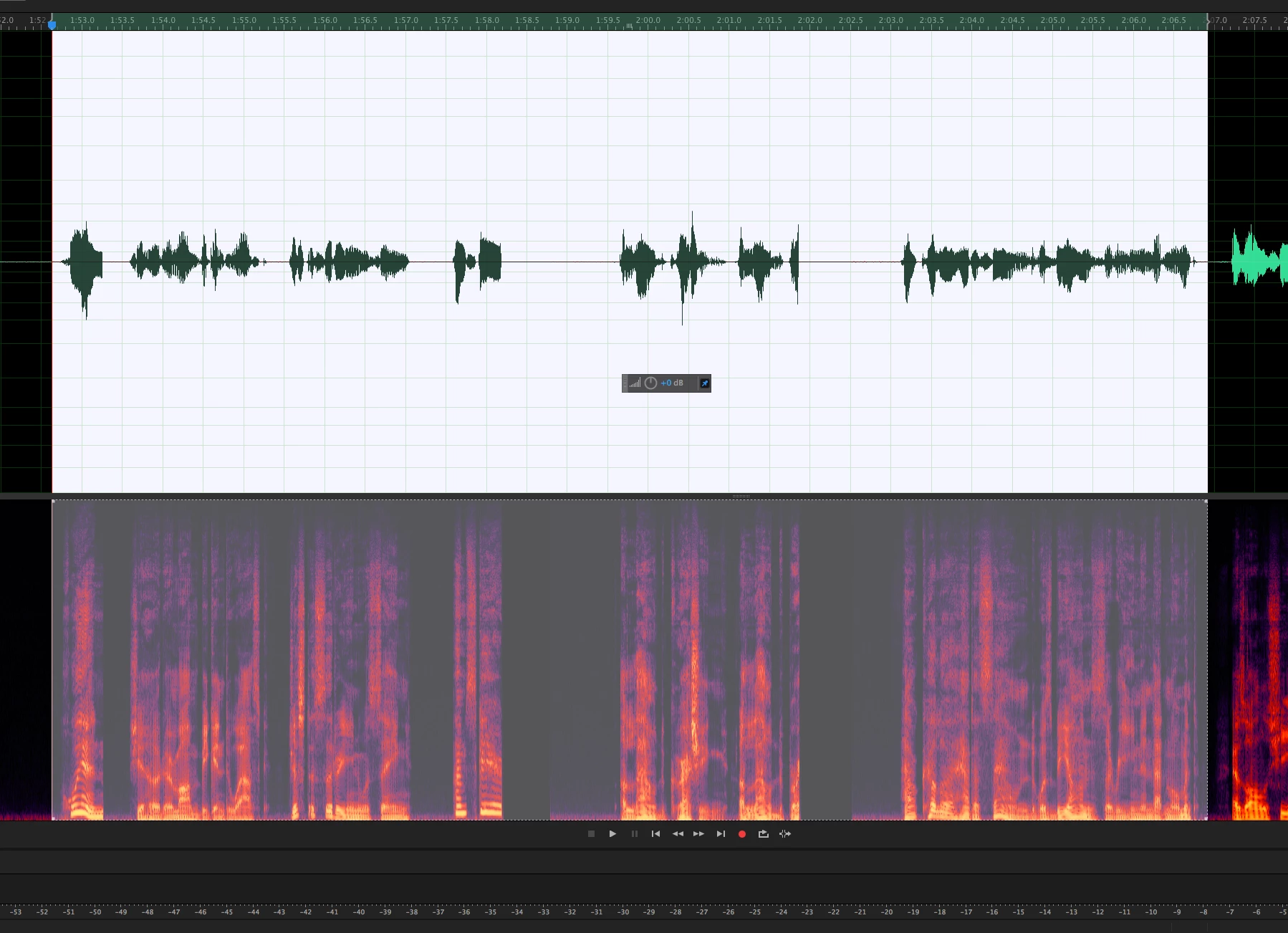
What's going on here?  The voice talent had to stay longer (at expense) to re-record these lines, not to mention the time lost preparing the file for mastering.  I have attached a copy of a picture of the .wav file where you can see the audio is clearly cut-off/clipped.  In the middle of the shot, you can see where the noise floor abruptly disappears behind two wave forms.  It's like this throughout the recorded audio.

This is an issue which needs to be addressed.

BTW, yes, I have "auto-save" turned on, have re-directed the auto-save to an internal hard drive, along with any temp files, or files needed to be accessed by Audition while recording.  We can't lose audio like this.
    This topic has been closed for replies.
    Correct answer ryclark

    Good morning.

    Here are the log reports from a session I was working on this morning (07/06/16). I was in the middle of editing the finished recording. I was in the “waveform” editor, with both the waveform and spectral display modes on, and using the “auto healing brush to cleanup audio. I noticed that the program was slowing down and beginning to glitch (taking a long time to heal the requested fix in the audio, and return to the normal display) so I manually “saved” the file, then clicked on the “history” tab, and clicked on “clear history” to clear previous edits, when the entire program shutdown. Upon logging back into the program, it said it couldn’t recover the file. Fortunately, I have a backup of the original file, but now I have to start at the beginning (two hours of work down the drain) and re-edit this file. I wanted to clear the history, because I remembered reading when the program begins to slowdown, it can be due to a large “history” file which the program is trying to keep track of.

    The audition logs are attached below, along with the log for the crash report to Apple.

    Rhett

    Rhett

    Rhett Samuel Price

    Audiobook Narrator

    Website: http://www.thevoiceofrhett.com/ <http://www.thevoiceofrhett.com/>

    E-mail: thevoiceofrhett@gmail.com <mailto:TheVoiceofRhett@ca.rr.com>

    Cell Phone: (562) 382-0482

    Confidentiality Warning: This email and any files transmitted with it are confidential and intended solely for the use of the individual or entity to whom they are addressed. If you have received this email in error please notify the system manager. All quotes from TheVoiceofRhett are valid for 30 days following the date of email transmission. Our company accepts no liability for the content of this email, or for the consequences of any actions taken on the basis of the information provided, unless that information is subsequently confirmed in writing. Please note that any views or opinions presented in this email are solely those of the author and do not necessarily represent those of the company. Finally, the recipient should check this email and any attachments for the presence of viruses. The company accepts no liability for any damage caused by any virus transmitted by this email.

    TheVoiceofRhett, USA, www.TheVoiceofRhett.com


    As we can't see them here have you sent them to audbugs@adobe.com ?

    2 replies

    Charles VW
    Inspiring
    June 23, 2017

    Even though you forced-quit the application, can you send us the log files? Audition Crashed. Now what?

    SteveG_AudioMasters_
    Community Expert
    Community Expert
    June 23, 2017

    One of the problems with making recordings in Waveform view, especially long ones, is that they're being written initially to a temp file, and only saved to a permanent location when you've finished recording, and hit 'save'. If, during this process you manage, for instance, to use up all the space available in the temp file location, then yes, the system can screw up. And yes at this point, recovery probably won't be perfect, especially at the end of the file; you are relying on the recovery process to reconstruct something that inherently failed. Now I don't know if that's what has happened here (insufficient detail given) but it's certainly a possibility.

    What's much safer, and indeed is what most people do these days, is to record in Multitrack view. The huge difference is that what you record is written directly to the file, with no temp processing in the way. And even if you crash it at the end for whatever reason, it's generally recoverable as raw data, which is more than can be easily said for the temp file version...

    ryclark
    Participating Frequently
    June 23, 2017

    And, just as an extra aside, the Autosave function AFAIAA only applies to Multitrack sessions not, unfortunately, to Waveform recording/editing sessions.

    MaxDirect Audio, LLC
    Known Participant
    July 4, 2017

    Thank you ryclark. Just to update you with more information, the picture of the file I sent you is from a portion of the .wav form which was manually saved prior to the crash. This is why I’m having a hard time understanding while the entire file is affected this way. I’ve gotten into the habit of saving the file whenever I stop or make a mistake to avoid losing information, but when it crashes, all of the file is affected in this way.

    I have been asked to send the log files, but the only ones I can see are from my most recent recording session. Is there a location where the old logs exist?

    Thanks,

    Rhett