
adaptable_world0D44
Participant
August 16, 2017
Answered

Audition CC no sound

  • August 16, 2017
  • 2 replies
  • 10154 views

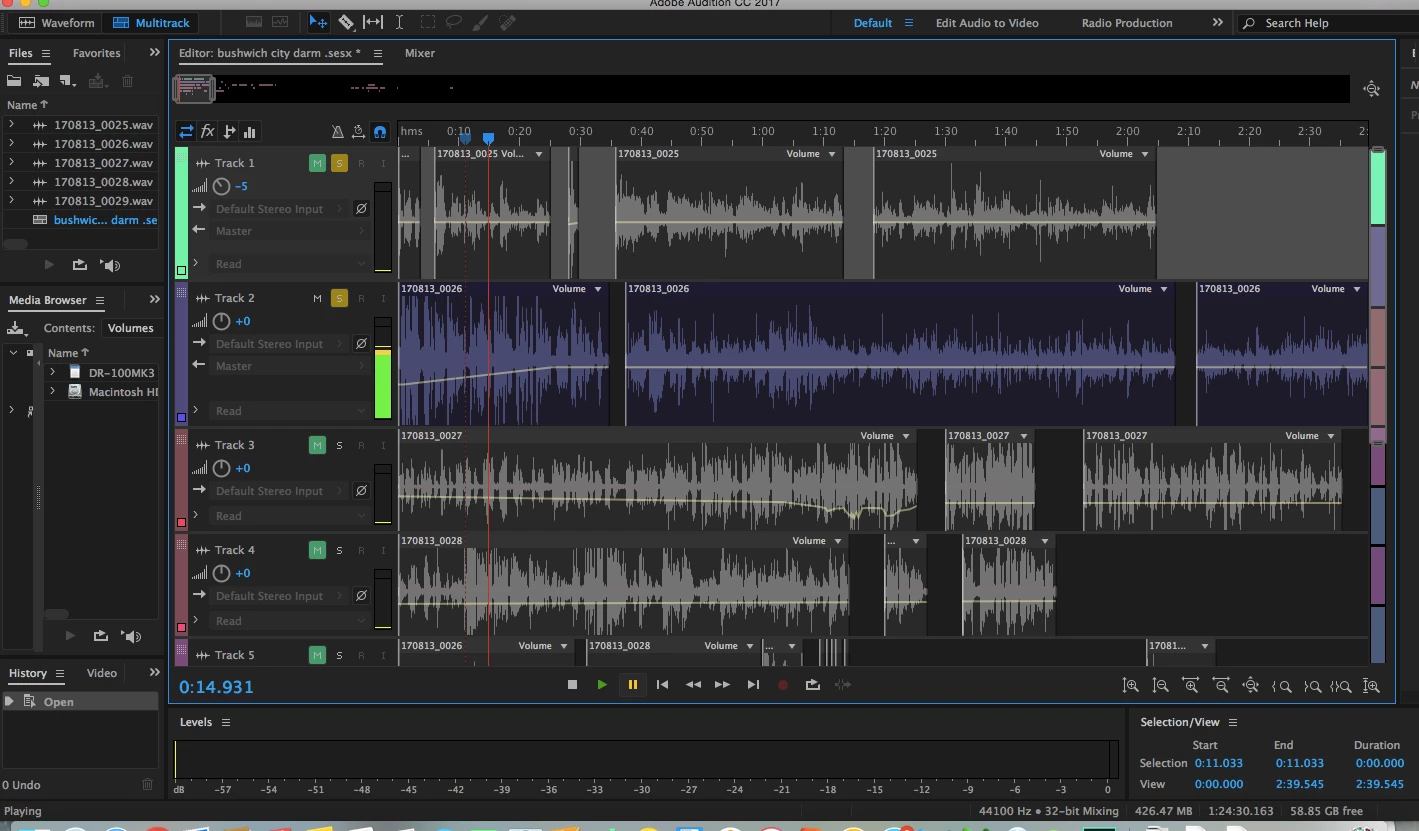
Hello, I recently began using Audition CC 2017. While editing a project, the audio stopped playing back. I checked that the volume on my computer is fine because other programs can play sound. I also checked that the track I want to hear is unmuted. When I click play, I see movement indicating sound in the little vertical bar next to the track I want to hear, but there is no reaction from the horizontal 'level' bar at the bottom of the screen.

I read several answers to this type of question and tried toggling Audio Hardware and Audio Channel Mapping, but everything seems fine and connected there. Also the problem started without my plugging/unplugging from speakers or headphones. I also checked that this problem happens for any track in my project.

Please see a screenshot of my project below. Your help is much appreciated!
This topic has been closed for replies.
Correct answer adaptable_world0D44

The tech people at my school actually just solved this for me. They couldn't figure out what caused the problem, but their workaround was to simply copy all the tracks into a new project, and then the sound worked again. Thanks anyhow!

2 replies

Participant
October 1, 2018

If this helps anyone out there, I just spent a very frustrating 48 hours with a master track yielding nothing while my individual tracks were all metering.  Nothing was working until I started soloing out channels and discovered that one particular track was the problem.  When muted (and everything else up), the master ran perfectly.  I never got an error message on this, so it was dumb luck that I found it.  Once I deleted that track and replaced it with a new one, everything ran perfectly.

In other words this was an Audition glitch that I couldn't find documentation for anywhere.  Hope this helps some frustrated person out there!

Participant
October 1, 2018

PS - the bad track was outputted correctly to the master and on volume when it wasn't functioning.  Replacing that one track fixed the problem of the master not metering.

SteveG_AudioMasters_
Community Expert
Community Expert
August 16, 2017

Just to confirm, can you also show us a picture of the Audition mixer (including the Master track) whilst this track is playing, please?

adaptable_world0D44
adaptable_world0D44AuthorCorrect answer
Participant
August 16, 2017

The tech people at my school actually just solved this for me. They couldn't figure out what caused the problem, but their workaround was to simply copy all the tracks into a new project, and then the sound worked again. Thanks anyhow!